11

I have a computer that I control using teamviewer only. When I connect to the computer, the resolution is 640x480. I tried changing the registry values of DefautlSettings.XResolution and DefautlSettings.YResolution, and I tried disabling the TMM. Nothing helped.

The computer has R9 290x GPU.

How can I change the resolution?

Thanks for your help,

yuval.

Yuval
  • 111
  • 1
  • 1
  • 4
  • 1
    Try forcing resolution in Catalyst Control Center instead of registry. Issue is mainly connected with the fact that device has no external display device detected. – mwilczynski Feb 18 '14 at 17:33
  • possible duplicate of [How to set default screen resolution without monitor in windows 7](http://superuser.com/questions/604026/how-to-set-default-screen-resolution-without-monitor-in-windows-7) – Ƭᴇcʜιᴇ007 Feb 18 '14 at 19:30
  • Perhaps try a DVI/VGA terminator plug to force it into thinking it's got a monitor: http://www.overclock.net/t/384733/the-30-second-dummy-plug – Ƭᴇcʜιᴇ007 Feb 18 '14 at 19:34
  • Why not use RDP? – kinokijuf Jan 22 '15 at 19:55

1 Answers1

2

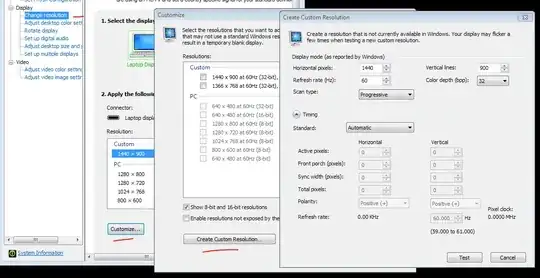
If your host display adapter allows you to add custom resolutions, you can set one up and use it in teamviewer settings when connecting to that computer.

I have Nvidia GF 9300 M and my laptop display only allows up to 1280 x 800. I defined a 1440 x 900 custom resolution. That's how I overcame this issue when I connect to my laptop from my desktop.

image 1 image 2

Regards

Schiavini
  • 105
  • 4