1

I had a similar problem in Win XP, that I was not able to solve but now all of a sudden this happens in Windows 7 with MSOffice 2007.

What is most disconcerting is that this happens all of a sudden, while all the same software, DNS 10 and Microsoft office 2007 worked very well together until today.

What happens is that it writes 'voilŕ' for 'voilà, 'lŕ-bas' for 'là-bas', 'pčre' for 'père', 'męme' for 'même', 'oů ętes-vous' for 'où êtes-vous'.

This does not happen when I dictate here in the internet browser, in Notepad, Wordpad or OpenOffice.

Some new changes must have taken place that I cannot identify.

What type of changes could these be?


The problem seems to be with Office 2007. DNS displays the proper spelling in its floating box , while the error is inserted in the text editor:
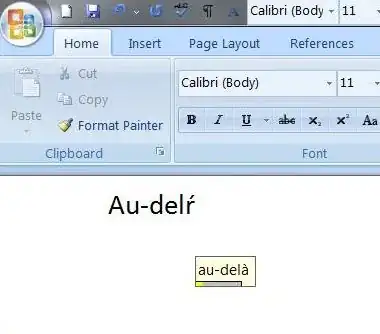
enter image description here


Changing the font or reinstalling both applications doesn't help. I have installed Office 2003 and the problem is present there too.

  • 1
    It is off language for me, but your description and pictures indicate that the speech recognition itself is working, and the "correction" is being made by the program. I would be seeking out the programs AutoCorrect (spelling) features, and disabling or altering it. – Psycogeek Mar 03 '14 at 13:21
  • 1
    Try switching keyboard language between EN and FR. I know it sounds crazy but it actually does affect things not directly related to keyboard input. – jwalker Mar 04 '14 at 10:58
  • thank you all for your comments - i suppose the bounty will expire, because i am on holliday and i will not be able to confirm any solution until expiration. but i will try what was suggested and also will test in a virtualbox installation - and then maybe i will figure out a solution –  Mar 04 '14 at 15:26

1 Answers1

0

It might occurred because the DNS add in “dgnword.dll” has become disabled.

try this :

Launch Microsoft Word 2007.

Click the Office button.

Choose Word Options.

Click Add-ins.

If NatSpeak Word AddIn (dgnword.dll) does not appear in the Add-ins list then it has been disabled.

Select Disabled Items from the Manage dropdown list, then click Go.

Highlight dgnword.dll in the Disabled Items list and click Enable.

Click Close, and then click OK.

Source : nuance

BlueBerry - Vignesh4303
  • 8,129
  • 22
  • 68
  • 99