Im trying to speed up an android emulator using VT-X but there is no VT-X options in my BIOS. Even worse, my BIOS is almost empty! There is only the change password, which way to boot, information and a few boot settings (there is only 7 options in my BIOS, all Enable/Disable and no 'advanced' tab or options). Does anybody know how I could show that option? I have a Acer 5755-9674 (SNID 13717259616) with an Intel i7-2670QM (it supports VT-x) and an Acer JV51_HR motherboard. I checked a lot of websites and Q & As but I just cant find an answer. Thanks in advance.
Asked
Active
Viewed 1.8k times
7


-
2I am not sure what you want us to tell you. Of the option is not located in the BIOS then it cannot be enabled. – Ramhound Feb 22 '14 at 18:10
-
Well, I'm kinda sure that my BIOS is 'cut down' or something. I never seen one BIOS with this little amount of options before. Maybe some options are hidden? – Snipe_and_Swipe Feb 22 '14 at 18:47
-
Its very likely based on what you describe the firmware has features that are disabled. Not much you can do about it though. – Ramhound Feb 22 '14 at 18:57
-
Definition of firmware: _permanent software programmed into read-only memory_. Isn't there ways to 'go around' it? I heard of it happening so does it actually exist? – Snipe_and_Swipe Feb 23 '14 at 00:51
-
Have your installed the Bios software from lenovo driver download? May be that could help. – Lucky Jul 31 '15 at 05:44
2 Answers
1
You can only use VT-x if both CPU and motherboard support it. A motherboard that doesn't support VT-x is sadly quite common for laptops.
Things you can try:
If you didn't do so already, check if VT-x isn't enabled already. Just because there's no option in the BIOS doesn't mean it's not enabled by default.
Visit Acer | Downloads, choose your notebook model or enter your serial number or SNID and search for a BIOS update.
You should find you SNID on a sticker below your laptop:
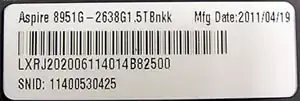
If that sticker got lost or became unreadable, you can use this tool (Windows only) to auto-detect your serial number.

Dennis
- 48,917
- 12
- 130
- 149
-
It doesn't seem that there is a jv51_hr motherboard spec on the Acer website. I checked another version, an Aspire 5755-6678, and it seems that it doesnt have VT-X. Does that mean mine shouldn't have it too? – Snipe_and_Swipe Feb 22 '14 at 18:58
-
Oh, and I know that its probably not enabled because I tried to install the 'Hardware Accelerated Execution Manager' for Android SDK. – Snipe_and_Swipe Feb 22 '14 at 19:03
-
Don't search for the motherboard; search for your computer model. You should find your SNID on a sticker below your laptop. If that sticker got lost or became unreadable, use [this tool](http://support.acer.com/serialharvest/SerialNumber/SystemInformationSetup.msi) to auto-detect your serial number. As for the 5755-6678, different models of the same series can be very similar in some aspects and very different in others. – Dennis Feb 22 '14 at 19:04
-
I search my SNID (Aspire 5755-9674) everywhere but it almost seems that Acer doesn't have specs for it or something! On its website, it says there is no such things as a laptop 5755-9674 (I still have the sticker, so it's not the wrong one) and on Google there is only things about replacing batteries or replacing screens. – Snipe_and_Swipe Feb 22 '14 at 19:11
-
1
-
It took me exactly 30 seconds to locate the latest bios (v1.13) for your system on the Acer website. Just use that SNID as instructed or search the site by model number (Aspire 8951G) – Tonny Feb 22 '14 at 19:30
-
Ok. I installed the latest one but it did not help. Nothing changed. And I'm confused now. I searched online for how to get motherboard specs and now it seems to tell me that it lists the processor and the motherboard at the same place, which for me, tells that my processor/motherboard is 'Intel(R) Core(TM) i7-2670QM CPU @ 2.20GHz, 2201 Mhz, 4 Core(s), 8 Logical Processor(s)'. Is it right? Does it mean I can do VT-x except it doesn't show the options and I have to 'hack' it? – Snipe_and_Swipe Feb 23 '14 at 00:46
-
That are the specs of the CPU, not the motherboard. There is, in theory, the chance that your motherboard is physically capable of VT-x. That would mean that, in theory, you could write your own BIOS to enable VT-x. In practice, you're out of luck. Sorry. – Dennis Feb 23 '14 at 02:00
-
-
The things is, there is almost _no_ options! The options that I can change are the network boot, quiet boot and two other things (no advanced options)! I think that I somehow disabled most of the options or they are in hiding. Is my hypothesis right? – Snipe_and_Swipe Feb 23 '14 at 05:06
0
Newer Acer Laptops (I have the E5-571-58CG) and it came with Virtualization on by default. I think that it will become a standard to have it on in the not too distant future.

AntiMalwareFlames
- 11
- 1