According to this answer the Windows command prompt can't be maximised. However, the PowerShell command window can be maximised. What is the difference between them that allows maximising Windows PowerShell while not allowing the command prompt window to be maximised?
Asked
Active
Viewed 3,128 times
1


-
2If you want a maximized, full screen PowerShell console, you could use the PowerShell ISE or ConEmu. – dangph Feb 25 '14 at 00:28
-
1http://superuser.com/a/233138/8972 – paradroid Feb 25 '14 at 01:32
-
1ConEmu (http://superuser.com/a/441545/139371) is flexible and full of features console emulator. – Maximus Feb 25 '14 at 07:58
2 Answers
3
Should you wish to mess around with it you can do the following:
Left Click C:\ in the top left of you cmd.exe Window > Properties > Layout
Change it to whatever you prefer.

Matthew Williams
- 4,314
- 12
- 26
- 38
-
1You may set only fixed size using this method. Available emulators provides much more flexible way to configure your terminal window... – Maximus Feb 25 '14 at 08:00
1
Both the command prompt and powershell can 'maximized', you must remember 'maximize' does not equal full screen. By default, they will both maximize to 80x25, which for me takes up the height of my screen, and about 1/3 the width. You can change this on either powershell or cmd by left clicking in the top left corner of their window, going to properties, then 'layout'.
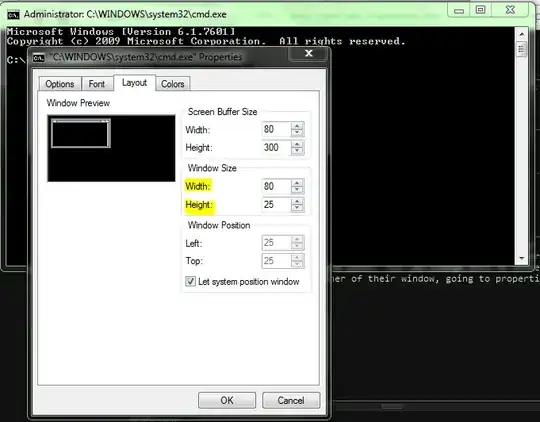
If you go this route, I like to uncheck 'Let System Position' Window, and Position the window at 0,0 - the top left corner. It takes some practice to get the Window size perfect, it's based on 'lines' and not pixels, so what looks like full screen for your monitor, might be too big for your laptop, etc.

MDMoore313
- 5,956
- 1
- 27
- 31