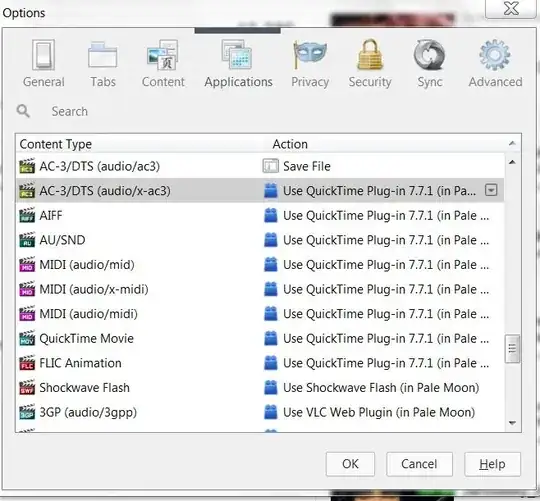
5

enter image description here

I find the Options/Applications settings very useful in Firefox.

I am looking for something similar in Chrome/Chromium - that is: options that would allow to change the action (the way a media or text file is opened - by what application) in a way similar to that available in Firefox.

Is it already there under the hood?

Is there an extension to add this feature?

Hennes
  • 64,768
  • 7
  • 111
  • 168
  • Are you looking for `chrome://plugins/` – Renju Chandran chingath Feb 26 '14 at 11:18
  • @RenjuChandranchingath - No. That is the equivalent in Firefox of *Addons-Plugins*. I want something in Chrome that will set the program to use for type of files (extensions), accessed in FF by going to *Preferences-Applications*. –  Jan 17 '17 at 12:23

4 Answers4

2

Chrome has a lot of information available if you don't mind poking around. You can get the best look at all this by vising chrome://chrome-urls/ from within your Chrome browser and having a look.

Beyond this point it really depends what information you're specifically trying to find. Addressing the question I am not familiar with a carbon copy of the Firefox dialog box you seek, but the above URL is a good starting point for you.

Matthew Williams
  • 4,314
  • 12
  • 26
  • 38
  • What I meant was: options in Chrome that would allow to change the action (the way a media or text file is opened - by what application) in a way similar to how this is possible in Firefox. –  Apr 01 '14 at 10:22
0

If you are on Windows, and I believe you do, Chrome follows the system's file type associations (located in Control Panel > Programs > Default Programs > Set Associations). Unfortunately, Chrome does not offer a similar feature to Firefox's.

Sanny
  • 1,589
  • 1
  • 10
  • 15
0

Chrome does not have a similar feature as Google is trying to get rid of all Add-ons, including Flash (once it's virtually gone)

You can still set the system associations Control Panel > Programs > Default Programs > Set Associations or in windows 10 going to settings and going system > defaults the click on set file association, protocol association, or just change the general defaults

DanHolli
  • 891
  • 1
  • 8
  • 25
0

There is an addon Open in external app for Chrome that accomplishes this. It unfortunatly only works on Windows as it needs Visual C++ runtime files. It also needs a secondary tool ("a small helper application" as it is described) that should be downloaded from within the addon's interface once installed.

They seem to promise a Linux version to come, but that's not a sure thing. The interface is clean, and simialr to Firefox's, with an icon added to the toolbar to get to it.

enter image description here

Chindraba
  • 1,963
  • 1
  • 11
  • 25
  • 1
    A screenshot and a example on how to use it would help a bit – Journeyman Geek Jan 19 '17 at 06:54
  • The Chrome addon page linked above includes a screenshot. How to use seems very intuitive, but as a Linux user can't say for sure. – Chindraba Jan 19 '17 at 07:00
  • Have you tested it? It can be installed (I have Visual C++ 2010) but it also needs a second extension called "helper" that should be here: chrome-extension://okdopehcdgnellkaldfnaemhbpciplem/Launcher/setup.exe. Only it isn't, as indicated on the addon's page under *Support* tab. - Maybe it will be fixed. –  Jan 19 '17 at 09:58
  • also: I think your answer was intended for my other question (http://superuser.com/q/1123915/162573), not this one! - Please move it. –  Jan 23 '17 at 13:06
  • @cipricus This is not an anwer to your other Q, as the comments there make it plain you needed a Linux solution, and this extension only works in Windows. I wouldn't have posted this info there. This Q seems to be Windows-based from other answers, so this extension does fit here. Down votes accepted since I;m not interested in rep anyway, just helping where I can, and getting help when I need it. Best of luck in your search. – Chindraba Jan 23 '17 at 20:55
  • @GypsySpellweaver - Forgive me but I think I'm not wrong in saying that the above ("There is an addon Open in external app for Chrome") is an answer to [Open address in external application from inside Chrome Browser](http://superuser.com/q/1123915/162573), where it is interesting and can be discussed (while not working for a different reason that the NPAPI deprecation, see my first comment under here), only it is odd to discuss it here (where the question is not about Chrome addons but about setting default applications) instead of there. –  Jan 23 '17 at 23:14
  • I have tried to edit your answer in order to repair the down-vote (which was intended to grab your attention), as only after edit can I reverse the vote, and now my edit waits peer-review. - I sincerely think you have read my both questions but answered under other than the one you intended to. There is no harm, just please copy/paste the above answer under [this](http://superuser.com/q/1123915/162573) question (where I will up-vote it), then delete the above (as your answer has nothing to do with applications **settings**). –  Jan 23 '17 at 23:30
  • I came across this extension before and it uses another exe to install the helper out of the Chrome Store, so be careful. Someone's written a review on that extension's page that supports my comment here. – Sanny Jan 25 '17 at 13:32