11

Firefox keeps asking me if I still want to open a file type with a certain program, even though the checkbox that says Do this automatically for files like this from now on is checked. This window always pops up for this type of file. This has been an issue for me for several years and with different versions of Firefox.

I'm talking about a dialog window like this, but with different file type and options:
enter image description here

Checked or unckecked, the checkbox does nothing and this window always appears.

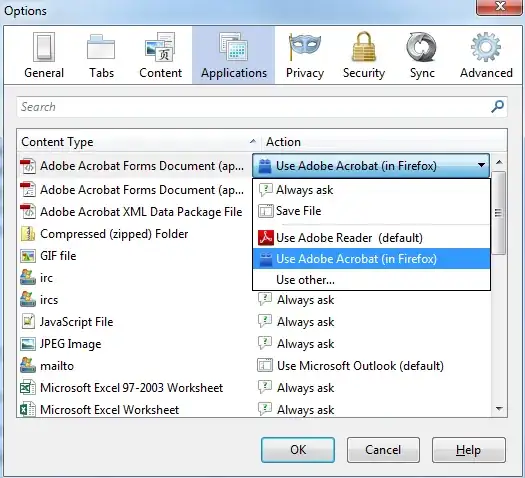
In the Applications tab, the file type is set to open with a specific application, and the window still appears.

How do I stop this madness?

user1306322
  • 4,736
  • 14
  • 50
  • 88
  • Does this happen with a particular file extension? – and31415 Feb 27 '14 at 10:11
  • No, this happens with default Firefox installation. – user1306322 Feb 27 '14 at 11:31
  • 1
    This is still happening, throughout many new OS installations and Firefox versions (Nightly, Waterfox, Pale Moon, etc). This must be some core feature that works like developers intended it to, even though it makes no sense to ask the user every time. – user1306322 Feb 17 '15 at 06:10

4 Answers4

12

That behavior is usually because the file is served with a ContentDisposition: attachment response header. This is a long-standing bug in Firefox, due to an obstinate misinterpretation/misapplication of certain standards by Firefox developers. You will never stop the madness until that changes, and Mozilla fixes the bug. See for instance: https://bugzilla.mozilla.org/show_bug.cgi?id=453455.

kreemoweet
  • 4,565
  • 17
  • 19
3

The posts here are 2014. As of August 2020, the same behavior continues to occur, and with simple pdf files. I have the setting for pdf files set to "Open in Firefox". But it behaves as if I've set it at "Always ask". The option button in the dialog box reflects the setting (Firefox vs. Adobe), but the appearance of the dialog box itself should not be happening. v. 79.0/Win 10.

  • 1
    It's sad that this has been a bug for 12 years now. Maybe try some of the solutions listed in the long history of attempts to fix this on the bug page https://bugzilla.mozilla.org/show_bug.cgi?id=453455 or, in extreme case of annoyance, write an AutoIt script which will press the default buttons on the dialogue when/if it appears. – user1306322 Aug 27 '20 at 21:24
  • The weirdest thing. Who has to die before this gets fixed? – Peter - Reinstate Monica May 01 '21 at 13:43
1

https://addons.mozilla.org/en-US/firefox/addon/do-this-automatically/

Clicks OK automatically on the download screen if you choose to open with a certain program.

user420716
  • 11
  • 1
-1

You should check the behavior from within the Application options.

Firefox > Options > Applications

Ensure an application is associated with the specific file type.

enter image description here

Matthew Williams
  • 4,314
  • 12
  • 26
  • 38
  • 1
    It's set to use a specific app, yet the window still appears. – user1306322 Feb 27 '14 at 11:32
  • Set it to 'Save File'. Bare in mind you are downloading a .exe file so there is no default program to open this. From your screenshot I gather you want to same the file. So set the action to save file using the above method. – Matthew Williams Feb 27 '14 at 11:34