0

I have problem with getting time to synchronize between a PC MS-DOS 6.22 and Microsoft Network Client 3.0 and a Windows 7 Ultimate box. This previously worked between the DOS PC and an XP machine.

I follow the instructions in this discussion and successfully connected to my other computers with Windows 7, but I cannot synchronize the clock on the DOS computer.

I used net time \\Windows7 /set /yes, but it gives me "error 1 an internal error occurred".

Nasko
  • 1
  • 1
  • 1
    If you do a `net /?` on the DOS machine, does it show TIME as a valid Net command? – Ƭᴇcʜιᴇ007 Mar 05 '14 at 19:02
  • the problem is i can synchronized dos computer with windowsXP computer, bute with windows 7 can't – Nasko Mar 05 '14 at 19:06
  • 1
    That'd be worth editing into your question to mention it. ;) – Ƭᴇcʜιᴇ007 Mar 05 '14 at 19:06
  • If you type `w32tm /query /status` from the command-line of your Win7 computer, what does it say under `Stratum:`? – JSanchez Mar 05 '14 at 19:43
  • Leap Indicator: 3(last minute has 61 seconds) Stratum: 0 (unspecified) Precision: -6 (15.625ms per tick) Root Delay: 0.0000000s Root Dispersion: 0.0000000s ReferenceId: 0x00000000 (unspecified) Last Successful Sync Time: unspecified Source: Local CMOS Clock Poll Interval: 10 (1024s) – Nasko Mar 05 '14 at 19:50
  • @Nasko Like i mentioned in that discussion... do you get the same error when you do `NET VIEW \\Windows7` or `NET VIEW \\IP_ADDRES_OF_Windows7`? And can you connect with the Windows7 **without** an error (`NET USE P: \\Windows7\SHARE`)? – Rik Mar 06 '14 at 08:58
  • @Nasko FYI: I dusted off my old laptop and tried it again. I needed to add the TCP protocol but now i get `Error 50: This request is not supported by the network` when i try to do a `NET VIEW \\Windows7`. I get the same with `NET TIME \\Windows7 /SET`. However `NET USE P: \\Windows7\SHARE` still works perfectly and i browse the new created drive-letter. I remember reading somewhere the newer Windows-versions are much more restricted (see my remark about the change with `gpedit.msc` i had to do to get it working) and maybe not all functions work (or i missed an option still needing to be set). – Rik Mar 06 '14 at 11:40
  • when i type NET VIEW \\Windows7 give me error 1, when use NET VIEW \\ip-Windows7 i get error 53 The computer name specified in the network path cannot be located. But the ip address of Windows7 is correct. I connect to Windows7 share folder and have full rights on the folder. – Nasko Mar 06 '14 at 18:44
  • i can see files on share folder in Windows7, i make the same user and password on both machines, after this i connect to windows7, but time synch give me error 1 an internal error occured – Nasko Mar 06 '14 at 18:53

1 Answers1

0

(possible solution for time-sync in DOS at the bottom)

It's the same with two DOS-machine of mine. One gives error 50 (unsupported) and the other gives error 1 (like yours). It think the problem is with the protocol used by NET to request the time (and also the 'NET VIEW' command). If i take a quick look at WireShark on the Windows 7 machine i can see the following traffic (image below):

DOS-machine is 192.168.1.23 and Windows 7 machine is 192.168.1.33
Command used on DOS is NET TIME \\XPS8500
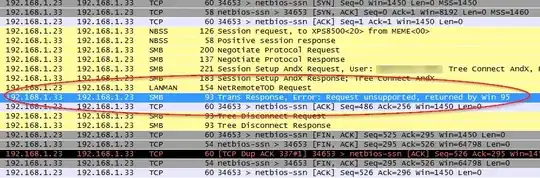
enter image description here

You can see that the DOS-machine (192.168.1.23) requests NetRemoteTOD via the LANMAN-protocol. Which isn't supported anymore by Windows 7 (as you can see by the answer back).

When i do the same from a Windows XP-machine (192.168.1.67) i get:

enter image description here

You can see Windows XP uses the SRVSVC-protocol.

It's the same with the NET VIEW command. From DOS NET it uses the LANMAN-protocol to request a NetShareEnum while from Windows XP it uses SRVSVC to request a NetShareEnumAll.
Unfortunately we can't use the NET.EXE from Windows XP or '98 in DOS.

Luckily the NET USE-command only uses the SMB-protocol so access to the shares still work.
Just the NET VIEW and NET TIME commands are defect.


There is another solution if you only want to synchronize the time.
You can look at SNTPC - A Simple Network Time Protocol Client for MS-DOS. I haven't tried it because it would need another protocol (FTP's PC/TCP-protocol) loaded (another memory hog) but it should do the job for syncing with any NTP-server on the internet. I'm not even sure you can get the PC/TCP-protocol anymore (now FTP is out of business) and you would probably need QEMM or 386MAX to maximize lower memory or else you would have little memory to run any programs.

Another possible solution is mTCP SNTP. (this one you can actually get your hands on)

And another one (non-free).

Rik
  • 13,159
  • 1
  • 34
  • 41
  • i have other question, it is possible to get time from network server like time.windows.com ? – Nasko Mar 07 '14 at 21:08
  • Yes, with the last 3 possible solutions you should be able to get the time from a NTP-server (which `time.windows.com` is). If it doesn't work with the host name you could try it with the corresponding ip-address. I would recommend you start with [mTCP SNTP](http://www.brutman.com/mTCP/mTCP_Sntp.html). From what i could see you could download all the necessary drivers. First you need the packet driver for your network card. Second connect with `dhcp`-command to a dhcp-server and last use the `sntp` command to get the time from either time.windows.com or ip or any other NTP-server. – Rik Mar 07 '14 at 22:44