In iTunes there's a small icon in the title frame, by which we can jump to the current playing song in the play list. I'm wondering if there is some similar way to jump to the song currently playing.
Asked
Active
Viewed 2.6k times

4 Answers
36
You could also double click the status bar (if the track is still in one of your playlist; that's not always the case with playlists generated automatically or by browsing...)

fluxtendu
- 7,151
- 6
- 35
- 51
-
2You must have "Playback Follows Cursor" option disabled for this to work. – Adam Caviness Jan 06 '12 at 15:45
-
3As an update to the previous comment, intervening Foobar2K updates seem to have fixed it to work whether or not that option's checked. – SilverbackNet Mar 03 '18 at 05:11
-
@SilverbackNet Agreed - doesn't need the option checked on 1.6.2. – drkvogel Feb 06 '21 at 13:15
-
Can confirm working on version 1.6.2 – kohane15 Mar 12 '21 at 23:30
25
From the foobar2000 FAQ:
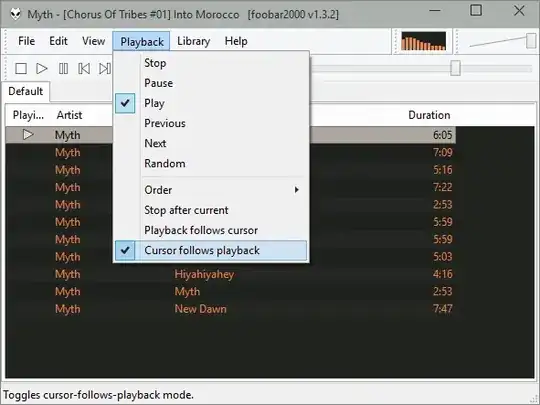
How do I make the currently playing track to be selected (highlighted) and stay always in view?
Enable “Cursor Follows Playback” under main window's “Playback” menu.

harrymc
- 455,459
- 31
- 526
- 924
12
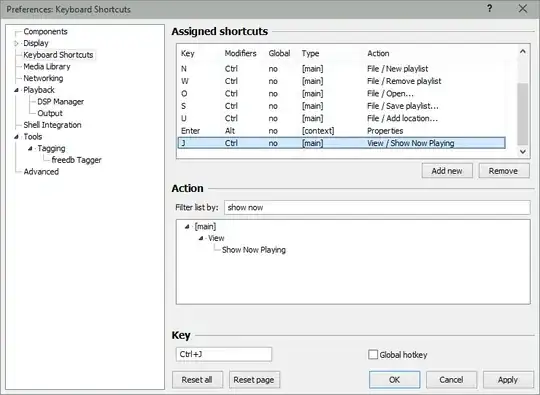
The Cursor follows playback preference messes with me sometimes when I'm organizing a non-active playlist or doing other tasks. I've made a keyboard shortcut to go to the song being played only when I want.
- Open the
Filemenu - Open the
Preferenceswindow - Click on
Keyboard shortcuts - Click on
Add new - Use the filter to find the
View→Show Now Playingsetting - Assign it to any key or key combination you want. The below screenshot uses CTRL + J as a shortcut for it:

dailyherold
- 121
- 1
- 3
0
You can access the current playing song from the menu bar View -> Show Now Playing in Playlist. However this menu item is usually hidden. If you press the menu bar while holding the shift key however all the hidden commands will show.

Loreno Heer
- 124
- 7