2

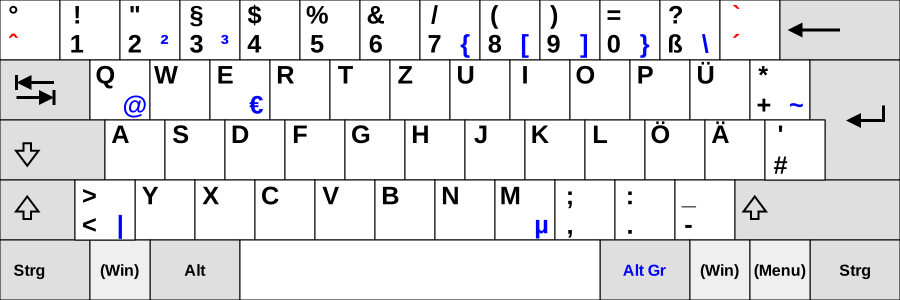
I'm using a German keyboard layout on Ubuntu. I always write LaTeX mathematical formula with the Kile editor and the exponent key ^ is not active there. I have to copy-paste it from somewhere else and this is really annoying.

The Kate editor also has the same problem.

How can I use/activate the character ^ which is assigned as a dead key in the German keyboard layout?
keyboard

robinCTS
  • 4,327
  • 4
  • 20
  • 29
physiker
  • 133
  • 1
  • 4

4 Answers4

2

Try pressing "^" once, followed by pressing the space bar once.
The same way you can get "'", "`", etc. If you press a letter instead of the space bar, you get characters likes these: û, ô, é, è, etc.

jhscheer
  • 226
  • 1
  • 3
  • I found the way how to do. Inspired by this link (http://askubuntu.com/questions/56560/what-exactly-is-meant-by-eliminate-dead-keys), then one can easily add the German (eliminated dead key) ( here for kde: http://kate-editor.org/2013/10/07/multiple-keyboard-layouts-and-shortcuts/). Then i removed the original German layout as i dont need to switch between two. Now they are not dead key anymore! – physiker Mar 10 '14 at 13:04
2

choose 'German eliminate dead keys' as your keyboard layout, it can be changed in the system settings -> keyboard

madn
  • 21
  • 1
  • If you can't find that layout (I couldn't on Kubuntu 16.04), look if you have "ger" as a layout. For some reason, my Kubuntu decided to rename "German" to ger, so I initially only found "Germany/Switzerland". – Florian Wendelborn Jun 19 '16 at 12:38
0

In Lubuntu (16.04 - 18.04) e.g. you select Menu -> System Tools -> 'Fctix' ('Start Input Method'). You become a keyboard-icon on the right side of the bottom panel. Click -> 'Configure Current Input Method'. Belgian Flemings also have problems with their keyboardsettings. We speak and write Dutch, but our keyboards are the French azerty, whilst the Dutch use qwerty. We regularly use 'umlauted' letters like 'ë' and 'ï'. In Fctix/Input method we have to unselect 'Only show current language' and then go to 'Duits' ('German') and choose "Keyboard - Belgisch (met Sun dode toetsen" in order to get the dead keys. They would 've better programmed the 'Keyboard - etc'-layouts under a language 'Other' instead of 'German'. You don't expect to find your e.g. Belgian settings under the German settings.

0

Shift+°+Space to get ^
or
Shift+°+° to get ^^

Vlastimil Ovčáčík
  • 2,748
  • 1
  • 24
  • 32