100

Is it possible to manually specify the username, in which Windows uses it when connecting to a networked share?

perhaps \\username@host\...

PS: Both the server and clients run Windows 7.

Mahdi Alkhatib
  • 564
  • 5
  • 7
Kieth Parker
  • 1,003
  • 2
  • 8
  • 4

6 Answers6

83

You can specify it through the command line using the net command.

net use <driveletter>: \\<server>\<sharename> /USER:<domain>\<username> <password> /PERSISTENT:YES

You can also specify different credentials using the Windows Explorer GUI. From the Tools menu select Map network drive.... On the Map Network Drive dialog window there is a checkbox for "Connect using different credentials".

Note: If you do not see the menu bar in Windows Explorer, press the ALT key to make it appear.

  • 6
    for `net use`, if you enter `*` for the password, it will prompt you for it. – localhost Jul 28 '17 at 04:49
  • 1
    Aslo, the : is optional. Not everyone wan'ts to access the network like a floppy disk :) – Robert Jørgensgaard Engdahl Nov 27 '18 at 09:58
  • 5
    Combing this answer and the two previous comments, I was able to achieve my similar need -- connect to a network share using separate credentials without mapping to a drive letter. So the combination for my needs is: `net use \\\ /USER:\ *` Note that with this set of parameters, you must either specify the password or use the asterisk to signify that you want to be prompted (which I do). – Mark May 29 '20 at 12:20
  • It helped me to do the "net use /delete" first and then try this. – S4nd33p Aug 23 '21 at 09:57
41

Yes, it is.

When you map the network share from Windows Explorer (right click on share name > Map network drive) you can use different user credentials:
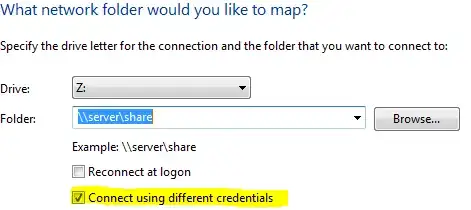
Map network share

You can also do it via command prompt (started as administrator):

net use [drive] [share] /user:[user] [password]

Example:

net use s: \\homesrv\share /user:vp pass123
voji
  • 596
  • 4
  • 5
  • 31
    The GUI method complains "The network folder specified is currently mapped using a different user name and password. To connect using a different user name and password, first disconnect any existing mappings to this network share." — No it's not! I only accessed it with explorer, it's not mapped. The CMD method complains "Multiple connections to a server or shared resource by the same user, using more than one user name, are not allowed. Disconnect all previous connections to the server or shared resource and try again." – Mark Jeronimus Feb 14 '16 at 10:12
  • 8
    @MarkJeronimus, look here https://support.microsoft.com/en-us/kb/938120 TL;DR: You have to use the computer's IP, not it's network name. – GetFree Nov 29 '16 at 16:14
  • 1
    @MarkJeronimus Open your Windows user settings, click "Manage credentials", and see if the share is listed under Windows Credentials. If so, you should be able to modify or remove the stored login there. One problem of the GUI method is that it forces the assignment of a drive letter. The Windows Credentials section is where login information is stored regardless of how the share was accessed or mapped. – Daniel Saner Mar 07 '17 at 02:27
  • 3
    I got the same issue as Mark. I assume the link that GetFree provided is related but it's not fully correct as in my case I had connected via IP in the first place. It seems the GUI just screws up and **as a workaround you can use the server name if you used the IP for the GUI or vice versa** to get a new login or map prompt. These types of loging do *not* show up in the Credential Manager. – Lilienthal Aug 11 '17 at 15:06
  • The GUI behaves less dumb if you save the password in the password manager application (last thingie on the "user accounts" control panel page). This actually works, reliably, every time (whereas otherwise it seems to work 20% of the time, and fail again after reboot). – Damon Nov 12 '17 at 11:46
  • 1
    @voji, on your shell syntax and example you forgot to put a colon right after the /user option. Like this : `net use s: \\homesrv\share /user:vp pass123` – Diego Tercero Jun 18 '18 at 09:01
  • @DiegoTercero thank you for the info, i fixed the missing colon on my post. – voji Jun 19 '18 at 11:53
  • @MarkJeronimus - This is a little niche, but you can (in addition to the hostname and IP address) also use a FQDN (fully-qualified domain name) to reference the server/share. I use Ubuntu as my server, and I can append extra names to its loopback address in its host file, `/etc/hosts`. So it now looks something like: `127.0.1.1 myserver myserver-root`. I can then map a network drive to say, `M:` as `\\myserver`, with an unprivileged user, and `N:` as `\\myserver-root`, with a fully privileged user. Windows will allow them, and it remains resilient to logical topology changes (IP changes). – Jack_Hu Jul 08 '20 at 11:08
24

To delete saved share usernames:

open cmd prompt type:
net use \\fileservername /del
or
net use * /del
to delete all

found @ http://www.windowsnetworking.com/kbase/WindowsTips/WindowsServer2008/AdminTips/Network/DeleteLoginCredentialsforaNetworkShare.html

Andrew Corkran
  • 257
  • 2
  • 3
  • 2
    Welcome to Super User! Please read the question again carefully. Your answer does **not** answer the original question. The OP is not asking about deleting shares and your answer doesn't even mention user names which he did ask about. – DavidPostill Mar 10 '16 at 18:01
  • 7
    @DavidPostill Maybe not but deleting them all actually allowed me to map another one. – Paul Stelian Jun 07 '17 at 16:38
8

The comment to the top answer is a good solution, it does not require mapping network drive, just tries to access the directory with different user account and password, which meets my need. Quoting the comment to here :

... connect to a network share using separate credentials without mapping to a drive letter: net use \\<server>\<sharename> /USER:<domain>\<username> * Note that with this set of parameters, you must either specify the password or use the asterisk to signify that you want to be prompted...

I tried * and also replacing * with password, both worked well

MeSo2
  • 167
  • 2
  • 11
jasper
  • 91
  • 1
  • 3
0

I'll put a link to an answer which helped me perfectly. After I deleted all connections, Windows asked me for a username and a password again. Perfect!

https://serverfault.com/a/309338/547024

Doing what the accepted answer says returned an error because I was already using the other shares somehow, even though all that was using them was closed. So the answer above removed all the connections completely and Windows was able to ask me for new credentials.

Note: you might want to run CMD as normal user and as administrator, as it seems I had connections on both outputs and were different, so I deleted them all (except one that couldn't be deleted, for some reason - but worked and I didn't have to reboot the computer).

Edw590
  • 123
  • 8
-2

net use Z: \192.168.1.2:8080\DavWWWRoot /user:admin pass123 /persistent:yes