1

Today I purchased a workstation viedo card so that I could use HDMI with my new monitor.
The card is a Radeon HD 5450
The monitor is an Acer T232HL

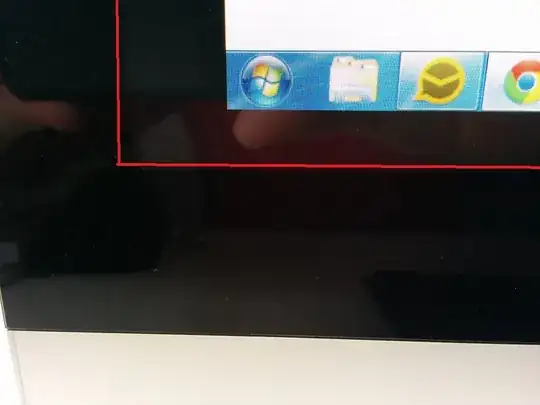
Before I got the card, I was using the onboard VGA output and it was working fine. But now that I'm using HDMI with the new card it's not using the full monitor. There's about an inch of unused screen space. I have installed the latest drivers and catalyst software for my new card. And I have set the resolution to 1920x1080. It's still not stretching the full height and width of the screen.

Any ideas how I can fix this? Here's a picture. The screen SHOULD stretch to where the red line is.
enter image description here

fixer1234
  • 27,064
  • 61
  • 75
  • 116
Frantumn
  • 936
  • 3
  • 16
  • 33
  • 1
    Check this info first. http://superuser.com/questions/57239/how-do-i-enable-disable-overscan-on-my-tv-in-catalyst-control-center/64264#64264 then report back with how that goes. Or find in the Catalyst settings the underscan/overscan option, and tweak it and see if that fixes it easily. – Psycogeek Mar 12 '14 at 22:22
  • 1
    @Psycogeek I can't do that. Due to another issue http://superuser.com/questions/731826/how-do-i-trace-computer-freeze/731838#731838 the ATI drivers were causing my computer to freeze. Because of this, I am just using the basic Windows drivers. Is there a way to do this without ATI software? – Frantumn Mar 21 '14 at 13:38

1 Answers1

0

Switch to the DVI cable rather than HDMI. I did the same thing with mine thinking HDMI would be the best, but it was not. Now the screen is stretched to the corners and very sharp. The HDMI issues may be the fault of the cheap integrated graphics card.

  • Could you elaborate a bit on how exactly changing cables does the trick? As it stands now, your answer is based only on anecdotal evidence, that being a single instance of your own experience. Do you have something more general to support the claim that switching cables work (in general, not just in some single particular case)? –  Apr 27 '14 at 04:49