5

In Word 2013, lets say I have a few table layouts. For example
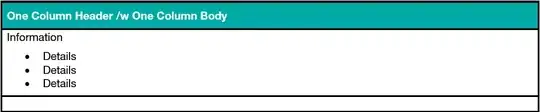
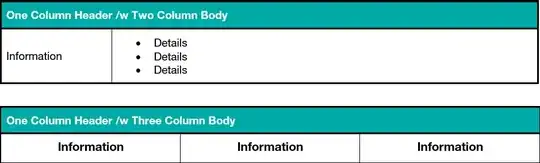
word table word tables example2

Is there any way to create a new table style via the Design tab based on my existing table design, or am I forced to try to emulate this table design by creating a new style that mimics my current table design? I cannot seem to find any way to create a new table style based on my existing table formatting.

Judith
  • 673
  • 4
  • 18
Richie086
  • 5,152
  • 12
  • 42
  • 65
  • 1
    Are you looking for [How to save Table Templates in Word 2013](http://www.thewindowsclub.com/table-templates-word) ? – harrymc Mar 17 '14 at 21:11
  • That might just work! I will try when I get back to work. In the meantime, go ahead and post your comment as the answer so I can award the bounty. – Richie086 Mar 18 '14 at 19:27
  • Yep you got it! Thank you so much.. Could Microsoft choose a worse place to put this function? Why not in the design tab when you have a table selected? – Richie086 Mar 18 '14 at 20:50

2 Answers2

2

the article How to save Table Templates in Word 2013 describes how to set up a table-template from an existing table :

  1. Select the table
  2. In the Insert tab click the small drop-down arrow residing below the Table icon to display the menu
  3. Select Quick Tables and on the right Save selection to Quick Tables Gallery
  4. In the window Create New Building Block, give your new table template a name
  5. Click OK to save

To insert the table template in the document, go to the Insert tab -> Table -> Quick Table.

harrymc
  • 455,459
  • 31
  • 526
  • 924
  • 4
    This is not so much how to create a new table **STYLE** (i.e., a mechanism by which a set of design characteristics can be applied to an existing table). It is a way to generate a *template* that applies styles when *new tables* are **created**. Not the same thing, really. As far as I can tell, the only way to create a custom table **style** is to go through one of 2 GPITA tasks: creating one from scratch, or modifying an existing one. Both are the sort of thing that nobody wants to do... thus garmonbozia is created. – GT. Sep 10 '15 at 21:48
  • @GT., what is GPITA?... garmonbozia also sounds interesting :P – LuizAngioletti Sep 24 '15 at 20:35
  • See [garmonbozia](http://www.urbandictionary.com/define.php?term=Garmonbozia). Everyone knows what [PITA](http://www.urbandictionary.com/define.php?term=pita) is, but not GPITA. It might mean "Great PITA". – harrymc Sep 24 '15 at 21:33
0

You can create a new table style or modify an existing one by doing the following:

  1. Select the table
  2. Select Design under Table Tools
  3. Click the drop-down on the bottom right of the Design menu
  4. At the bottom there is the choice of Modify Table Style, Clear, and New Table Style.
  5. If you choose New Table Style you can base it on an existing table style.
  6. You can find out the name of the existing table styles by hovering over the table style.
Karen
  • 1
  • 1
    This does not answer the question. He wants to base it on an existing table... not an existing table style. – f.thorpe Apr 19 '18 at 17:20