1

I have the following browsers installed on my system.

  • Google Chrome, Version 33.0.1750.154 m
  • Mozilla FireFox, Version 27.0.1
  • Internet Explorer 8

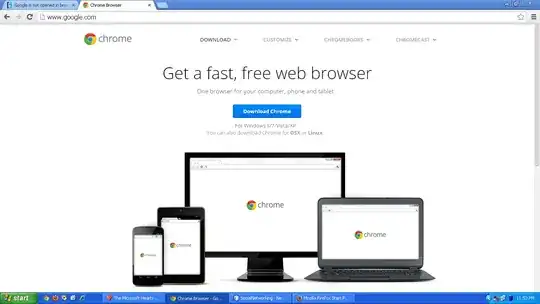
Except for other sites, Google doesn't open in all of these browsers. When the link http://www.google.com/ is entered in the address bar, it opens up the page as shown in the following:

snap shot.

It happened suddenly a few days ago. Why does this happen? How do I fix it?

Burgi
  • 6,493
  • 14
  • 39
  • 52
Tiny
  • 139
  • 1
  • 1
  • 7

1 Answers1

4

Sounds system based. You likely have poorly written spyware. See this SuperUser article for recommendations

Your host file may be modified: Check your host file:

  1. Press Windows Key + R
  2. Type: %systemroot%\System32\drivers\etc press ok (you may need to tell it to show system files)
  3. Double click on hosts and open with Notepad
  4. The only line that should not have a # before it should be 127.0.0.1 localhost (if this is a work computer, check with your IT staff before modifying this file).
  5. Erase anything that is not that and save.

If you are behind a admin controlled network you may not be getting a good address for Google.

  1. Press Windows Key + R
  2. Type cmd press ok.
  3. In the black command window type: nslookup google.com
  4. it should look something like the following (not exactly the same numbers though)

    Name: google.com Addresses: 2607:f8b0:4009:804::1006 173.194.46.36 173.194.46.37 173.194.46.46 173.194.46.34 173.194.46.38 173.194.46.35 173.194.46.33 173.194.46.32 173.194.46.41 173.194.46.40 173.194.46.39

Edit due to comment:
You certainly have malware. Your DNS is hijacked.
Follow the recommendations in the article I've linked above, I recommend Malwarebytes Free. You may need to free your DNS see this Microsoft article to check your DNS. You want it set to automatically obtain. If it is already set to automatically obtain, you may find it difficult to download anti-malware programs, in which case you should obtain them from another computer and portable media(thumb drive probably).
Jeff F.
  • 4,413
  • 1
  • 20
  • 43
  • There is a `tmphosts` file in `C:\WINDOWS\System32\drivers\etc`. There is no `#` before `127.0.0.1 localhost`. Do you want to see the entire file? – Tiny Mar 18 '14 at 18:59
  • Entering `nslookup google.com` on command line shows this, `Server: du-113-122.sv-en.ru Address: 46.19.113.122 Non-authoritative answer: Name: google.com Address: 46.202.194.197 ` – Tiny Mar 18 '14 at 19:08
  • 1
    You Have malware. See Step one. Delete any host file and tmphost file you have in there. I'm also adding to my answer based on your comment. – Jeff F. Mar 18 '14 at 19:08
  • Also, your host file may be hidden. You may need to show hidden files to see it. – Jeff F. Mar 18 '14 at 19:15
  • That's some useless malware though. – dgo Mar 18 '14 at 23:15
  • @user1167442 Hence why I called it poorly written :) – Jeff F. Mar 19 '14 at 13:02
  • I have used Malwarebytes Free to scan the system. Removed objects that were listed by the tool still sometimes Google is not opened (usually it opens). It seems to me that I will have to reinstall the operating system. Are these malwares harmful to the system like viruses? (I have many applications running on the system using different servers and all of them require reconfigurations, if the OS is reinstall. It could be a time waste activity). – Tiny Apr 12 '14 at 16:52
  • A virus is a type of malware. When I say malware I mean anything bad for your computer: Viruses, Spyware, Worms, rootkits etc. I would recommend an OS reinstall from the sound of it. – Jeff F. Apr 17 '14 at 17:08