It seems that some Windows editions don't include the GUI secpol.msc tool.
I would like to change some data at Local Security Policy, like, for example, Create a token object.
How can I do that?
All I have found until now is the secedit command-line tool, but it allows only export/import of a complete tree, not changing specific parameters.
Command-line method prefered, please, but GUI allowed too.
Asked
Active
Viewed 3.4k times
3

Sopalajo de Arrierez
- 6,603
- 11
- 63
- 97
-
2Which edition of Windows are you on? – pratnala Mar 19 '14 at 15:08
-
You can't. You would have to attach them to a domain in order to do this. – Ramhound Mar 19 '14 at 15:15
-
2You could try the solution given here: http://superuser.com/questions/40143/alternative-to-gpedit-msc-for-windows-home-editions – JSanchez Mar 19 '14 at 15:27
-
I have found this problem on some editions of Windows 8, Windows 7 and Windows XP, the less featured. – Sopalajo de Arrierez Mar 19 '14 at 15:35
-
Well, I can not really think that this question is duplicated: **gpedit.msc** is not exactly **secpol.msc**, so it could be useful to remain in the SuperUser forum a thread with this title. – Sopalajo de Arrierez Mar 19 '14 at 15:40
-
@JSanchez , your solution (the *Group Policy Registry Table*) seems not to have anything about the word "token", so I must suppose that is not a complete replacement for "secpol.msc". Thanks anyway. – Sopalajo de Arrierez Mar 19 '14 at 15:44
1 Answers
2
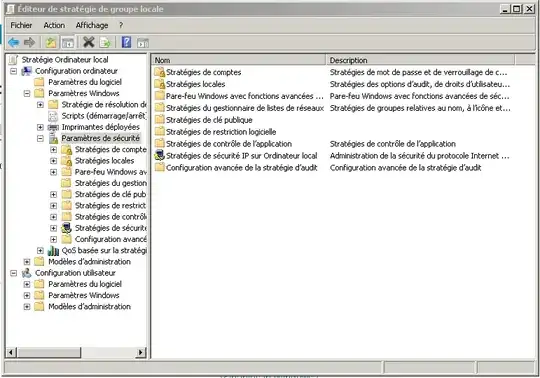
Try: gpedit.msc: under Computer Configuration --> Windows Configuration --> Security policies.
By default it's only installed on Windows 7 Professional, Enterprise and Ultimate editions. But you can follow this tutorial to install it on other version.
Sopalajo de Arrierez
- 6,603
- 11
- 63
- 97

chaput
- 441
- 2
- 5
-
1The answer is correct. It is logical that the **Group Policies Editor** should include the **Security Policies** tool, but it wasn't obvious for me. Thanks, @chaput . – Sopalajo de Arrierez Mar 19 '14 at 15:48