I need to re-arrange the order of the style in Quick Style in Word as below snapshot.
How can I do that?
I need to re-arrange the order of the style in Quick Style in Word as below snapshot.
How can I do that?

If the below method doesn't work, then maybe you have a different version of Word than me. I'm using Office 2010. In that case, view this link.
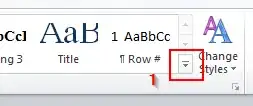
Click on the down-right arrow, below the "Change Styles" button on the right.
A Styles window will appear, as shown in the image below. Click on the "Manage Styles" button : 3rd button beside the "options..." , the button on the bottom right.
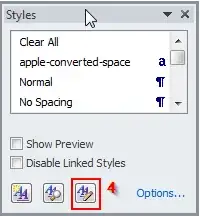
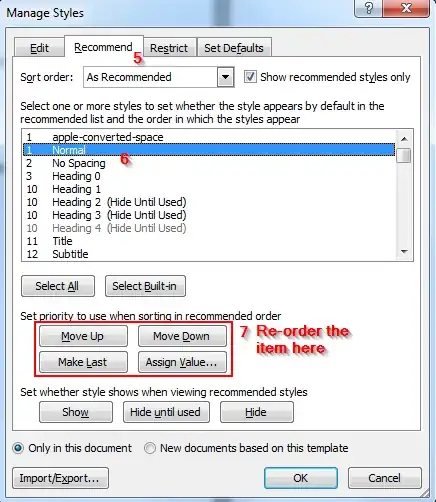
Click on Recommend on the manage styles screen and from here you can move your style up or down the list to re-order it.
Had the same issue on Microsoft Word 365, where my 'Heading 1' was near the bottom of my style list and I wanted it at the top... the fix is very unintuitive, but here it is:
open the style gallery (Ctrl+Alt+Shift+S)
Click on the symbol of an A with a tick that takes you to 'Manage Styles'
Click on the 'Recommend' tab
Find the style you want to fix. (The number to the left indicates the priority it has in your list (e.g. '1' will show up first. In this case all my other Heading styles were 1, but Heading1 was somehow on 10.)
Once the style is selected, click assign value, or manually change it using 'move up' or 'move down'
Fixed.

