I tested the micro SD card of my phone with testdisk, and it says somethings about heads/cylinder mismatch. What is that? SD card should not have heads...
I tested the micro SD card of my phone with testdisk, and it says somethings about heads/cylinder mismatch. What is that? SD card should not have heads...

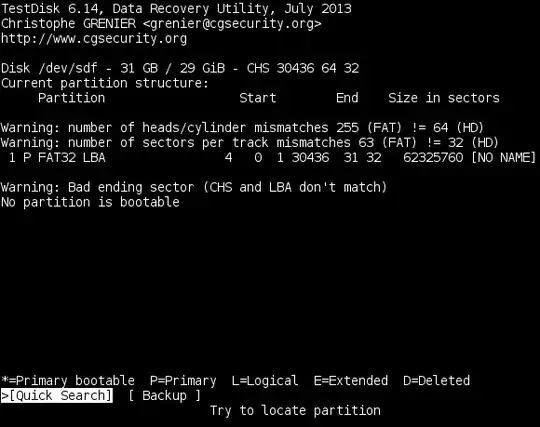
The SD card is formatted in a way that mismatches the standard number of heads-per-sectors that is built-into in TestDisk for FAT32.
This is just a warning and one can usually try and go ahead with TestDisk (with no guarantee of success, of course).
However, TestDisk is primarily designed to help recover lost partitions, so might not be the tool you want if you wish to save files.
SD cards are usually very fragile, and when they go that's it. To be in good health the card should first show up in Windows Explorer as a drive with the files visible.
Here is one free Android test app : SD Card Tester, and a PC test program : H2testw 1.4.
If any problem is found, reformat the card using slow format, and if problems reoccur then junk it.

I tested the micro SD card of my phone with testdisk, and it says somethings about heads/cylinder mismatch. What is that? SD card should not have heads...
No, not physically, however they do, or at least can have them logically. You can convert large-block addresses to cylinder/head/sector addresses and vice-versa, so technically you can use either format to address any sort of sotrage medium regardless of its physical attributes.
In addition, flash media is usually formatted in such a way as to create “blocks” which are written to wholesale. Depending on their internal makeup, they can vary in what block configuration is optimal, and will usually come pre-formatted in a way to maximize speed and reduce wear. That is why formatting a memory-card is usually advised against, and why there are special formatters to restore them to their factory settings.
Testdisk on SD card heads/cylinder mismatch
It looks like there is a difference in the card layout to what Testdisk is calculating. There are a few distinct possibilities that could be causing this:
The card-reader is bad/cheap/incompatible. What kind of card reader are you using? Cheap card-readers like the kind of cheap Chinese ones on eBay tend to be buggy and can cause full-on corruption due to buggy programming in their card-structure handling.
The card has been formatted incorrectly or in a non-standard format with the phone. It is possible that a phone may have formatted the card in a way that is not standard, so the computer which is expecting a standard format is seeing it as unusual.
The card is mounted incorrectly. If it is an external reader, make sure that the cord is plugged in correctly and that the pins on the cable and USB port are clean because a poor connection can lead to read errors, which may be causing it to mount as a hard-drive instead of a memory-card.
It could be a formatting issue. The card is showing as 32GB, but it looks like it was formatted with FAT which does not support that size. For a 32GB card, you would need to use FAT32 (or exFAT), so something (the phone?) may have formatted it incorrectly.
There’s a few things to try:
Test with a different card, preferably an identical one.
Test with a different card-reader, preferably a high-quality one, like the kind that are often built-in.
If possible, try formatting it with the computer (make sure to use a format that is compatible with the phone like FAT32).
