6

For some reasons I'm running into SSL problems since a few days. When trying to clone a git repository for example I receive the following error message:

fatal: unable to access 'https://someuser@bitbucket.org/somerepo.git/': SSL certificate problem: Invalid certificate chain

I was able to solve this issue by setting the following configuration option:

git config --global http.sslVerify false;

But when I try to access github.com or bitbucket.org through chrome I get the following:
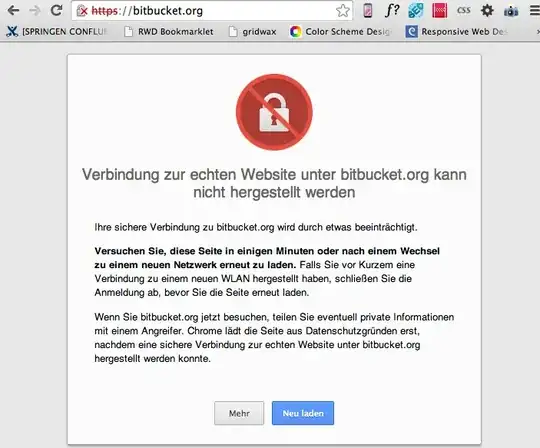
HSTS failure

certification failure certification failure

Unfortunately it's in german but in short it says that the connection is affected by something. The failure type is HSTS failure. The second screen says that the certificate was signed by a unreliable deliverer.

I'm using Chrome (34.0.1847.116) on a Mac (OS X 10.9.2 (13C64)).

Any suggestions what could cause this issue or how to solve it?

damian
  • 163
  • 1
  • 1
  • 6
  • Pretty sure this is Heartbleed – w00t Apr 10 '14 at 06:55
  • @w00t But as far as I understand the Heartbleed bug there ought to be something wrong on the github server. And these seem to be fine: http://filippo.io/Heartbleed/#github.com Or am I wrong? – damian Apr 10 '14 at 08:23
  • Click on the lock next to the https:// and then you can inspect the certificate chain and see which cert is invalid. – w00t Apr 10 '14 at 08:24
  • @w00t Updated my question. It's quite strange that the Mac Keychain Access doesn't show any invalid certificates... Also there is no issue when using any other browser (like Safari). – damian Apr 10 '14 at 08:38
  • 1
    Click on the first cert and see why it's not trusted. It's still trusted on my phone... – w00t Apr 10 '14 at 08:44
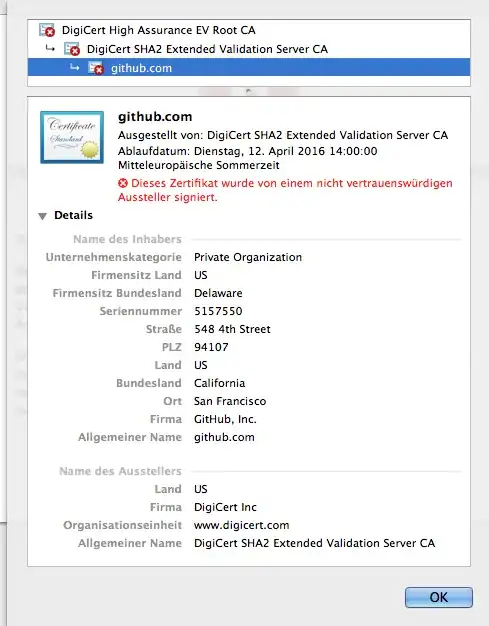
  • @w00t The first certificate says that it was signed from an unknown instance. `Entrust.net` – damian Apr 10 '14 at 08:46
  • I'm beginning to think you don't have any trusted certs in your key chain any more... Start manually adding the ones that you trust :-) – w00t Apr 10 '14 at 08:47
  • Err what? For me the top cert is from digicert.com, not entrust.net... – w00t Apr 10 '14 at 08:50
  • The owner is digicert.com but the originator is entrust.net (see screen above) – damian Apr 10 '14 at 08:52
  • On my phone, there is no reference to entrust.net anywhere. Sorry, I can't cut paste the fingerprint but the sha1 starts with 5f and ends with 25 – w00t Apr 10 '14 at 09:28
  • I get the same problem opening https://www.quora.com/. I hope you find a solution! – Peter Mortensen Apr 11 '14 at 18:54

6 Answers6

3

i've got the same problem since weeks (!), exactly same setup (chrome / mac os - newest versions), also from germany. anybody an idea?

workaround: use safari or firefox.

seems to be a chrome specific problem.

- update -

here is the solution:

https://productforums.google.com/forum/#!topic/chrome/Duu4y-d-PIU

  • delete false certificates
  • will be correctly recreated by system on reboot
mrhell
  • 64
  • 2
  • 1
    Removing the certificates solved it for me... Danke! – damian Apr 16 '14 at 07:54
  • I tried this and it didn't work for me. Or rather, I deleted a bunch of certs that were expired and it is still not working. How do I add the more updated version of the ones I removed? Once I go to the site, should it auto download the correct certificate? If that is the case, when I go to Heroku it is still giving me the error. – marcamillion Sep 03 '14 at 06:43
3

This other answer helped me: https://superuser.com/a/788547.

It's Mac OS X related, and it helps solving a problem that affects chrome in a similar way (with Github) because of a certificate that expired on July 26th 2014.

The steps that worked for me:

  1. Open Keychain (Applications / Utilities / Keychain)
  2. Go to Presentation -> Display expired certificates
  3. Find the "DigiCert High Assurance EV Root CA" certificate
  4. Close Chrome
  5. Download back this certificate from : https://www.digicert.com/digicert-root-certificates.htm
  6. Drag it to your "Session" keychain
  7. Restart Chrome
  8. Go to github, should be solved!
Vala
  • 131
  • 3
2

I've been having similar issues.

Try synchronizing your system clock with an internet time server. SSL connections check the date and time of the system so doing this fixed it for me.

Mokubai
  • 89,133
  • 25
  • 207
  • 233
solver
  • 21
  • 1
  • This was my problem as well--you can tell if this is "your" problem by [ironically] browsing to the same site using firefox, if it shows a message like "The certificate will not be valid until 07/30/2014 05:55 AM. The current time is 07/17/2014 07:54 PM." then your time is out of date. – rogerdpack Aug 07 '14 at 22:45
1

This is what worked for me (mac, not able to open github):

  1. Open Keychain
  2. Select "View" -> "Show Expired Certificates"
  3. In the search box, type "Digi". This should be enough to show any/all DigiCert certificates.
  4. Delete any certificates that have a red "X" icon (these are expired).
  5. Navigate to / reload GitHub. You should be allowed access.

Worth noting, I did not need a restart of Chrome or the OS.

bjunc
  • 111
  • 1
0

The certificate of BitBucked and GitHub was recently revoked but they didn't restart their servers at the moment you were trying to connect. Just try again right now. It should be fine.

Braiam
  • 4,709
  • 3
  • 26
  • 57
0

None of the above helped me. I tried this

export GIT_SSL_NO_VERIFY=true

Via -> http://www.uwosh.edu/ploneprojects/docs/how-tos/how-to-fix-a-git-ssl3-get-server-certificate-error

Vaibhav Jain
  • 101
  • 1