0

Possible Duplicates:
Where did the other .8 GB of RAM go?
Windows x86 physical memory is 24-bit?
Why is usable RAM less than total RAM?

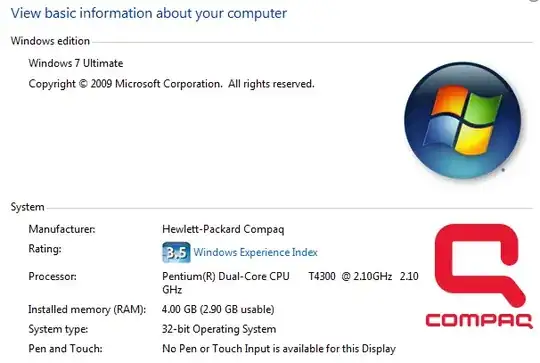
I have a computer with 4GB RAM. Why isn't it all usable? What does this mean?

See below:

Installed: 4GB, Usable: 2.9GB

alt text

flybywire
  • 4,030
  • 10
  • 42
  • 55
  • 3
    possible duplicates: http://superuser.com/questions/7964/where-did-the-other-8-gb-of-ram-go http://superuser.com/questions/54056/why-is-usable-ram-less-than-total-ram http://superuser.com/questions/13210/3gb-of-ram-showing-up-as-2gb http://superuser.com/questions/50138/4-gb-of-ram-installed-but-only-2-97gb-usable-what-gives (undoubtedly there are others as well...) – quack quixote Nov 24 '09 at 21:43
  • 2
    Dude - where's my 4 Gigabytes of RAM > http://www.codinghorror.com/blog/archives/000811.html – Sathyajith Bhat Nov 24 '09 at 21:46
  • 3
    A better question might be "Why does this dialog in Windows 7 not explain why less than 4GB is usable?" – JMD Nov 24 '09 at 21:53
  • 1
    @JMD: Would be nice if Microsoft would just put the answer in Windows, wouldn't it? – TheSmurf Nov 25 '09 at 04:09
  • open task manager and in the performance tab click on system monitor. – bandybabboon Mar 22 '16 at 17:32

2 Answers2

1

It's because you have 32bit installed. 32 bit can only go so high. You need 64bit.

If you do have 64bit, 1Gb of RAM may be shared with the video card.

Matt
  • 6,231
  • 20
  • 57
  • 79
1

This is purely a limitation of the 32-bit operating system, and has been around since XP. Vista SP1 had an update that changed the dialog to show 4GB, but in reality, the OS was still only using 3.

The reason: Windows 32-bit can only use 4GB of memory. This applies to ALL hardware, including your video card.

If your video card has 1GB of VRAM, this means you're trying to use 5GB total. The BIOS often has settings to choose the amount of memory dedicated to your video card, and Windows will use as much RAM as it can in the remaining space.

Here is an external reference with people stating the same thing.
Will Eddins
  • 3,582
  • 1
  • 26
  • 28
  • 2
    Actually it's not Windows deciding that the video card is more important. The hardware memory space is always mapped below the 4 GIB boundary. Also it can also be a chipset limitation. My ThinkPad R60 only allows for 3 GiB of RAM even with a 64-bit OS. – Joey Nov 24 '09 at 21:44
  • Assuming the chipset allows for 4GB, it usually is a BIOS option to change the amount of memory dedicated to video. Edited that part, since in either case, it really is the chipset deciding this. – Will Eddins Nov 24 '09 at 21:48
  • You're 95% there, but... _"If your video card has 1GB of VRAM, this means you're trying to use 5GB total."_ That's not necessarily true. All of the video card's VRAM does not have to appear in system physical address space. And the firmware settings _"to choose the amount of memory dedicated to your video card"_ don't apply to add-on cards, only to integrated graphics. An add-on card's firmware will be designed to present a "window" into its VRAM of a certain size. This may be adjustable through the utility that comes with the video card's drivers, but the system firmware has no idea of it. – Jamie Hanrahan Feb 06 '19 at 15:15