6

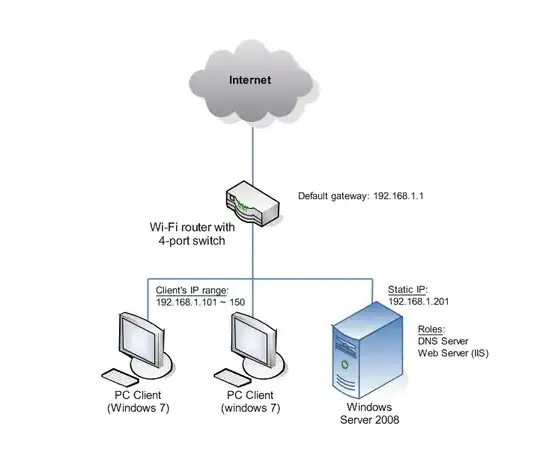
Network Diagram

I have a web site set up in IIS, mysite.net, which I want to be accessible ONLY from within my local network. So it's supposed to be an intranet site.

Now, the way the DNS server and the Web server are configured, when I go to "mysite.net" from the server computer, it all works fine; it's reachable. What I don't know how to do is to make this accessible from the clients computers.

PS: I can reach it from a client computer if I set preferred DNS server, on the router, to point to my server, but then I can't get to the web.

So, what am I missing? Is it a config to be done on the DNS server? On the Web server? On the router? Am I missing one or more hardware components?

Thank you.

heavyd
  • 62,847
  • 18
  • 155
  • 177
fduayer
  • 163
  • 1
  • 1
  • 5
  • @heavyd Thank you for the help on the revision. – fduayer May 08 '14 at 19:44
  • No problem. And just for future reference, typically, if your question is on the wrong site, the best course of action is to flag the question for moderator attention and ask them to move it for you, rather than reposting. Your original will likely be moved anyway, so we'll end up with a duplicate. – heavyd May 08 '14 at 19:47
  • Got it. Kinda of inexperienced, still. I'll try to flag the other one for removal. Can that be done? – fduayer May 08 '14 at 20:01
  • If I remember right, if there aren't any answers yet you should be able to delete it yourself. – heavyd May 08 '14 at 20:02
  • Yep! Correct. Just did that. Thank you again for all the advices. Now we should be all set. Just one question; no duplicates; and in the right place. :) – fduayer May 08 '14 at 20:03
  • Don't forget to mark one of the answers as your accepted answer after the minimum time elapses. – Lynn Crumbling May 08 '14 at 20:13

2 Answers2

6
  • Set up a Forwarder in your Windows DNS server that forwards all unknown requests to your ISP's DNS (or your router if it forwards requests, or use Google's DNS, etc.).
  • Set the clients to use the internal DNS server as their DNS setting.

This setup will cause the clients will check with the internal DNS, which will respond with IPs for any hosts it has entries for. Any other host requests (i.e.: Internet hosts) will be forwarded to your ISP's DNS for resolution.

More info (from MS):

Ƭᴇcʜιᴇ007
  • 111,883
  • 19
  • 201
  • 268
  • In my DNS server, I have a forward lookup zone set up: mysite.net, so mysite.net is reachable. What I don't know how to do, is how to configure forwarders, since I get DNS servers dynamically from my ISP, through the router. This way I can't go to the DNS server and set a specific IP address to use as a forwarder. Any ideas on how to do that? You see, I just need to figure out the part between the router and my DNS Server. – fduayer May 08 '14 at 20:36
  • As it says in the answer: If your router supports DNS forwarding (which is most likely does), then just aim the DNS Forwarder (_not_ the same as a Forward Lookup Zone) at your router. You could also use your ISP's DNS server directly if you know it's IP, or just skip your router and ISP DNS completely and use a public DNS server, like Google's (8.8.8.8). "What I don't know how to do, is how to configure forwarders" - there's a link to steps about how to do that, right there in the answer. :) – Ƭᴇcʜιᴇ007 May 08 '14 at 20:53
0

Just use a regular domain & point it to an internal address. Eg

Mysite.net resolves to 192.168.1.230

Where 230 is your internal server address. This way you don't need an internal DNS server you can just set it like normal

Toby Allen
  • 3,015
  • 5
  • 31
  • 46
  • Ok, but where do I set this? On the router? – fduayer May 09 '14 at 01:01
  • @fduayer You would set this in your domain name provider. Eg. if you purchased your domain from twocows then you should be able to set up dns to point to a particular IP thats where you set it up – Toby Allen May 09 '14 at 10:39