2

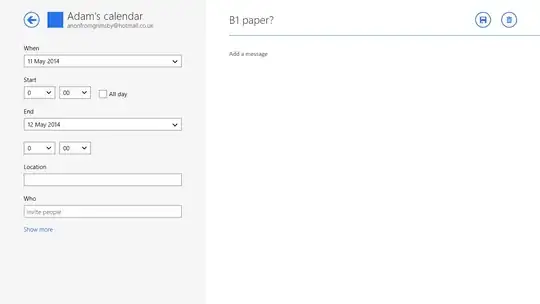
Here's a screenshot of my Windows 8.1 Calendar.

As you can see, some of the items appear lighter/greyed out (ie on the 15th, 21st).

Why is this? I have not noticed any difference between these items, and none of the ideas I've had for why (ie items without a specific time are lighter) have fitted.

My calendar is synced to hotmail.
calendar

The calendar online (hotmail.co.uk). (There are a couple of new events, but nothing should have changed with the earlier ones.)

hotmail calendar

This event appears lighter.

C1

But this event does not.

B1 paper?

ACarter
  • 1,374
  • 3
  • 14
  • 27
  • Can I see a full screenshot of the same screen in Hotmail in a browser? – Paul C Jun 03 '14 at 19:55
  • @CodeBlend added :) – ACarter Jun 03 '14 at 20:04
  • Hm odd how these doesn't appear to be a distinction in the web version. I was thinking something like all day event but don't think that's it – Paul C Jun 03 '14 at 20:08
  • Maybe the 19th contains a customized event, as in section "How to Customize your Calendar" of [this article](http://www.7tutorials.com/introducing-windows-8-complete-guide-windows-8s-calendar-app). – harrymc Jun 04 '14 at 11:18
  • @harrymc nah, it just contains another standard event. – ACarter Jun 05 '14 at 08:16
  • It is possible that there is still some customization/script that is setting this color - but only you can investigate your calendar. – harrymc Jun 05 '14 at 08:42
  • hmm, as soon as I change the colour in the Win calendar app, the lighter colours instantly change to be a lighter version of that colour (ie if I set it to purple, those events become light purple), so I assumed the app was setting them to a lighter colour for a specific reason. – ACarter Jun 05 '14 at 08:55
  • 1
    Can you post screen shots of the event details themselves? Is it possible that they are from another calendar (shared calendar), or that they are shared with another person? Is it possible that they are in conflict with another event (same time)? – rishimaharaj Jun 07 '14 at 02:56
  • @rishimaharaj done it, and you can see the difference! Both last all day, which is why I didn't spot it before, but one is ticked as all day, whereas the other is from 00:00 to 24:00. Feel free to post an answer and I'll accept it :) Thanks! – ACarter Jun 07 '14 at 15:23

1 Answers1

1

Per the comments section, posting screenshots of the event details in question show what the differences are: both are All Day events whereas the others in the calendar are not, hence the difference in color.

rishimaharaj
  • 1,300
  • 4
  • 15
  • 33