2

Hello to all you smart people =) This is driving me nuts and I've been Googling like crazy. I'm using a desktop PC with Windows 8.1, and I keep dragging my desktop around by accident, when I'm trying to either move a folder or file around on my desktop or perform a highlight of the file.

I found this page and others, that says you can disable it entirely by regedit. I tried and it didn't work

http://support.myaxispoint.com/knowledgebase/articles/233923-disabling-windows-8-edge-gestures

I've also read that the gestures are dependent on explorer.exe, which is why Classical Shell works. I've tried Classical Start Menu and it's a cluster or English and my own language, and I'd rather not use it. But so far it's the only way I've found to disable the desktop dragging feature. Does anyone know how to completely disable it? :(

Kind regards, Thor.

Edit: See a short streamed video of the problem here. https://www.dropbox.com/s/tjqpvpeyfmhxxh4/2014-06-02%2012.01.00.mp4

Thor
  • 21
  • 1
  • 3
  • What exactly do you mean your dragging your desktop around. I only ever experience this problem when the Start Screen is up, on dual monitors, otherwise I don't personally have this problem ( and it takes less then a second to fix when it does happen ). – Ramhound Jun 02 '14 at 11:21
  • Short video of it :) https://www.dropbox.com/s/tjqpvpeyfmhxxh4/2014-06-02%2012.01.00.mp4 – Thor Jun 02 '14 at 12:02
  • That's one of the core features of Windows 8. I'm not sure it can be disabled, but I found a SU answer that seems to have achieved this. I'll update my answer in a moment. – Vinayak Jun 02 '14 at 12:18
  • Do you happen to know what the feature is called? I have just zero use for it, since I don't use any metro apps or am going to. I have it 99% as windows 7 was. And God speed to you! :) I hope I can find a solution to this problem, that doesn't involve swapping explorer.exe. – Thor Jun 02 '14 at 12:26
  • I know it's not called "edge swipe". So the link you've posted in your question is irrelevant. According to the app that disables this feature, it's called the "drag-to-close" hot corner. – Vinayak Jun 02 '14 at 12:29

1 Answers1

0

I think what you're trying to say is that you want to disable Windows' right edge swipe feature that brings up the Charms bar on notebook touchpads when you swipe your finger from the left edge of the touchpad to the center of the touchpad. Windows swipe gestures

You can disable this gesture through your touchpad settings (if available). My notebook came with a Elantech touchpad (which is similar to Synaptics touchpads). This is how I disable the edge gestures on my notebook:

  1. Press Win+R → "control /name Microsoft.Mouse" → OK
  2. Select the "ELAN" or "Synaptics" tab and press the "Options" button Mouse properties

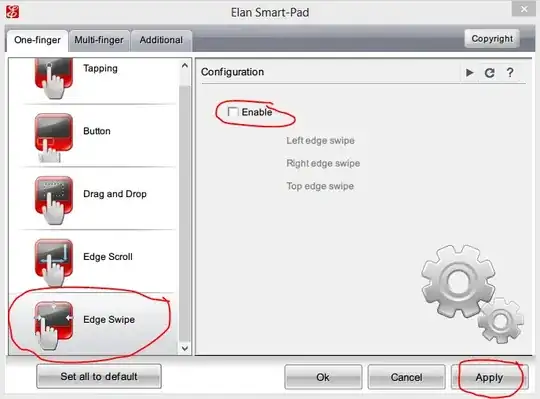
  3. Switch to the one finger swipe options and find the edge swipe option and disable it enter image description here

If you have a Synaptics touchpad on your computer, follow the instructions mentioned here (if you want to disable it through the registry, which is not recommended.

You could also check out this forum post from EightForums that has instructions for enabling/disabling edge swipe gesture for a muiltitude of touchpads.

UPDATE

To disable the "drag handle" on the desktop, that allows you to snap your desktop screen to the sides, try this solution.

If that doesn't work, maybe you could try doing the opposite of what's been done in this SU answer and change AlwaysEnableLSSnapping to 0.

NOTE: This solution requires tinkering with the Windows registry, which isn't recommended if you don't know what you're doing. Make sure you create a system restore point before you proceed.

Vinayak
  • 10,625
  • 10
  • 54
  • 89