What is the hexadecimal system and why is it used so much in computing? I know that computers use 0s and 1s to store data, so how come we use hexadecimal?
Asked
Active
Viewed 1.1k times
13

-
13If not off-topic, how is such a basic question not a duplicate 5 years after the start of Super User? – Peter Mortensen Jun 06 '14 at 09:52
-
3@PeterMortensen Even weirder, it hasn't even been asked yet on any of the sister sites, at least, not that I can find. – Nzall Jun 06 '14 at 10:46
-
9May be it doesn't need to be asked as Wikipedia has a pretty good answer: http://en.wikipedia.org/wiki/Hexadecimal – Piers Myers Jun 06 '14 at 10:48
-
4Why so many upvotes? – Vi. Jun 06 '14 at 19:24
-
2Related: [Why using hexadecimal in computer is better than using octal?](http://superuser.com/questions/374009/), [Why do we use hex so much, when there are enough letters to use base 32 instead?](http://superuser.com/questions/719455/) – and31415 Jun 06 '14 at 21:07
-
No one seemed to comment on why it was off-topic yet, so I'll just say that it seems like the [help/on-topic] says it is on-topic (as all data in computing is stored as binary). If there is another way I can improve the question, I'd like to know. :) – Justine Krejcha Jun 06 '14 at 21:59
4 Answers
31
Hexadecimal is a number system that is very common in computing. You may have heard of binary before, which only has 1s and 0s.
Humans mostly use the decimal (base 10) system, in which we have 10 numerals:
0, 1, 2, 3, 4, 5, 6, 7, 8 and 9
Though, computers don't operate using decimal system. They have a binary state (something is either true or false) and therefore operates in base 2 (binary numbers are usually prefixed 0b) with the only numerals being 0 and 1.
In earlier days, octal (or base 8) was used. It was good because "10" in base 8 was "0b1000" in binary (10 in decimal is 1010 in binary). Octal is usually prefixed "0o" when writing numbers (but is prefixed just '0' in most programming languages). It's called base 8 because we have eight numerals.
Octal is still being used today, mostly when setting permissions in Unix and Linux
As time went on, we needed an easier way to represent larger numbers, as computing power and space was rapidly increasing. It became the standard to use hexadecimal, or base 16, because 16, like 8 is a power of 2, which makes it easy to do digit-by-digit conversion (see this comment.Because there are 16 numerals, letters were used for the other numerals. Also, hex is usually prefixed with 0x.
Hex numbers are also useful as since a hex number is 4 bits (1 octal number can represent 2), and therefore two numbers in a byte. In most hex editors, this is how a byte is represented.
Counting
In base 10, we have 10 numerals. After 9, what do we do? We're out of numerals. We create a "tens" place to the left of original number, have that be 1 and the rightmost becomes 0. Same thing happens in hexadecimal as well:
0, 1, 2, 3, 4, 5, 6, 7, 8, 9, A, B, C, D, E, F, 10, 11, etc
Until we get to 0x1F, and then the process repeats up until 0xFF (255 in decimal) and then we get 0x100. More information about counting can be found here.
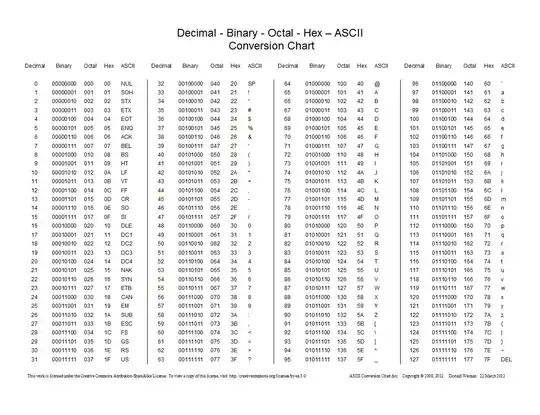
Here is a chart showing conversions between decimal, hexadecimal, octal, and binary:

Stephen Rauch
- 3,091
- 10
- 23
- 26

Justine Krejcha
- 2,207
- 2
- 16
- 27
-
21The main benefit is that, because 16 is a power of 2, you can do digit-by-digit conversions. – TRiG Jun 05 '14 at 22:24
-
2Note that many languages use the `0` prefix and not `0o` for Octal numbers. – ysap Jun 05 '14 at 22:30
-
2Your note about 16 being a *multiple* of 2 is incorrectly copied from TRiG's comment. Being a multiple is not the relevant relation. – Ryan Reich Jun 06 '14 at 04:27
-
-
2@justcool393, may be worth mentioning that the name for what you call "base 10" is actually "decimal." This may help make clear the relationship between base 8 (octal), base 10 (decimal) and base 16 (hexadecimal). – HalosGhost Jun 06 '14 at 04:40
-
1Octal remains in use where grouping by sets of 3 bits is handy, an obvious case being the file access-rights flags. Relatedly relatively non-techie people will use hexadecimal with colour codes because it's similarly useful to group octets (sets of 8 bits) and having two hexadecimal digits does that nicely. – Jon Hanna Jun 06 '14 at 14:15
-
@TRiG Can you please explain what you mean by *digit-by-digit conversion* and how does 16 being a power of 2 help here? – Geek Jun 06 '14 at 14:49
-
1You can directly map three binary digits to one octal digit, or four binary digits to one hex digit. 0xF = 0b1111, for example. That means you can look at a hex or octal number and easily turn it into binary. Hex 1234 = 0001.0010.0011.0100, or oct 123 = 001.010.011. You can't do that with decimal. – rojomoke Jun 06 '14 at 15:07
-
@rojomoke This allows us to write IP addresses, or color codes in a short hex format, where you can easily get any section if you know which digits to look at, and convert it directly to binary. – Cruncher Jun 06 '14 at 18:15
-
3Arrrg. Every base is base 10! http://stale.soup.io/post/114652207/every-base-is-base-10 – woliveirajr Jun 06 '14 at 18:43
-
@woliveirajr I remember seeing that comic and thought about it, but I'm not sure there is a better way of saying it while showing what base the numbers are in. – Justine Krejcha Jun 06 '14 at 22:01
-
1@justcool393 :) was just kidding, 'cause the first time I saw that comic, it took some good minutes to understand it :) – woliveirajr Jun 09 '14 at 11:48
-
@Geek. Sorry, I was away, but I see it's already been explained by rojomoke. If you don't follow that, let me know and I'll try to write up a longer explanation and give you a link to it. – TRiG Jun 10 '14 at 11:04
-
4
What is the hexadecimal system
The hexadecimal system is the base-16 numbering system that uses 16 digits (0123456789ABCDEF), as opposed to binary which uses 2 (01), or decimal which uses 10 (0-9). Since there are only 10 numeral digits (in our system), letters from A to F are used to describe "digit #10," "digit #11," etc. instead.
why is it used so much in computing
16 is a power of 2, which makes it easy to convert hexadecimal numbers to binary numbers, and as you noted, "computers use 0s and 1s to store data." Since each digit stores exactly 4 bits of data, a hexadecimal digit can be converted into 4 binary digits (1 bit) very easily, and vice versa.
| hex bin  | hex bin  |
| 0   0000 | 8   1000 |
| 1   0001 | 9   1001 |
| 2   0010 | A   1010 |
| 3   0011 | B   1011 |
| 4   0100 | C   1100 |
| 5   0101 | D   1101 |
| 6   0110 | E   1110 |
| 7   0111 | F   1111 |
how come we use hexadecimal
It makes it easier than binary to represent large numbers. Just two hexadecimal digits can represent 256 different values, as in:
dec  0  1  2  3  4  5  6  7  8  9 10 11 12 13 14 15 16 17 18 19 20 21 22 23 ...
hex 00 01 02 03 04 05 06 07 08 09 0A 0B 0C 0D 0E 0F 10 11 12 13 14 15 16 17 ...
Four hex digits can represent 65536 values, and so on. Hex makes it much easier to inspect data with something called a hexdump, as letters, numbers, and punctuation are stored in a format that maps each character to a number between 0 and 256 (called ASCII, or sometimes using other encodings). Furthermore, many other file formats (like PNG) are tailored so that each piece of information that the file is made up of contains 256 bits.
In summary, 16 is a power of 2 and 256 is a power of 16. This makes it a nice way to represent both binary numbers and text or other data.

Doorknob
- 767
- 1
- 8
- 22
2
What is the hexadecimal system?
If you have a number abcd then in this is equivalent to ((a* + b) + c) + d. So this is like:
- abcd(binary) = ((a*2 + b)*2 + c)*2 + d
- abcd(octal) = ((a*8 + b)*8 + c)*8 + d
- abcd(decimal) = ((a*10 + b)*10 + c)*10 + d
- abcd(hexadecimal) = ((a*16 + b)*16 + c)*16 + d
In a hexadecimal system you need 16 digits, but we have only ten digits available (0..9). So for the missing 6 digits the characters A..F are used with A=10, ..., F=15.
Of course you could also think about many other number systems, for example with base of 5 or 7.
For calculation with numbers it does not matter which base you are using. You can add and multiply in the binary system, you can do it in the decimal system and you can do it in the hexadecimal system. We are used to calculate in the decimal system, computers do it in the binary system.
Why is the hexadecimal system used so much in computing?
As said above it does not matter in which number system you give a number. The underlying number is the same, only the representation changes. The computer will internally always store and use (e.g. calculate with) numbers in binary.
So why do programmers (like me) use different number systems? There are two reasons to choose a number system based on a power of 2. First is shortness and the second is a good view of which bits are set.
Shortness
If I have a function that is writing the content of a buffer to the console then I could write code that prints in decimal, which is 1 to 3 digits (decimal: 0..255). If I am writing the number in binary format then I would end up with output of 1 to 8 digits (binary: 0..11111111). I could also use octal system and end up with 1 to 3 digits (octal: 0..377) or hexadecimal with 1 to 2 digits (hexadecimal: 0..ff).
This was for one byte only. Let's now assume you want to write a 32 bit number:
- binary: 0..11111111111111111111111111111111
- octal: 0..37777777777
- decimal: 4294967295
- hexadecimal: 0..ffffffff
As you can see the hexadecimal output is the shortest.
Seeing the bits
A common pattern to store information packed is to use each bit in a byte individually. Let's take for example file attributes (see MDSN). You want the attributes "hidden", "archive", "readonly", "temporary" and others. You could store each attribute in one byte or you could pack the information into one byte (or multiple bytes) where each bit represents exactly one attribute. If you look at the dwFlagsAndAttributes in the MSDN article you can see that Windows is using this pattern.
Staying at the MSDN page let's take FILE_ATTRIBUTE_ENCRYPTED as an example, this flag is decimal 16384 and hexadecimal 0x4000. The leading "0x" is just a C programmer's convention to mark hexadecimal numbers, so we'll just look at 4000. When you want to know which bits are set, then you'll need to convert 16384 to binary first - nothing you could normally do with mental arithmetic. But let's take hexadecimal 4000. This is quite easy. 16 is 2 * 4, so every hexadecimal number is exactly 4 bits. Therefor we just convert 4 to binary 0100 and the zeroes to binary 0000 and we are done.
Often it is not about individual bits but programmers tend to align things to powers of 2. We like to load programs not to a random address but to an address with the 16 least significant bits set to zero. That way if you have an address 0x12345678 you can easily see that this address belongs to the program loaded to 0x1234 and not to the one loaded to 0x03810000.
Prefer binary, octal or hexadecimal?
That is a question of flavor. If you directly want to see the bits binary might be fine. For long numbers binary might be frustrating if you have to count the digits to see if bit 23 or bit 24 is set. This is easier with hexadecimal because each digit represents 4 bits, so you have less counting involved. Personally I seldom use octal. It is very uncommon.
But why not use base 32?
Base 32 is a power of 2, this is great. But you would need 32 digits like 0..9, A..V. This is much more digits to remember (can you easily spot which number 'S' would respond to?). Another caveat is that with base 32 you loose the nice feature that two hexadecimal digits are exactly one byte, which comes in really handy if you take a look at memory contents! Also with base 32 you still need 2 digits to represent the values one byte can have. For a 32 bit value you only need 7 digits instead of 8 hexadecimal digits, but that is not so much to live with the disadvantages of the base 32 system.

Werner Henze
- 4,847
- 3
- 19
- 33
1
Different number representation systems in use today are (=include):
binary, octal, decimal and hexadecimal.
Which one to chose is often dependent on ease of use for the task at hand.
binary is used within computer systems and digital technology in general, as it is easy to represent within electronics; functions for base-2 numbers are easy to build, as is representation of on/off, true/false, or any other similar repeating two-state information.
octal is nice to have if there are groups of three binary digits, e.g. as is the case in permission settings in Unix/Linux.
skipping decimal for a moment, hexadecimal is nice in the same manner as octal but for four binary digits, and the fact that 8 bits, one byte, fits nicely into two hexadecimal digits. (= the answer)
Of this follows that the even-8-bit-groups in a computer is easily written down, represented and understood - that is; very convenient in daily use when writing software, handling data (e.g. rgb color values in HTML/CSS), forming data structures and anything else similar.
decimal. One could guess that the decimal system developed from the fact that we have ten fingers and toes. A single digit represent the number of items counted, one for each finger up to the maximum ten.
These represent number systems with a base of:
2, 8, 10 and 16.
Generally the base tells how many single digit "items" you may count, e.g. binary has two, decimal has ten.
As hexadecimal has 16 single digit items, the system requires 16 "numbers", therefore using 0-9 and a-f (6 extra, compared to decimal), where "a" equals 10 and "f" equals 15 in the decimal system.
To continue with general mode: any base 2 or higher works as well as anything else, as long as you have a nice single digit representation.
Numbers in decimal is formed by:
... d*10³ + c*10² + b*10¹ + a*10⁰
for a decimal number "dcba" - with d,c,b,a, picked from 0123456789
Now change that to:
... d*base³ + c*base² + b*base¹ + a*base⁰
and you have a more general form that shows how any base 2 or higher "works";
e.g. a five digit, base 5 could be just as convenient as any of the others above, or why not a 12 digit (one dozen) system for time (12 hours ="10" base 12, with the first "decimal" telling which 1/12th [5 minutes] of an hour it is)
Note: ⁰¹²³ - superscript 0123 if your screen shows something else

Hannu
- 8,740
- 3
- 21
- 39