I just want to make my pendrive write protected just to make sure, when I insert it public PCs like in cyber cafes in order to just read the files, it doesn't get virus affected. How can I do this?
Asked
Active
Viewed 5.3k times
5

-
1Possible duplicate of (deep breath) http://superuser.com/questions/184004/make-a-usb-drive-read-only OR http://superuser.com/questions/458749/can-you-make-a-flashdrive-read-only OR http://superuser.com/questions/543067/why-is-my-usb-flash-drive-now-read-only – Dave Jun 16 '14 at 07:27
-
other info here http://superuser.com/questions/391397/pen-drive-automatically-got-write-protected?rq=1 & http://superuser.com/questions/269600/how-to-write-protect-a-usb-key Add it all up it is easiest to get a pendrive with protect switch, or get SD card (with protect) and reader. – Psycogeek Jun 16 '14 at 07:32
3 Answers
13
You could always try locking the drive using diskpart.
Open CMD as admin and type diskpart.
When diskpart loads - type list disk
This will give you a list of drives in your machine.
Select your USB device using the select disk 1 command (where 1 is the number of your USB)
Use attributes disk set readonly to set the drive as read only.

Fazer87
- 12,520
- 1
- 36
- 48
-
2The above method will set readonly USB disk only on PC that has executed diskpart. – Behzad Ebrahimi May 19 '20 at 11:33
6
Unless your USB drive has a physical switch, this is not possible. You cannot enforce something like this using a software solution, especially when you do not control the system.

Daniel B
- 60,360
- 9
- 122
- 163
-
...or your hardware pen has to be projected to have only authorized access, that means that there is a microprocessor inside with a _"nano operative system"_ that asks for authentication and only after allow to read and write. So not a normal pen drive. – Hastur Jul 11 '14 at 12:00
-
There are some low-level manufacturer tools that can enable/disable a write lock on a drive - though the whole security of this system is based on the fact that these tools are not publicly available and there are no standards regarding such mechanisms (otherwise - anybody could unlock that etc.). So you could order read-only flash memory with some files written in china - or try to get a manufacturer tool for your exact model of memory - but I don't think that's going to be easy ;) – unfa Aug 29 '18 at 08:42
3
If your stick uses the NTFS filesystem, you can do the following. If not, consider copying the files off of the drive, then format as NTFS.
Do the following:
- Open your explorer and select the driveletter of your USB drive.\
- Right click and select
Properties - Open the tab Security
- Click the
Changebutton, and answer yes to the UAC prompt if applicable. - Look if there's an Everyone user. It is likely not there. If it is, skip step 8.
- Click on Add...
- Type in
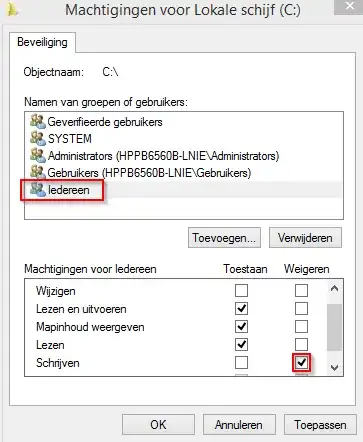
Everyoneand click Ok - Select the Everyone user
- Set a checkmark in the column
denyfor Write.
From this moment on, no one can change the drive anymore. If you want to make changes, Repeat the above steps and remove the checkbox for write in the deny column.
Although the screenshot is dutch, it is showing the endresult.

LPChip
- 59,229
- 10
- 98
- 140