0

I have a user who created a database using Access 2003.

The problem is, if he's opening the db and made some changes, the other user can open the db but they can't work on it. If he's exited the program, then the user can make some changes.

I would like to know if it's possible for them to work on it at the same time when they open the database?

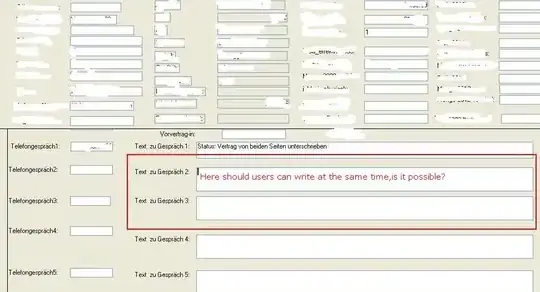
enter image description here

enter image description here


Additional question:

I tried to do the "Splitting of Database" here and after I clicked on Split I got an error: "The database engine couldn't lock the table, because it is already in use by another person or process"... what does that mean? Did I lock the table?


enter image description here

Gaff
  • 18,569
  • 15
  • 57
  • 68
tintincutes
  • 1,237
  • 10
  • 29
  • 49

2 Answers2

1

Are the users trying to make design changes or just add/edit/delete data? Access doesn't allow more than one user to modify the design of a single object at the same time. If they are jsut trying to edit data then there are a few possabilites.
1) The user has at some point opened the database for exclusive access. you need to get each user of the database to open the database by first opening access, the choosing file->open, browsing to the file, then click the arrow next to the open button and then click open (the top option on the list of 4 that should appear).
2) The form that the users are using may be set to lock the entire table instead of only the current record. If you open the form in design mode there is a property of the form that will tell you how big a lock it takes.

It should not be necessary to split the database into application and data to allow multiple users to edit data at the same time. It is normally a good idea to split the database though.

pipTheGeek
  • 1,257
  • 6
  • 6
0

Yes, you can, but typically how this is done is to split the mdb into parts. The tables reside in one .mdb in a shared folder somewhere & the queries, forms & reports live in a client-only version of the database. The client verison contains links to the tables in the 'back-end' database. Use File -> Get External Data -> Link... to connect to the back-end tables.

Each user has a local copy of the 'front-end', but they all share the common 'back-end'.

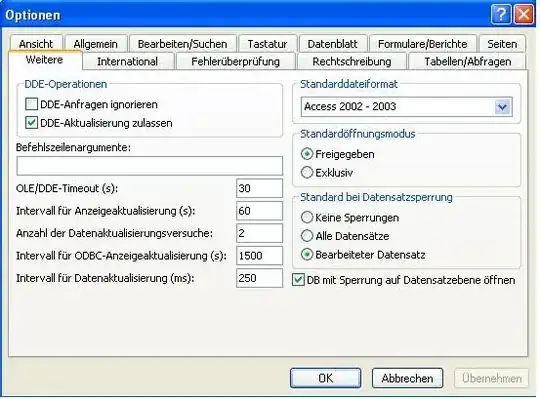
You could try the simplest thing: Tools -> Options -> Advanced -> Default Open Mode & check that it is set to Shared and that both Open databases using record-level locking and Edited record checked , but my experience just doing this in a multi-user environment is mixed. Sometimes works, sometimes not.

UPDATE

Taking a look at your image: if the form field in question maps to the same database record, then no, you can't have 2 people edit this at the same time. If the field maps to different records, then yes, it's possible.

Yet another update

If you have Access 2003 or similar there is a Database slpitter utility provided. Select Tools -> Database Utilities-> Database Splitter. It will ask for a location to save your files. You'll want this to be a shared drive. It should automatically make the linked tables for you and copy all your table data to a new 'back-end' database named whatever your db name is_be.mdb.
DaveParillo
  • 14,505
  • 1
  • 39
  • 46
  • @DaveParillo: do you mean, the user should have a "back-end database" what about if he doesn't have and he only have a plain ms access 2003? – tintincutes Dec 02 '09 at 16:06
  • @DaveParillo: i would like to ask the user if he has a back-end database, what is the correct terminology for that? Is this correct: What kind of "back-end database" are you using? thanks – tintincutes Dec 02 '09 at 16:07
  • The back-end is something you have to create. It involves splitting the existing database into 2 parts, 1 (back-end) only has the tables, 1 (front-end) has everything else. They are both access mdb files. You could ask "Do the tables in the database you're using link to an external datasource?" – DaveParillo Dec 02 '09 at 16:12
  • @DaveParillo: that is already check in this db. not sure what to do next? :-( – tintincutes Dec 02 '09 at 16:12
  • First step is to determine if Text zu Gesprach 3 maps to completely different records or not when you're having the editing conflict. If your users are trying to edit the same record at the same time, then no, you can't do that in Access. You're done :-( Otherwise you can proceed with splitting the database into parts. – DaveParillo Dec 02 '09 at 16:20
  • In the Default Open Mode, the "Default Record locking" defaults to "No locks". Change it to "Edited record" & see if that works for you. – DaveParillo Dec 02 '09 at 16:22
  • @DaveParillo: how can i determine if it maps to the same records?sorry for this but it's my first time to work with database. – tintincutes Dec 02 '09 at 16:28
  • @DaveParillo: please check the .jpg I attached again.The "Edited record" is it the 3rd one right? it's already checked and also the "Shared" in my case it says "Freigegeben" it's also checked... – tintincutes Dec 02 '09 at 16:30
  • Those settings *look* ok, but your english is **far** better than my german. babelfish gave me "worked on data record" which sounds correct. – DaveParillo Dec 02 '09 at 16:38
  • The only way to determine if they are the same record is to have an understanding of the form and table design. – DaveParillo Dec 02 '09 at 16:39
  • @DaveParillo: thanks. sorry i haven't had the chance to translate. how will i ask the user about this? can i ask like this: are the records map differently? – tintincutes Dec 02 '09 at 18:20
  • The user is the wrong person to ask. This is a database design question. – DaveParillo Dec 02 '09 at 19:32
  • @DaveParillo: i just read your updated answer. when you say form field question, do you mean this field texts like: Text zu Gespräch 2, Text zu Gespräch 3, etc? i'm sorry i don't understand, what is the meaning of "map" here. do you have an email? – tintincutes Dec 02 '09 at 19:32
  • @DaveParillo: that's true, but he designed the database by himself he told me. – tintincutes Dec 02 '09 at 19:33
  • re: what I mean when I say 'maps to a field'. Is the box *Text zu Gespräch 3* on the form displayed in your picture associated with a single field in one record of the database? Another way of describing this: A table is (mostly) just rows and columns - does the text in *Text zu Gespräch 3* correspond to the intersection of **1 row** and **1 column**? If the answer is no, then you have a problem. – DaveParillo Dec 03 '09 at 00:40
  • @DaveParillo: i checked it and it seems the box "Text zu Gespräch 3" on the form is associated with a single field. I attached again a jpg file to see what i mean. is that the one you mean? – tintincutes Dec 03 '09 at 09:34
  • Yes, so you should be able to split this database. Make a copy before you begin. You should work with the person who originally created the database if possible. – DaveParillo Dec 03 '09 at 14:35
  • @DaveParillo: you mean on his computer? – tintincutes Dec 03 '09 at 14:47
  • I don't understand this last question. You can do the work anywhere you have MS Access installed. The person who originally created the database probably understands it better & can help you split the db. – DaveParillo Dec 03 '09 at 19:49
  • @DaveParillo: sorry about that, you mentioned that I have to work together with the user, so am wondering if I have to do it on his PC the splitting of database or so... – tintincutes Dec 14 '09 at 16:02
  • No. You do the work anywhere. I thought you might need their help understanding the db. – DaveParillo Dec 15 '09 at 14:16
