0

The main reason I installed Gmail Notifier was so I could use Gmail to send messages when I click on a "mailto" link in my browser. I've installed the software and made sure the options are set correctly, but this feature simply doesn't work.

I still get the same ol' Outlook "New Mail Message" window when I click a "mailto" link.

Any suggestions on how to get this to work? I'm using Windows XP SP3, and my default browser is Firefox 3.5.5 (I do have IE8 installed).

Note: this is not a duplicate of FireFox Gmail Notifier Plugin? because my problem is only with the "mailto" feature.

devuxer
  • 3,951
  • 6
  • 31
  • 33

3 Answers3

2

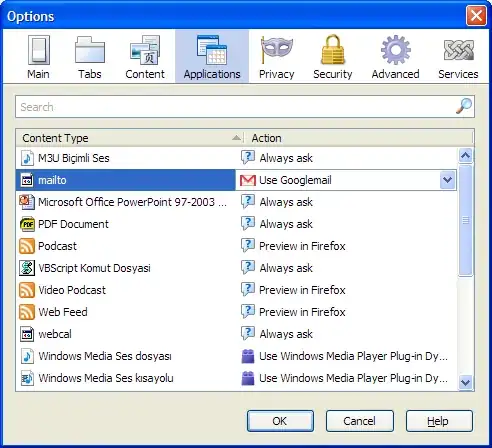
To do that in Firefox, you don't need to use addons or plugins. Just go to Firefox Tools -> Options and in the Applications tab, select "Use GoogleMail" as your default mailto action.

alt text

Gaff
  • 18,569
  • 15
  • 57
  • 68
Mehper C. Palavuzlar
  • 55,164
  • 49
  • 193
  • 250
1

Google Toolbar provides the mailto: redirection. Try that first!

More info here.

Saxtus
  • 1,443
  • 2
  • 16
  • 24
  • +1 thank you! You've solved several of my problems with this answer. I was using Googlebar Lite and a separate AutoFill extension, because, when I first switched from IE to FF a few versions ago, there was no FF version of Googlebar. Anyway, this is great. – devuxer Dec 03 '09 at 01:17
  • I am new here, it is the first accepted answer I got in this community, I am glad that I was helpful. Take care! – Saxtus Dec 03 '09 at 01:21
0

One of the best ways to integrate webmail into the entire system, including the browser, is by installing Affixa. You'll even be able to email your MS Office documents to anyone without having Outlook or another mail client installed on your machine! Give it a try, it's free :)

  • Besides that this program might not be the answer the OP asked for, it does what he wants and is definitely not spam, perhaps just poorly worded. – Ivo Flipse Feb 25 '10 at 07:16