21

There appear to be a thousand articles on how to view gmail calendars in outlook365, but I cannot seem to find any on doing the other way around.

I want to see an outlook365 calendar (my workplace) overlaid or imported, or whatever on my gmail calendar.

Maxcot
  • 333
  • 1
  • 4
  • 9
  • 1
    should be migrated to [WebApps.SE](http://webapps.stackexchange.com/) – chharvey Jul 21 '15 at 18:34
  • 1
    In the office365 web application, choose "Share". Then share with a private email address. You'll receive a webcal link that you can "Add by URL" in Google Calendar. – neu242 Jan 21 '16 at 12:17

3 Answers3

9

I believe the below will work for you. I'm currently using Outlook 2013 but the steps are backward compatible with Outlook 2010 as well.

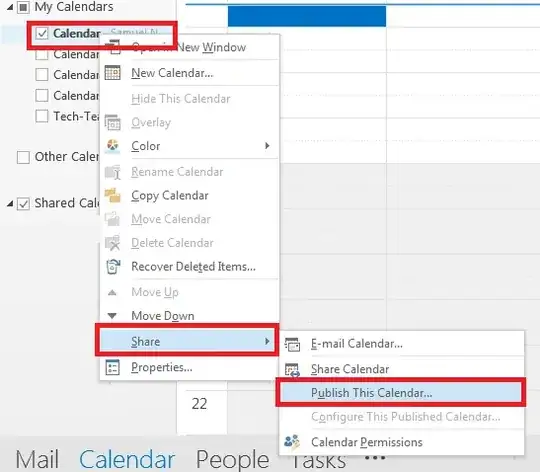
  1. From your Outlook, right click on your O365 calendar and select "Share" -> "Publish Calendar".

enter image description here

  1. Sign in to OWA using your standard Office 365 credentials.
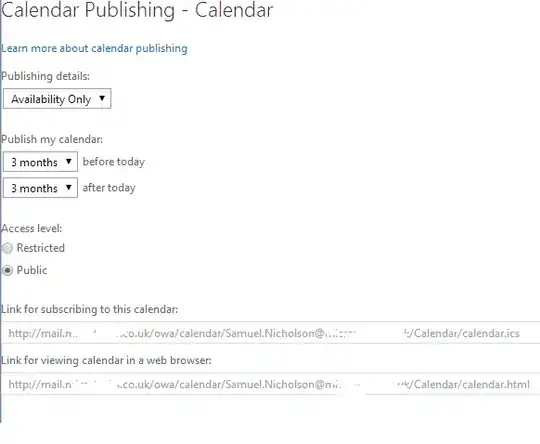
  2. Configure your options to your preference (I've chosen availability only but you can grant more permissions or change the date range to your requirements.)

enter image description here

  1. Copy the subscribe link and open your Gmail calendar.
  2. Click the "Other Calendars" drop down arrow and select "Add by URL".
  3. Paste in the URL from step 4 and voila, your calendar should now be visible.

enter image description here

Samuel Nicholson
  • 1,524
  • 2
  • 13
  • 26
  • 2
    does not work anymore, imported calendar shows no events – bgs Sep 23 '14 at 20:30
  • 1
    I get an error going from the Outlook 365 http address into Gmail. The big guys don't want to play nice! :) Google tells "Cannot fetch URL." – alphadogg Sep 28 '14 at 17:16
  • 1
    I use Outlook on Mac which doesn't have the 'publish' option for calendars (that I could find) but logging on to the O365 web app and sharing the calendar through email from there will get you an .ics URL that you can import in Google calendar as well. – mvexel Oct 10 '14 at 17:05
  • "Send" is greyed out when I try to follow @mvexel instructions.... – GreenAsJade May 21 '15 at 04:23
  • @mvexel, by importing a .ics URL, does it automatically update? like if you change an event in Outlook (after importing) will it sync to Google? – chharvey Jul 21 '15 at 18:59
  • @Samuel Nicholson — This answer needs to be updated. With Outlook 2013 (for Windows) the old "Publish This Calendar…" option becomes "**Publish to WebDAV Server…**" and you must supply your own URL, which sucks if you do not have a server on which you can host your own calendars. – chharvey Jul 21 '15 at 19:03
  • Creating a public ics as described above didn't work for me with Office 365, but using "share calendar" and sending myself an invitation to my gmail address provided a useable ics url. – Drealmer Sep 05 '15 at 10:40
  • I just did it. but after sharing it in OWA (O365) I needed to wait a few minutes before either ICS or HTTP view worked. – Tilo Nov 12 '15 at 23:08
  • 1
    The ICS link worked for me today (June 2016), but I had to use web version of Outlook to get the ICS link via in Options > Calendar > Publish calendar. The desktop version of Outlook error'd when following the exact steps above. – pettys Jun 12 '16 at 22:06
  • This is the best answer, but it only works if you change http to https as mentioned in the answer by @simon-t – eugenevd Aug 22 '16 at 15:06
6

rather than using url shortening (which becomes a public link), I found that replacing http: with https: in the link also works (it seems that the http link gets a redirect on microsoft side to https which Google calendar cannot follow).

Simon T
  • 69
  • 1
  • 2
4

As noted in this answer , there seems to be a restriction on the length of the URL. Using shorteners fixed it for me.

iKarampa
  • 548
  • 2
  • 7
  • 18
  • I've been struggling with this for a few hours. Thanks for this answer. I used tinyurl to shorten the URL and it worked! – Sun Dec 09 '14 at 23:33