After installing Windows 8.1 Embedded Industry Pro, and ELM, no lockdown options are listed under the local device (IDEAL-TEST):
How can I access the lockdown options?
After installing Windows 8.1 Embedded Industry Pro, and ELM, no lockdown options are listed under the local device (IDEAL-TEST):
How can I access the lockdown options?

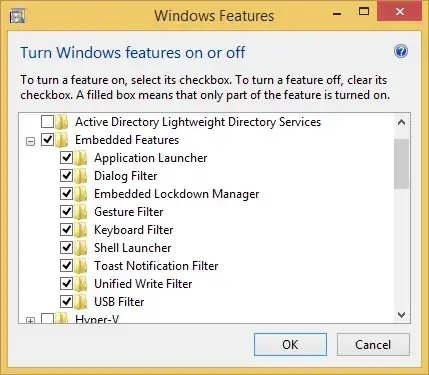
First press Start, then type features, and select Turn Windows features on or off.
From there, check the Embedded Features box, and make sure to expand it and check each child item (this won't happen automatically by checking Embedded Features):
After a reboot, ELM will show the lockdown options: