0

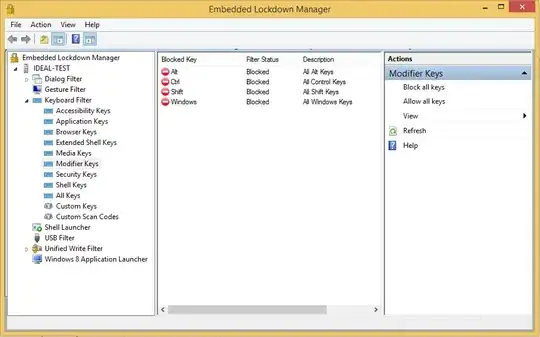
Using ELM you can disable modifier keys (such as Win, Alt, etc), but this seems to affect all users, including me.

Is there a way to allow logged-in admins to bypass lockdown features?
Danny Beckett
  • 1,375
  • 6
  • 23
  • 38
  • By reading the documentation it says you can modify these settings with a Powershell script. So the simplest solution is to run the script as an `Administrator` user. – Ramhound Jul 19 '14 at 00:03
  • @Ramhound I believe ELM is a GUI for those PS scripts. – Danny Beckett Jul 19 '14 at 00:29
  • Even if thats the case. They would need to be enabled then disabled as an Administrator. I can't say one way or another without more knowledge on the PS scripts in question. – Ramhound Jul 19 '14 at 00:45
  • I know an admin has to enable/disable them (I don't understand what point you're making?). I'm trying to enable them for standard users, and disable them for admins. – Danny Beckett Jul 19 '14 at 01:46
  • **Your question ask how can you allow admins to bypass it** The answer to that question is write a PS to change allow the keys. You could make it a login and logout event even – Ramhound Jul 19 '14 at 03:28
  • Ah, I see where you're headed with that now @Ramhound! There is actually an option to *Export to Powershell* in the Action menu. Perhaps you'd like to write an answer? :) – Danny Beckett Jul 19 '14 at 03:52
  • I don't have the tool. A proper answer should have the script to enable and disable it. – Ramhound Jul 19 '14 at 03:57
  • I'll post it tomorrow tonight, thanks for pointing me in the right direction @Ramhound – Danny Beckett Jul 19 '14 at 04:04

1 Answers1

0

You can disable the Keyboard Filter for Administrators.

For Windows Embedded 8.1 Industry, from a PowerShell window or script run:

Set-DisableKeyboardFilterForAdministrators $true

For Windows Embedded Standard 8, it is a little more complicated because it needs to be disabled via WMI. Microsoft does have a full script available here, but in essence you run:

    $Setting =$Entry = Get-WMIObject -class WEKF_Settings @{"namespace"="root\standardcimv2\embedded"} |
        where {
            $_.Name -eq "DisableKeyboardFilterForAdministrators"
        }
$setting.Value = "true"
$setting.Put() | Out-Null

You can also change the setting in your answer file as well.

Grumbles
  • 151
  • 7