23

Is there any software that can capture the screen and turn it into a webcam-type input so that you can easily record and/or broadcast your screen with regular video software?

Edit:

Just to be clear, I'd like to be able to use it live as an input to video conferencing software as well as for making recordings with video editing software. Bonus points if it allows me to capture a screen remote from the computer that is sending the video (for example by connecting to another computer with VNC).

So it should show up as an input alongside any webcams I have installed, but instead of being a camera, it should be whatever is on the screen.

Edit 2:

Skype's screen sharing feature is exacly what I want, but it only works with Skype. I'd like to be able to do it with anything that uses a webcam - Google Talk, UStream etc.

rjmunro
  • 1,346
  • 3
  • 14
  • 28
  • You wish to make a screenshot(screenvideo) ? And then turn that into some kind of webcam format ? – Rook Dec 03 '09 at 21:47
  • I want to be able to select "screenshot" as one of my video inputs so that the person on the other end of a call on skype or UStream or whatever can see my screen but not interact with it. – rjmunro Dec 08 '09 at 18:03
  • Clearly the mods who closed this are too conservative, – Minimus Heximus Nov 05 '21 at 09:42
  • I originally posted this question 12 years ago. Since then, most video sharing or broadcasting solutions support screen sharing natively, but for complex cases the answer I'd use now is OBS's Virtual Camera combined with its screen sharing capability. – rjmunro Nov 05 '21 at 10:10

6 Answers6

12

here's mine: https://github.com/rdp/screen-capture-recorder-to-video-windows-free it's free and open source

rogerdpack
  • 2,146
  • 7
  • 32
  • 49
  • Does this work with random programs expecting a camera, like Skype, Google Talk, or ChatRoulette (Flash) or only with specialist multi-purpose video processing tools like VLC or VirtualDub? The fact that the web page only mentions VLC as an example an example makes me think the latter. – rjmunro Nov 01 '11 at 16:17
  • 1
    it should work with "whatever can read from a Camera" -- for instance I've had it work with Skype before. Currently it doesn't allow for any "zooming" or "magnification" but I could add it if desired – rogerdpack Nov 01 '11 at 18:39
  • 1
    Please can you make a package so that its available to test by downloading one file setup.exe in Windows 8.1 pro, windows 10? we can test it and keep reporting. Its very difficult to install Gstreamer and all other dependencies on Windows. Can you please make a road map? – YumYumYum Apr 14 '16 at 09:28
  • @YumYumYum it has an install package that comes with a rudimentary GUI tester that uses ffmpeg underneath (so you can use that ffmpeg.exe). I almost never use it with gstreamer (mostly FFmpeg). Cheers! – rogerdpack Apr 14 '16 at 15:45
  • Requires Java :D No thank you! – Blackfighter Sep 17 '21 at 10:52
  • @Blackfighter Should I package java with it? LOL – rogerdpack Sep 17 '21 at 21:22
  • @rogerdpack In all seriousness, an option to run it easily with Portable Java would be nice. I've seen apps asking for javaw.exe through OpenFileDialog, which I like. – Blackfighter Sep 18 '21 at 04:34
3

VH Screen capture was exactly what I wanted. It comes in a bundle with VH Media studio which lets you mix multiple Webcams, with Picture in picture and fade effects, which was great for what I was trying to do.

Denilson Sá Maia
  • 12,863
  • 12
  • 40
  • 44
rjmunro
  • 1,346
  • 3
  • 14
  • 28
1

This appears to be another one:

Medialooks Screen Capture DirectShow Filter

rjmunro
  • 1,346
  • 3
  • 14
  • 28
0

Well. I know FFsplit has a webcam output and works really well. I've been using that for ages, it cannot be started over command line. It can also stream to the major streaming sites and output to video. It supports picture in picture with multiple layers of regions, monitors or windows themselves.

DavidPostill
  • 153,128
  • 77
  • 353
  • 394
user181782
  • 11
  • 1
0

Unreal Media Server has an optional add on called Screen Capture DirectShow source filter (half way down the page)

I haven't tested it.

rjmunro
  • 1,346
  • 3
  • 14
  • 28
-7

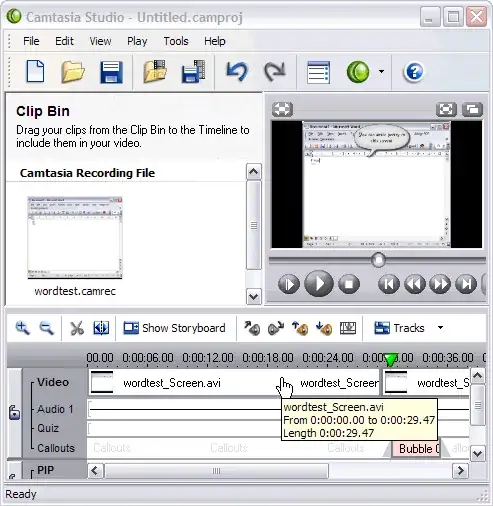
CamStudio is able to record all screen and audio activity on your computer and create industry-standard AVI video files and using its built-in SWF Producer can turn those AVIs into lean, mean, bandwidth-friendly Streaming Flash videos (SWFs)

alt text

CamStudio is free open source software.

Gaff
  • 18,569
  • 15
  • 57
  • 68
  • This was my first thought too, but then I thought maybe he's trying to describe either: allowing someone else to view his screen, or wants to record someone else's screen actions (with their consent, hopefully.) – JMD Dec 03 '09 at 21:52