1

I'm not certain if this is the place where I should ask this question. I've tried everything to remove this virus namely "This ad is provided by SupraSavings" but nothing works. I have Norton and I scanned everything and still getting this annoying ad. I've checked all applications but nothing suspicious. I've checked the extensions of all my browsers (Safari, Chrome, Explorer) and reset them. I'm still getting this ad. It's like a curse. Any suggestions.


Edit: I have solved the problem in my own way and documented it to be a solution for this damn problem. This is my I did

1- Start Task Manager.

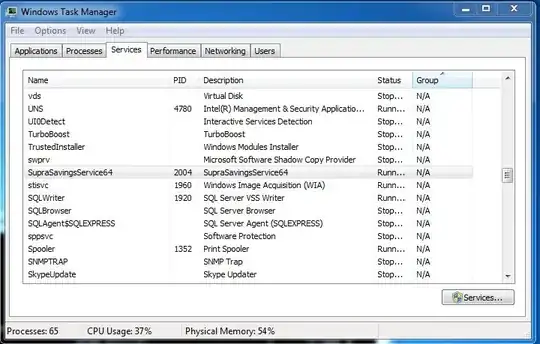
2- Go to Services Tab

3- Search for SupraSavingsService64 and get its PID

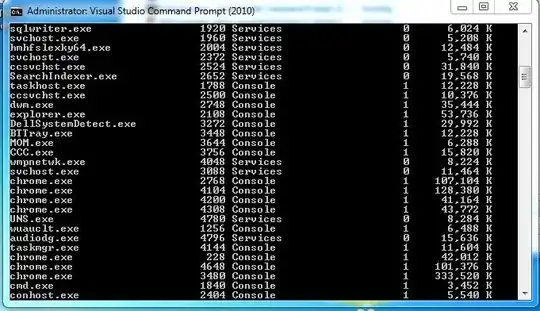
4- Open Command Prompt as an administrator and type tasklist.

5- Search for the PID of SupraSavingsService64.

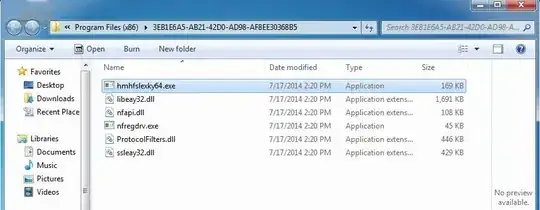
6- You will find the name of the executable file for PID is not SupraSavingsService64.exe but it has another name. (Damn it) in my case it was hmhfslexky64.exe.

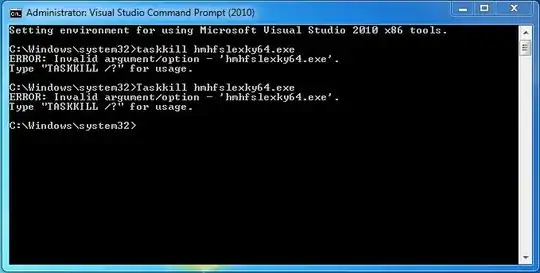
7- Kill the this executable file by its PID not its name. Type taskkill /PID 1972 /F. (Note: if you try to kill it by its name won't work.)

8- Now, search for hmhfslexky64.exe in your PC and remove the entire folder.

These are some pictures
enter image description here

enter image description here

enter image description here

enter image description here

enter image description here

enter image description here

CroCo
  • 161
  • 2
  • 12
  • I've had this happen before and I used [this article](http://malwaretips.com/blogs/ads-by-supra-savings-virus/) to help me clear it out of my system. It's at least worth a read. – An Dorfer Jul 29 '14 at 15:30
  • @AnDorfer, I've tried it and it didn't work. I'm still getting this damn ad. – CroCo Jul 29 '14 at 15:40
  • In case you didn't already, try scanning your system using [AdwCleaner](http://www.bleepingcomputer.com/download/adwcleaner/). – and31415 Jul 29 '14 at 15:51
  • I've bought Norton why do I need to install this tool? – CroCo Jul 29 '14 at 15:53
  • 1
    possible duplicate of [How do I get rid of malicious spyware, malware, viruses or rootkits from my PC?](http://superuser.com/questions/100360/how-do-i-get-rid-of-malicious-spyware-malware-viruses-or-rootkits-from-my-pc) – Ƭᴇcʜιᴇ007 Jul 29 '14 at 16:46
  • @Techie007, how this possible duplicate? I'm talking about certain problem here. – CroCo Jul 29 '14 at 16:56

2 Answers2

1

There is a nice, free-to-use application called ADW Cleaner. It will scan your system and report what it found, then allow you to pick what to leave and what to get rid of. Here's the link. Download link is right above the big SEARCH and DELETION buttons, hard to spot. This app saved me many times, I recommend it.

Kitet
  • 2,047
  • 1
  • 19
  • 23
0

Here is what I do to spamware from a computer.

  1. Press Win + R to open run then run msconfig. From there you can click on the 'Startup' tab and uncheck things that you don't know. It might be in there. If you find something maybe open regedit and search for something with the same name and delete it.

  2. Open the hidden folder C:Users\<your username>\AppData. Delete most everything in \local\temp and if a file looks funny maybe delete that too.

  3. Just download a program called MalwareBytes. Norton is good for viruses, but you don't have a a virus you have malware\spyware\spam. Just run it and it will do what I told you to do above, but usually better and with no risk of messing up your computer.

Notes:

  • In msconfig you can turn of things like your mouse or network driver, so be careful
  • regedit is the registry editor, if you delete things it can make things break. Most people recommend backing it up before deleting things, just in case.
  • Your AppData folder is most program preferences, so if you delete too much programs might break too.
mvndaai
  • 521
  • 4
  • 7