6

My home network is frequently down and I've narrowed down the problem to my ubuntu box.

$ ps -ef | grep elastic
elastic+ 11183     1  0  8월10 ?      00:07:49 [.ECC6DFE919A382]
eugenek+ 14482 14453  0 22:08 pts/19   00:00:00 grep elastic
elastic+ 20208     1  0  8월07 ?      00:01:35 [.......]
elastic+ 24398     1  0  8월08 ?      00:01:20 [SSHD]
elastic+ 24745     1  4 10:44 ?        00:27:29 /tmp/.Udelo
elastic+ 27895     1  0  8월09 ?      00:00:47 [.......]
elastic+ 28652     1  0  8월09 ?      00:00:46 [.......]
elastic+ 31127     1  0  8월09 ?      00:00:41 [.......]
elastic+ 31223     1  0  8월07 ?      00:01:34 [.......]
elastic+ 31460     1  0 19:23 ?        00:00:02 [freeBSD]

elastic+ is elasticsearch user which is created when I set up the elasticsearch server.

Does it look strange? or are they regular processes run by elasticsearch?

EDIT

I also found this.. So it looks severe than what kmac originally suggested?

116.10.191.177 is not someone I know, it's from China..
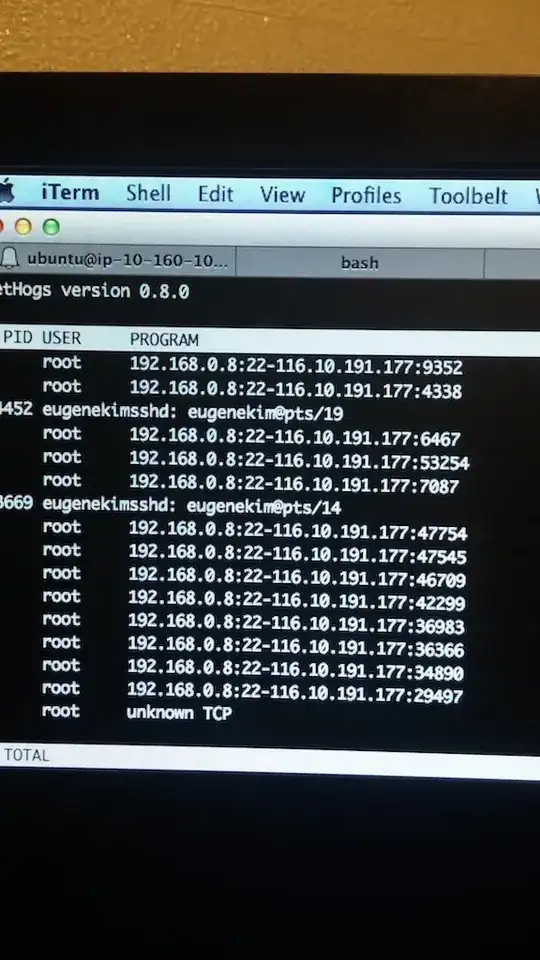
enter image description here

eugene
  • 317
  • 3
  • 13
  • Please take a closer look at the presumed `SSHD` process, via `/proc/24398`. Areas of interest are: The `exe` symlink’s target; `cmdline` arguments; process `environ`ment. These files contain null-separated values. Piping them through `xargs -0 -L1 echo` provides better output. – Daniel B Aug 11 '14 at 14:52
  • I was too alarmed, and killed them all and unplugged it from the network before I try what you suggested.. – eugene Aug 12 '14 at 02:13

2 Answers2

8

This is most likely malware using an exploit in elastic search or java.

I have run in to the same issue where my tomcat7 user gets compromised and there are the same processes running that you have.

There should be the following files (or similar) in your /tmp folder owned by elastic+

.ECC6DFE919A382BADRR1A8CDFC9FB43AA0
zzt.pl

and possibly

mysql1

Once compromised the machine will be used for DDOS attacks, usually over UDP port 80.

To clean up, kill the offending processes, and delete all of the offending files in /tmp. This will speed up your machine for the time being, but whatever vulnerability is being exploited can still be used to gain access to you machine again. Digging in to this a little more it looks like a fix for elasticsearch can add script.disable_dynamic: true to elasticsearch.yml. Still no fix for tomcat however...

Make sure the elastic+ user doesn't have root access or any elevated privileges as they could use those to exploit your box even more.

This exploit popped up in late July and I was only able to find information on Chinese forums. Using google translate I got some good info, but still no solution.

Here is the link with some information, they now mention elastic search as well as tomcat: http://my.oschina.net/abcfy2/blog/292159

UPDATE

For the tomcat exploit, I have found out that the exploit being used may be a struts2 vulnerability. I would recommend updating to the latest version of struts2.

kmac
  • 441
  • 2
  • 5
  • 1
    Thanks for the input, I added a picture to the question, can you take a look please? – eugene Aug 12 '14 at 01:56
  • 1
    I'd honestly seriously consider rebuilding the system. – Journeyman Geek Aug 12 '14 at 02:17
  • 1
    @eugene smart call unplugging it. It couldn't hurt to rebuild the machine. Next time be sure to include `script.disable_dynamic: true` in elasticsearch.yml as that should help, however at this time no one is sure how they are exploiting elasticsearch and tomcat. The one thing they have in common is Java, so that could be it. I have scripts on all of my webservers running to alert me in case of a subsequent attack, I'll be better able to comb through the logs and try to figure out more then. – kmac Aug 12 '14 at 10:58
1

I'm on version 0.90.10 and don't have SSHD running user elastic+.

~$ ps -ef | grep elastic
nonroot    1647  1627  0 10:24 pts/0    00:00:00 grep --color=auto elastic
elastic+  5322     1  1 May09 ?        1-02:38:50 /usr/lib/jvm/java-7-openjdk-amd64//bin/java -Xms256m -Xmx1g -Xss256k -Djava.awt.headless=true -XX:+UseParNewGC -XX:+UseConcMarkSweepGC -XX:CMSInitiatingOccupancyFraction=75 -XX:+UseCMSInitiatingOccupancyOnly -XX:+HeapDumpOnOutOfMemoryError -Delasticsearch -Des.pidfile=/var/run/elasticsearch.pid -Des.path.home=/usr/share/elasticsearch -cp :/usr/share/elasticsearch/lib/elasticsearch-0.90.10.jar:/usr/share/elasticsearch/lib/*:/usr/share/elasticsearch/lib/sigar/* -Des.default.config=/etc/elasticsearch/elasticsearch.yml -Des.default.path.home=/usr/share/elasticsearch -Des.default.path.logs=/var/log/elasticsearch -Des.default.path.data=/var/lib/elasticsearch -Des.default.path.work=/tmp/elasticsearch -Des.default.path.conf=/etc/elasticsearch org.elasticsearch.bootstrap.ElasticSearch
Daniel Agans
  • 183
  • 5