I want to replace the second audio stream (0:2) in a video file that has two audio streams and give it a label if possible. How would I go about this? All the ffmpeg commands I found won't let me keep the second audio stream.
Asked
Active
Viewed 2.6k times


1 Answers
28
Use the -map option to choose your streams. Default stream selection will only choose one of each stream type, so that is why -map has to be used.
Replace second audio stream
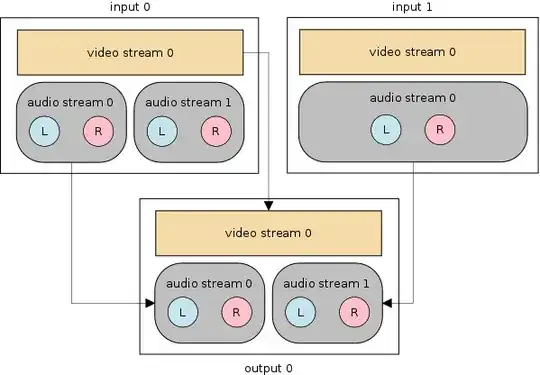
ffmpeg -i video.mkv -i audio.mp3 -map 0:v -map 0:a:0 -map 1:a \
-metadata:s:a:0 language=eng -metadata:s:a:1 language=sme -codec copy \
-shortest output.mkv
0:v– The0refers to the first input which isvideo.mkv. Thevmeans "select video stream type".0:a:0– The0refers to the first input which isvideo.mkv. Theameans "select audio stream type". The last0refers to the first audio stream from this input. If only0:ais used, then all video streams would be mapped.1:a– The1refers to the second input which isaudio.mp3. Theameans "select audio stream type".-codec copywill stream copy (re-mux) instead of encode. If you need a specific audio codec, you should specify-c:v copy(to keep the video) and then, for example,-c:a libmp3lameto re-encode the audio stream to MP3.-shortestwill end the output when the shortest input ends.
Combine two audio streams into one
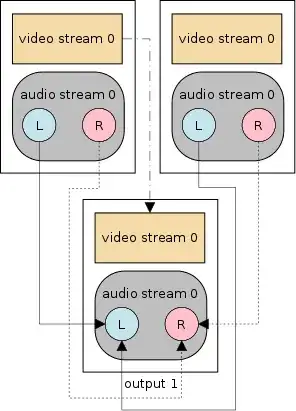
ffmpeg -i vid.mkv -i aud.mp3 -filter_complex "[0:a][1:a]amerge=inputs=2[a]" \
-map 0:v -map "[a]" -c:v copy -c:a aac -strict experimental -b:a 192k -ac 2 \
-shortest out.mp4
- Filtering requires re-encoding, and the
amergefilter is used here, so the audio can not be stream copied in this example.

llogan
- 57,139
- 15
- 118
- 145
-
didn't work for me at all. – Dec 08 '14 at 03:24
-
1@omouse "didn't work" is hard to provide help for. You should use a pastebin link to show your command and the complete console output. – llogan Dec 08 '14 at 03:41
-
My issue is the `-codec copy`, but I fixed that (different version of ffmpeg), the other issue I had was with with the `-map`, it complained about the wrong number of streams. – Dec 08 '14 at 14:15
-
1I just used `-map 0:v -map 1:a`. I assume this means to take the video from the first file (video.mkv) and then take the audio from the second file (audio.mp4) to create output.mkv ... Not sure what the `-map 0:a:0` is for. I excluded it and I get the results I wanted. – Sun Dec 26 '14 at 17:51
-
@sunk818 Same here. Didn’t work with `-map 0:a:0`, so I removed it and the result was fine. – aaronk6 Feb 25 '15 at 16:44
-
2@aaronk6 The original question requested a way to map **multiple audio streams** to the output. The example takes the first audio stream from the first input, and the audio stream(s) from the second input and maps them to the output. It appears some are assuming that the example makes an output with a **single audio stream** and are then confused. – llogan Feb 25 '15 at 16:57
-
@aaronk6 Added an example to combine two input stereo audio streams into one output stereo stream. – llogan Feb 25 '15 at 23:29