2

I selected the option to create a recovery drive in Windows and then deleted the recovery partition using the option provided (see screenshot). Now I want to restore the partition exactly as it was before so it is automatically used if I want to Refresh or Reset. How can I do this?
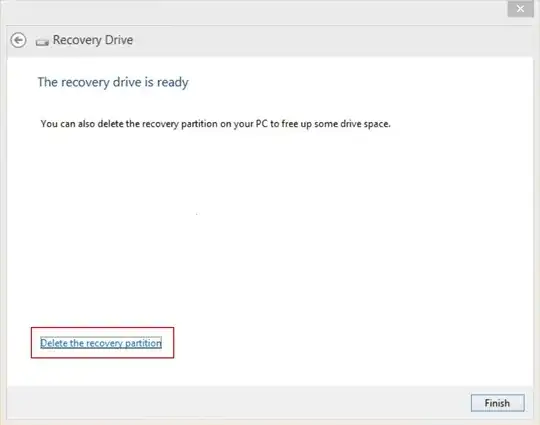
Deleting recovery partition in Windows 8.1

Kamil Maciorowski
  • 69,815
  • 22
  • 136
  • 202
user361527
  • 31
  • 1
  • 1
  • 2
  • If you went through deleting the partition the data that was on it is gone and you can't recover it; at least to the best of my knowledge? – Abraxas Aug 25 '14 at 20:02
  • @Abraxas - The recovery partition data is now on the recovery drive I created. Please see the screenshot above (I can't add inline images yet). – user361527 Aug 25 '14 at 20:09
  • @Ramhound - Oh? But then how come I can use the recovery drive to Refresh and Reset? What is on the drive? And whatever it is, can't it be restored? – user361527 Aug 25 '14 at 20:10
  • Great, -1 score already? Did not expect such a hostile response. What is wrong with my question will someone have the basic courtesy to say? – user361527 Aug 25 '14 at 20:12
  • I don't think you can "restore" a deleted partition, but I do think you can use a recovery drive to create a partition. https://www.youtube.com/watch?v=D8VSOiMlTno I've never done it though. – jAce Aug 25 '14 at 20:24
  • A single downvote isn't a negative response.... – Ramhound Aug 25 '14 at 21:10
  • @Ramhound - I'm new here but a negative score immediately wasn't nice to see without even a cursory explanation. If I left something out I am glad to edit it in. – user361527 Aug 26 '14 at 00:54
  • @jAce - That video was quite helpful. Didn't get one thing though - at the end they said they'd create a recovery partition if one didn't exist, but using RecImg they only seemed to create an image file in a folder? Where was the partition created? – user361527 Aug 26 '14 at 01:02

1 Answers1

1

Taken from this Microsoft TechNet blog article.

  1. Download the Windows 8.1 Enterprise evaluation kit ( if you don’t have installation media ) Note: Be sure to download the version of the evaluation kit ( 32-bit vs 64-bit ) that matches your Windows 8.1 operating system installation. If you are unsure which version you’ve installed, you can do a quick check using the Control Panel | System tool.

  2. After downloading the ISO image above, double-click on the ISO image to mount it as a new temporary drive letter.

  3. Use File Explorer to browse the folder structure of the newly mounted ISO image. Double-click on the Sources folder in the root of the mounted volume to browse the contents of that folder.

  4. Inside the Sources folder, locate the INSTALL.WIM file. Right-click on this file and select Copy from the pop-up menu.

  5. Use File Explorer to navigate to the C: drive on your PC. Create a new folder inside the root folder of your C: drive named C:\Win81-Recovery.

  6. Use File Explorer to navigate into the new C:\Win81-Recovery folder. Right-click inside the folder window and select Paste from the pop-up menu to copy the INSTALL.WIM file from the mounted ISO image to this new folder location.

  7. Right-click on the Start button tip and select Command Prompt (Admin) to open a new elevated Command Prompt window.

  8. Inside the Command Prompt window, run the following command line to register the copied INSTALL.WIM file as the Recovery Image on your PC: REAGENTC /SetOSImage /Path C:\Win81-Recovery\INSTALL.WIM /Index 1

  9. If the command-line above completed successfully, you should now see a registered location for the Recovery Image on your PC: REAGENTC /Info

Jason
  • 7,635
  • 4
  • 27
  • 43
  • That's great! Few questions though - a) So I need the Install.wim from the Windows DVD? No way I can use the files from the already created recovery drive? b) The Install.wim for Windows 8.1, 8.1 Pro and 8.1 Enterprise are the same? (The first step says if you don't have the DVD then just use the Enterprise evaluation version.) c) Instead of creating a folder in C:\, can I recreate the separate recovery partition I had? d) How can this be done with Windows RT since there's no DVD available for it? – user361527 Aug 26 '14 at 01:20
  • @user361527 - **Your recovery drive is an .WIM image.** You should follow these instructions. – Ramhound Aug 26 '14 at 02:33
  • @Ramhound - So I can take the recovery drive's WIM image and use it in place of Install.wim mentioned above? That's awesome provided it works. – user361527 Aug 26 '14 at 06:23