How often does the DNS cache clear on a Windows 7 machine?
Asked
Active
Viewed 1.4e+01k times


3 Answers
39
The DNS cache doesn't ever flush, unless you explicitly tell it to or you make a DNS/networking related configuration change. DNS records have a Time To Live (TTL) value associated with them which tells a DNS cache how long the particular record is good for. Records in the cache are kept for their TTL, then re-queried.
On a Windows machine you can see a list of all the records in your cache along with their TTL by executing the following command at the command prompt:
ipconfig /displaydns
You can force a flush of all cached DNS records using the following command:
ipconfig /flushdns
For more info:

heavyd
- 62,847
- 18
- 155
- 177
-
1What kind of things constitute a "networking change"? A new IP address, joining a different wifi network? or manually flushing the cache / setting DNS – cutrightjm Feb 27 '15 at 01:01
-
2According to the other answers (and common sense), it appears like there is indeed a maximum lifetime for cached DNS entries in Windows. Consider the opposite: It would then be trivial for websites to perform a denial-of-service attack against visitors by triggering a huge number of DNS queries over time, until Windows runs out of HDD/RAM/CPU because of the ever-increasing cache size. So this answer seems wrong. – Zero3 Mar 19 '17 at 01:07
-
@Zero3 That can be explained via a per-entry TTL (which may have a maximum value such that no entry is held over this time; the answer does not claim that there cannot be a maximum TTL). Thus the answer *can* be true, in it's assertion that there is no *"[entire] cache flush"*, while still explaining the counter-argument behavior because entries are "flushed" (expired) individually by their own TTL entries .. granted, a little bit of wording cleanup might help. – user2864740 Jun 14 '18 at 22:53
12
From what I've been able to find, Windows 7 does not set a parameter for dnscache MaxCacheEntryTtlLimit.
The default value for MaxCacheEntryTtlLimit is DWORD = 0x15180 = 86400 seconds = 1 day
- if DNS zone TTL < MaxCacheEntryTtlLimit, then DNS TTL is used
- if DNS zone TTL > MaxCacheEntryTtlLimit, then MaxCacheEntryTtlLimit is used

Darren Hall
- 7,568
- 2
- 28
- 23
8
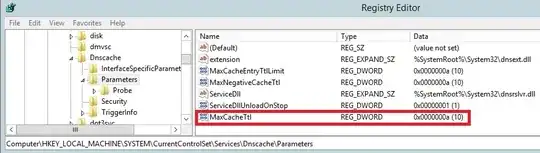
According to: Reduce DNS Client Cache in Windows Server 2012 R2
Instead of MaxCacheEntryTtlLimit you should modify maxcacheTTL. It works for Windows 8 too.
Description
Determines how long the Domain Name System (DNS) server can save a record of a recursive name query.
If the value of this entry is 0x0, the DNS server does not save any records.


-
Thanks! Exactly what I was looking for. One more thing to add from that blog post run ```net stop dnscache & net start dnscache``` to make setting take without rebooting. – Lucas Jul 11 '14 at 09:50
-
1For what it looks like, maxcacheTTL is for the "DNS server" component of Windows Server, not for the DNS Cache. – Jeroen Landheer Aug 07 '15 at 07:44