Each time I create a new file in Notepad2, the encoding is ANSI (1252).
I'd like instead to have UTF-8 as default. Is there a way to get this ?
Asked
Active
Viewed 2,072 times

3 Answers
7
File → Encoding → Default... → UTF-8
If the change doesn't stick when you restart Notepad2 change the default again and then try :
Settings -> Save Settings Now
This is using Notepad2 v4.2.25


u1686_grawity
- 426,297
- 64
- 894
- 966
-
no encoding option in file menu – metal gear solid Dec 09 '09 at 12:36
-
1I have it in Notepad2 4.0.23, and it's been there since version 2.x. – u1686_grawity Dec 09 '09 at 13:00
-
Me too in 4.2.25 – Josem Dec 23 '18 at 19:31
-
If you receive a permission error when saving settings (e.g. if you installed Notepad2 in place of Notepad.exe) then you need to run it as Administrator before performing these steps. – Chiara Coetzee Jun 07 '22 at 16:01
-
1In `Notepad2.ini`, this corresponds to setting `DefaultEncoding=3`. (Value 3 instead of 0.) – Henke Mar 08 '23 at 11:33
1
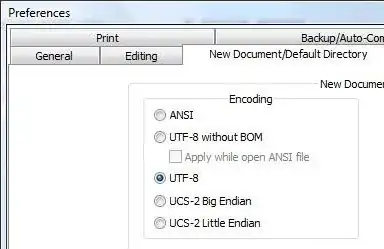
File -> Settings -> Preferences -> New Document, check UTF-8.


-
wrong!! for notepad++ you should NOT use `UTF-8 with signature` (BOM) **ever!** this is a mistake that could corrupt your source files (if you are a developer / programmer) and showing "weird icons" in your web-pages, and "you won't know why!" (because most of us won't turn on the "show all symbols"). for notepad2 it is "upside-down" there you should select `"UTF-8"` and not `UTF-8 with signature`!!!! – Dec 31 '15 at 17:00
-
@EladKarako: Who says this is for Web use (in any case, no problem for IIS and most web servers on Windows)? In the Windows world, a BOM can be extremely useful for suitable applications to better understand the file contents. – harrymc Dec 31 '15 at 18:43
0
Run notepad2.exe with a parameter. Example in command prompt or other program:
Notepad2.exe /utf8 MyAnsiiFile.txt
This opens and loads an ASCII file and converts it to a UTF-8 file. Then, you need only to close Notepad2 and save.
notepad2 version 4.2.25

Excellll
- 12,627
- 11
- 51
- 78
