70

in my keyboard the command key is mapped to the windows key (I'm using a regular PC keyboard) so I only have a left command, because the space on the right is occupied by the useless Fn key.

I've used Ukelele and also edited keyboard mappings but that's for printable characters, doesn't actually allow you to map modifier keys on the keyboard.

Thanks!

quack quixote
  • 42,186
  • 14
  • 105
  • 129
Petruza
  • 3,773
  • 10
  • 31
  • 45
  • 2
    Check in the Keyboard tab of the “Keyboard & Mouse” preference pane in System Preferences. Back in 10.4 there is a “Modifier Keys…” that lets you remap the modifier keys. With it you could reassign (for example) Control or Alt be your Command key. Maybe it is also there in whichever version of Mac OS X you are using. – Chris Johnsen Dec 10 '09 at 22:34
  • Up-voted for correctly referring to the Fn key as useless. – John Aug 16 '17 at 08:46

4 Answers4

114

The answer was as easy as this:

  • Click the Apple logo in the top left of your screen
  • Select "System Preferences"
  • Select "Keyboard"
  • Make sure the "Keyboard" "tab" is selected
  • Select the "Modifier Keys..." button in the bottom right of the window
  • Select keyboard: "USB Keyboard" (probably - if you're like me, you're trying to configure a keyboard that's plugged in to your laptop)
  • Switch the "Option" and "Command" values

enter image description here

Petruza
  • 3,773
  • 10
  • 31
  • 45
8

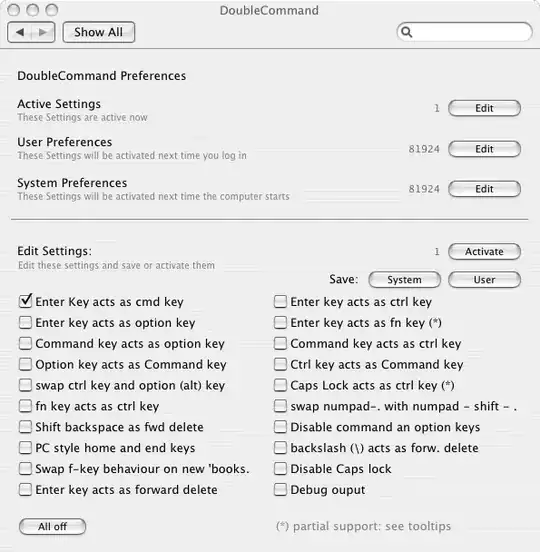
DoubleCommand can remap keys, you just need to know the Mac keyboard equivalents on your keyboard:

enter image description here

DoubleCommand is free and open source

Gaff
  • 18,569
  • 15
  • 57
  • 68
John T
  • 163,373
  • 27
  • 341
  • 348
  • 1
    +1 I just made the switch and DoubleCommand saved me! – Eric Wendelin Dec 09 '09 at 21:36
  • Thanks, I'll give it a try. This software is always running or it just makes the changes and they stay in the OS? Also, isn't any plist file anywhere to do this? Thanks! – Petruza Dec 11 '09 at 11:57
6

I recommend this keymap software for Mac OSX: http://pqrs.org/macosx/keyremap4macbook/ I used doublecommand before, feel this is better.

Alex
  • 61
  • 1
  • 1
  • **Karabiner-Elements** (previously called **KeyRemap4MacBook**) is breaking Eject button on **macOS Sierra**, so logout shortcut doesn't work. I found working built-in solution which works for me: [Changing modifier keys from the command line](http://apple.stackexchange.com/questions/4813/changing-modifier-keys-from-the-command-line/277544#277544). – Virus_7 Mar 27 '17 at 00:31
4

If you're trying to do something that the built-in OSX preferences or apps like DoubleCommand can't change — like remap right-control to command but leave left-control as is — you can do that with a little Terminal hacking:

http://hints.macworld.com/article.php?story=20060825072451882

Dan M
  • 141
  • 3
  • See also: [Changing modifier keys from the command line](http://apple.stackexchange.com/questions/4813/changing-modifier-keys-from-the-command-line/277544#277544) – Virus_7 Mar 27 '17 at 00:24