5

I am running a new SAP system release and it has a new auto-complete feature for some fields, such as this:
enter image description here

It is a cool feature, but sometimes you already know the input and you want to quickly tab through the fields. With the auto-complete feature, I am not able to do this any more.

Is it possible to disable it?

Eduardo Copat
  • 211
  • 1
  • 2
  • 7
  • Which version of SAP GUI are you using? – Jagger Sep 23 '14 at 14:43
  • SAP_UI 740 SAPK-74008INSAPUI – Eduardo Copat Sep 23 '14 at 15:24
  • 1
    Ok, I found a system with `SAP_UI 740 0006 SAPK-74006INSAPUI User Interface Technology 7.40` which I have access to. As I am no expert in ERP modules, could you please post also the transaction name that you took your screenshot from, so I can research more? – Jagger Sep 23 '14 at 15:34
  • That is great @Jagger! This was from transaction WB21. But I believe this option is available on several other transactions. – Eduardo Copat Sep 24 '14 at 02:06
  • With this `SAP_UI` component version I do not have the autocomplete by default, so I assume it depends on the SAP Logon Client. Could you also post your SAP Logon Client version? You can find it like on this screenshot [here](http://i60.tinypic.com/2lxt5jo.png). It might be also dependent on the Theme you are using. You can check it exactly as shown [here](http://i58.tinypic.com/28wo06.png). – Jagger Sep 24 '14 at 09:46
  • Hi, you can find my SAP logon info here: http://i58.tinypic.com/28wo06.jpg . I am using the Corbu theme, but I don't think it's related. – Eduardo Copat Sep 24 '14 at 18:08
  • Hi, you pasted my screenshot instead of yours, could you correct the link? – Jagger Sep 24 '14 at 18:14
  • Sorry! http://i.imgur.com/xzFf75M.png – Eduardo Copat Sep 24 '14 at 18:27

2 Answers2

6

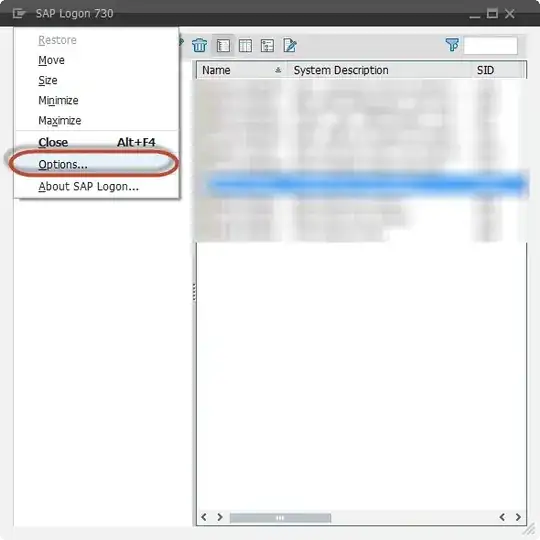
In your SAP Logon, select your options:

enter image description here

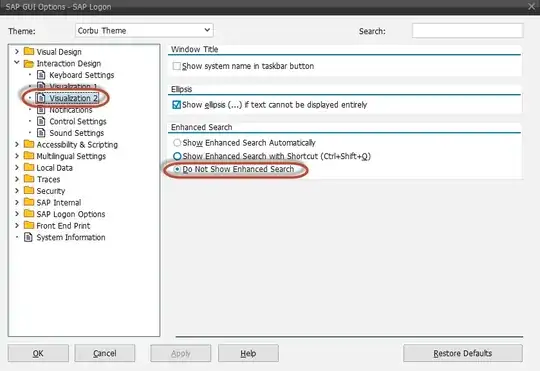
Then go to Interaction Design > Visualization 2 and click on Do Not Show Enhanced search.

enter image description here

Eduardo Copat
  • 211
  • 1
  • 2
  • 7
0

Go to: customized local lay-out OPTIONS / Local Data / History / History Status: OFF Don’t forget you will have to APPLY / OK and then fully log out and then log back in.