3

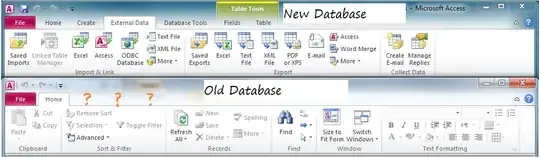
In MS access 2010, if I create a brand new project, the ribbon has a lot of options and actions.

But if I open an existing project, created in MS access 2003, I can't see any of those tabs. Does this just have to do with it being a 2003 .mdb? Or is there some other issue that could be causing this?
access

KyleMit
  • 5,992
  • 7
  • 46
  • 61
  • Are any warnings or alike presented when you open the 2003 DB? Is it doing this for _any_ .MDB, or just a specific one? Did you try saving it as a .ACCDB formatted file (in 2010) to convert it? – Ƭᴇcʜιᴇ007 Oct 03 '14 at 17:16
  • @Ƭᴇcʜιᴇ007, when I navigate to the file menu with the database open, I only get a limited subset of options ([screenshot](http://i.imgur.com/1Ziwd0k.png)), so I can't save it as a specific format. I don't get any errors when I open it, except the standard "Click to Enable Content" which I click and "Do you want to make this file a Trusted Document" to which I click "yes". It doesn't do this when re-opening 2010 files, and I don't have any other 2003 files lying around for comparison. – KyleMit Oct 03 '14 at 17:31

3 Answers3

3

Found it! You have to navigate to options (the only way I could do this was by going to File > Privacy Options which took me to the full options page).

Then click on Current Database and make sure that Allow Full Menus is checked

Access Menu

KyleMit
  • 5,992
  • 7
  • 46
  • 61
  • Hi Kyle, my privacy options is not bringing me to Full options page, do you know how to get to full options? – excelguy Jun 02 '20 at 15:28
1

Press Alt + F11 to activate the Visual Basic interface.

Create a new Module, or select an existing one, and insert the following code at the end:

Function recoverToolbar()
  DoCmd.ShowToolbar "Ribbon", acToolbarYes
End Function

Then press F5 to run your code, and your toolbar will reappear.

KyleMit
  • 5,992
  • 7
  • 46
  • 61
Steve can help
  • 544
  • 2
  • 5
  • 25
0

This same issue may happen when transferring MS Access files from a machine with windows 7 - Office2013 to a Machine with windows 10 - Office2016. To Fix: Right Click any access file and select properties. Should Read... Type of File: Microsoft Access Database(.accdb) Opens with: Microsoft Access "CLICK" [Change...] button Microsoft Access will show as an other option...click/select it from the other options group! then click Apply then Ok in the properties window and try opening your files again. Nonsense...but works.

well work for me, Thanks to Jim B. with the company IT Team.