11

I would like to combine multiple movie clips with .mov and .avi extension into a single file. Is there any free software in the market that is good and able to perform that?

Preferably that should work without any loss in quality.

slhck
  • 223,558
  • 70
  • 607
  • 592
Lopper
  • 277
  • 1
  • 2
  • 7

4 Answers4

20

Try mencoder or ffmpeg, both free, both good.

Mencoder

mencoder -oac copy -ovc copy -o output.avi input1.avi input2.avi

FFmpeg

From the FFmpeg Wiki article on how to concatenate (join, merge) media files:

Create a file "mylist.txt" with all the files you want to have concatenated in the following form ( Lines starting with a dash are ignored ) :

# this is a comment
file '/path/to/file1'
file '/path/to/file2'
file '/path/to/file3'

Note that these can be either relative or absolute paths. Then you can encode your files with:

ffmpeg -f concat -i mylist.txt -c copy output
slhck
  • 223,558
  • 70
  • 607
  • 592
blahdiblah
  • 4,873
  • 2
  • 22
  • 30
  • Will there be any loss of quality by using Mencoder or FFmpeg? – Lopper Dec 12 '09 at 04:41
  • 1
    if you're joining multiple files of different codecs, yes, loss of quality is likely -- the tool will need to re-encode the streams so the final stream uses the same codec/bitrate throughout. – quack quixote Dec 12 '09 at 17:22
  • 2
    Best answer, too few upvotes and not accepted. Shame ... +1 from me. – 0xC0000022L Mar 01 '13 at 01:28
  • The FFmpeg tutorial was very useful, thank you, +1 for your answer! I used `concat` with the file list input as shown in the example, and it worked flawlessly. One of the easiest methods I've seen so far for concatenating videos (which are in similar formats). – Sk8erPeter May 13 '13 at 20:38
  • @Sk8erPeter The tutorial is (relatively) new and didn't exist at the time blahdiblah wrote the original answer, as the concat demuxers, the concat protocol and filters hadn't been developed back then. – slhck May 14 '13 at 04:44
  • @slhck: OK, but I found this method via the linked FAQ yesterday (I edited the original answer to update the link to the new one, which already contained concat; and after that, you updated the answer again pasting the mentioned method and linking the very page which describes the method in detail, which was even a better idea :) ). So this was a great help anyway. :) It would be good to know whether there's a fine GUI built on top of that method with FFmpeg. – Sk8erPeter May 14 '13 at 09:53
  • @Lopper Provide the -sameq option to ffmpeg to ensure lossless encoding. – w4etwetewtwet Jul 03 '13 at 11:02
  • 1
    @handuel `-sameq` has been removed http://www.ffmpeg.org/faq.html#Why-was-the-ffmpeg-_002dsameq-option-removed_003f-What-to-use-instead_003f – Jürgen Steinblock Nov 24 '14 at 15:17
  • 1
    You may need to add `safe 0` in the command: https://stackoverflow.com/questions/38996925/ffmpeg-concat-unsafe-file-name – Gruber Sep 14 '18 at 12:51
3

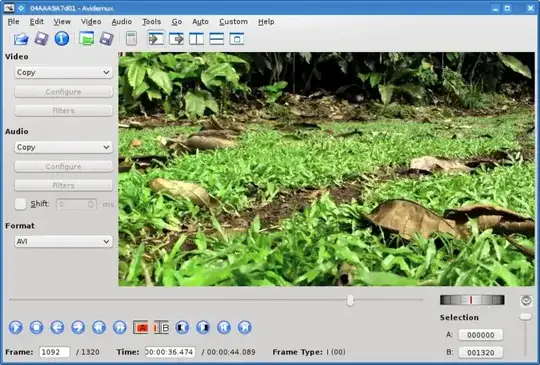
I use Avidemux for tasks like this.

enter image description here

Process with Avidemux is as follows:

  1. Choose File->Open and select the first file
  2. Choose File->Append and select the next file. Repeat this step until all the files you want to append to the first file have been appended.

  3. Choose Save and select location and filename

Gruber
  • 2,231
  • 5
  • 24
  • 32
Maciek Sawicki
  • 1,152
  • 1
  • 11
  • 16
1

Easy Video Joiner can join multiple AVI, MPEG (MPG), RM (Real Media) or WMV/ASF (Window Media) files into one large movie file. You can add an unlimited number of video files as you like to the list and easily rearrange their order if needed. With just a few mouse clicks, you can enjoy your movie clips without interruption.
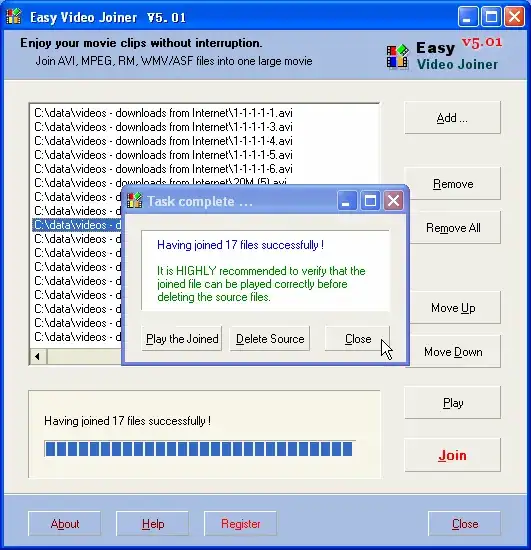
alt text

Easy Video Joiner is freeware.

Gaff
  • 18,569
  • 15
  • 57
  • 68
  • Will there be any quality loss? – Lopper Dec 12 '09 at 05:08
  • @lopper: if you're joining multiple files of different codecs, yes, loss of quality is likely -- the tool will need to re-encode the streams so the final stream uses the same codec/bitrate throughout. – quack quixote Dec 12 '09 at 17:23
-1

Use any video editing software (even Windows Movie Maker), import the files into the Editor timeline, then export it as a new movie. If you can pay - "Camtasia Studio 8" is the best choice as it takes less ram and CPU to produce HQ output files.