I have a new disk, so I wanted to see how the testdisk backup works.
After partitioning and formatting the disk with gksu gparted /dev/sdc, this is what I get:
$ sudo fdisk -lu /dev/sdc

Disk /dev/sdc: 60.0 GB, 60011642880 bytes
255 heads, 63 sectors/track, 7296 cylinders, total 117210240 sectors
Units = sectors of 1 * 512 = 512 bytes
Sector size (logical/physical): 512 bytes / 512 bytes
I/O size (minimum/optimal): 512 bytes / 512 bytes
Disk identifier: 0x000c0705

   Device Boot      Start         End      Blocks   Id  System
/dev/sdc1              63    20980889    10490413+  83  Linux
/dev/sdc2        20980890   117210239    48114675    5  Extended
/dev/sdc5        20980953    83891429    31455238+  83  Linux
/dev/sdc6        83891493   100663289     8385898+  83  Linux
/dev/sdc7       100663353   109049219     4192933+  83  Linux
/dev/sdc8       109049283   117210239     4080478+  82  Linux swap / Solaris
So, after this, I want to backup the partitions' boot record with testdisk and then restore it. So I do:
cd /tmp
sudo testdisk
... and then
[ Create ] Create a new log file- from
Select a mediachooseDisk /dev/sdc - 60 GB / 55 GiB, then[Proceed ] - from
Please select the partition table type,, choose[Intel ] Intel/PC partition - on next screen, choose
[ Analyse ] Analyse current partition structure...; I get this:
     1 P Linux                    0   1  1  1305 254 63   20980827
     2 E extended LBA          1306   0  1  7295 254 63   96229350
    No partition is bootable
     5 L Linux                 1306   1  1  5221 254 63   62910477
       X extended              5222   0  1  6265 254 63   16771860
     6 L Linux                 5222   1  1  6265 254 63   16771797
       X extended              6266   0  1  6787 254 63    8385930
     7 L Linux                 6266   1  1  6787 254 63    8385867
       X extended              6788   0  1  7295 254 63    8161020
     8 L Linux Swap            6788   1  1  7295 254 63    8160957
- I choose
[ Backup ] Save current partition list to backup.log file and proceed - Answer
ntoShould TestDisk search for partition created under Vista ?; I get:
    Disk /dev/sdc - 60 GB / 55 GiB - CHS 7296 255 63
         Partition               Start        End    Size in sectors
    * Linux                    0   1  1  1305 254 63   20980827
    L Linux                 1306   1  1  5221 254 63   62910477
    L Linux                 5222   1  1  6265 254 63   16771797
    L Linux                 6266   1  1  6787 254 63    8385867
    L Linux Swap            6788   1  1  7295 254 63    8160957
- I press
Enter: to continue; I get:
    Disk /dev/sdc - 60 GB / 55 GiB - CHS 7296 255 63

         Partition                  Start        End    Size in sectors

     1 * Linux                    0   1  1  1305 254 63   20980827
     2 E extended LBA          1306   0  1  7295 254 63   96229350
     5 L Linux                 1306   1  1  5221 254 63   62910477
     6 L Linux                 5222   1  1  6265 254 63   16771797
     7 L Linux                 6266   1  1  6787 254 63    8385867
     8 L Linux Swap            6788   1  1  7295 254 63    8160957
- Choose
[ Quit ] Return to main menuhere - Chooose
[ Quit ]from next menu - Chooose
[ Quit ] Quit programfrom very first menu
Now there is a backup.log in /tmp, with these contents:
#1412861047 Disk /dev/sdc - 60 GB / 55 GiB - CHS 7296 255 63
 1 : start=       63, size= 20980827, Id=83, P
 2 : start= 20980890, size= 96229350, Id=05, E
 5 : start= 20980953, size= 62910477, Id=83, L
 6 : start= 83891493, size= 16771797, Id=83, L
 7 : start=100663353, size=  8385867, Id=83, L
 8 : start=109049283, size=  8160957, Id=82, L
Repeats of the process above will append the same contents to the backup.log.
Now, I want to test restoration; I do again sudo testdisk ... and then
[ Append ] Append information to log file- from
Select a mediachooseDisk /dev/sdc - 60 GB / 55 GiB, then[Proceed ] - from
Please select the partition table type,, choose[Intel ] Intel/PC partition - now choose
[ Delete ] Delete all data in the partition tableon next screen - answer
ytoClear MBR partition table by writing zero bytes to it? (Y/N) - answer
ytoClear partition table, confirm ? (Y/N) - get
Partition table has been cleared. You have to reboot for the change to take effect.and hit[Ok] we're back to
Disk /dev/sdc; now choose[ Analyse ] Analyse current partition structure...; here get:Disk /dev/sdc - 60 GB / 55 GiB - CHS 57231 64 32 Current partition structure: Partition Start End Size in sectors No partition is bootable- click on
[Quick Search] - answer
nforShould TestDisk search for partition created under Vista ? [Y/N] hit
Stopas soon as the search starts ; get this:Warning: the current number of heads per cylinder is 64 but the correct value may be 255. You can use the Geometry menu to change this value. It's something to try if \- some partitions are not found by TestDisk \- or the partition table can not be written because partitions overlaps.
hit
[ Continue ], get:Disk /dev/sdc - 60 GB / 55 GiB - CHS 57231 64 32 Partition Start End Size in sectors L Linux 0 1 32 10244 63 32 20981697- now hit
lforL: load backup; - choose
Disk /dev/sdc - ...forChoose the backup you want to restore:and then hit[ Load ]
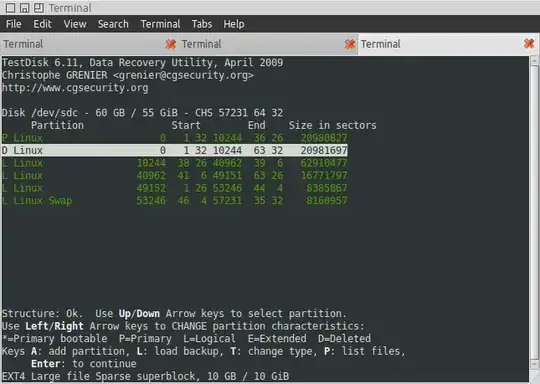
At this point, I get this:
<pre>Disk /dev/sdc - 60 GB / 55 GiB - CHS 57231 64 32
     Partition               Start        End    Size in sectors
P Linux                    0   1 32 10244  36 26   20980827
L Linux                    0   1 32 10244  63 32   20981697
L Linux                10244  38 26 40962  39  6   62910477
L Linux                40962  41  6 49151  63 26   16771797
L Linux                49152   1 26 53246  44  4    8385867
L Linux Swap           53246  46  4 57231  35 32    8160957</pre>
... and "Structure: Bad. " in red; as shown on the image:

My question is - why is this "Structure: Bad"? The only thing I can notice is that the first two entries about cover the same range; but why does testdisk import them both? How do I avoid this if I want to restore the partition structure from a backup?