28

some features in opera 25 are changes, with old documentations. I want to disable Opera auto update.

For this I read this opera webpage however there is no more "preferences" in opera menu.

so how to change this option?

update:

thank you all, and here is why.

Sometimes we are forced to do that, you will realize that with too many applications ask for updates over a slow connection or limited access traffic, the updates will be awful, horrible, consume the bandwidth, and prevent me doing my job, so I need some control, when to allow the updates to start and when to stop it. all other applications(Firefox, eclipse, even antiviruses and windows 7, ...etc ) give us an API to control updates, some of these applications informed with the risk and we decide when to update it. it is Ok to update as default behavior, but do not take the decision on behalf of me, let me change this, I know what am doing, and I am responsible for that.

Deilan
  • 164
  • 12
Eng. Samer T
  • 497
  • 2
  • 5
  • 8
  • 2
    Starting from **Opera 30.0.1835.125** the browser blocks usage of outdated plugins (e.g. **Adobe Flash Player**) despite of [usage of **--allow-outdated-plugins** argument on launching](http://superuser.com/a/943581/368301). So disabling automatic updates becomes critical untill [a way to enable outdated plugins in the new versions](https://superuser.com/questions/943576) appears to save very old machines. – Deilan Jul 21 '15 at 22:33

6 Answers6

22
  • The help page you linked is for old Opera 12.16 (Presto engine). They are outdated for Opera 15+

  • Currently there is no built-in preference to disable Auto Update in Opera 15+

  • Some command line switch from Chome work in Opera too since they both use on the same engine

    ..\Opera\Launcher.exe --check-for-update-interval=0
    

    After a short test I would say this one doesn't work

But

  • You can delete (or rename) opera_autoupdate.exe which is used to check for newer versions

    ...\Opera\26.0.1655.0\opera_autoupdate.exe
    

    After this, Opera displays an error which you won't see unless you open opera:\\about

    enter image description here

nixda
  • 26,823
  • 17
  • 108
  • 156
22

You can either use the commandline switch --disable-update in the shortcut you use to start opera

Opera shortcut properties

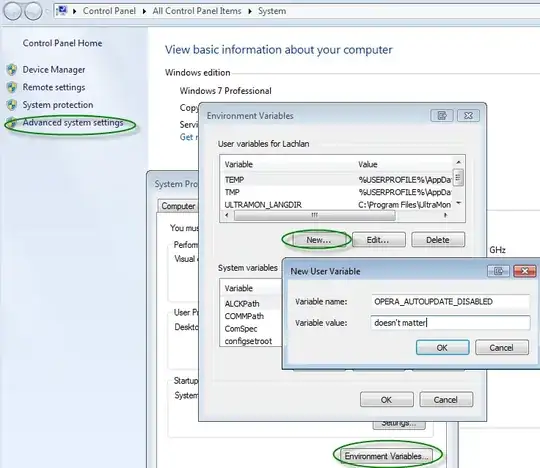
or if you want to stop Opera autoupdating no matter how you start it you can add an environment variable called OPERA_AUTOUPDATE_DISABLED (value doesn't matter).

enter image description here

LachlanG
  • 685
  • 7
  • 14
  • 1
    This one should be the right answer. It uses not documented feature (unless there is no documented option - so far), but doesn't use that dirty hack with delete/rename of **opera_autoupdate.exe** file. – Deilan Jul 21 '15 at 22:28
  • 2
    these answers also work after a manual version update unlike renaming the exe. – Grant Bowman Jun 08 '16 at 16:05
  • I would say this good answer should be combined with the ccpizza answer: disable the task manager Opera updater too. – Sopalajo de Arrierez Jul 16 '18 at 15:48
6

Windows

For the latest Windows version of Opera updates are configured via the Windows Task Scheduler.

Click Start, type Task Scheduler, locate the corresponding item for Opera Autoupdater and configure as needed.

You can also use [Autoruns] 2 — a Microsoft freebie which lets you quickly see all the scheduled items, as well as everything that starts on boot.

MacOS

To disable updates for MacOS type this in the terminal:

defaults write com.operasoftware.Opera OPDisableAutoUpdate true

To display the current configuration setting use:

defaults read com.operasoftware.Opera OPDisableAutoUpdate
ccpizza
  • 7,456
  • 6
  • 54
  • 56
0

Just Delete "operaautoupdate.exe" file in the directory For Directory, Right Click Opera Icon And Press "i" Go to a folder naming Numbers (xx.xxx.xxxx)[x are numbers]

Pandey
  • 1
0

A simple way to disable Opera autoupdates is to block Opera updates server domain name locally: add this line

127.0.0.1 autoupdate.geo.opera.com

to C:\Windows\System32\drivers\etc\hosts file (Admin privileges required to edit it).

AFAIK, this domain remains actual for years, and is probably less likely to change than the not documented OPERA_AUTOUPDATE_DISABLED env variable and --disable-update switch features (which I haven't tested in latest Opera, btw). To re-enable autoupdates later on, just remove/uncomment the added line.

0

Answer for SAME problem but on a Mac OSX (tested Yosemite: 10.10.5)

Pop occurs but without sound or other issue. Go to the OSX notification panel and disable notifications.

This can be done by:

  1. clicking on the black Apple icon in the far top-leftmost corner
  2. Selecting system Preferences
  3. Clicking Notifications
  4. scrolling down on the left side until reaching and selecting the Opera application
  5. Unchecking notifications for the application
bertieb
  • 7,344
  • 36
  • 42
  • 54