0

I've got an external hard drive (WD500BMVU) that was dropped and now does not mount anymore if I connect it to my Laptop (Mac). When I connect it with the USB cable, the LED light goes on, I hear the disks turning (though with an uncomfortable clicking) but within three seconds the drive stops turning. The LED light remains on but the hard disk seems to be off.

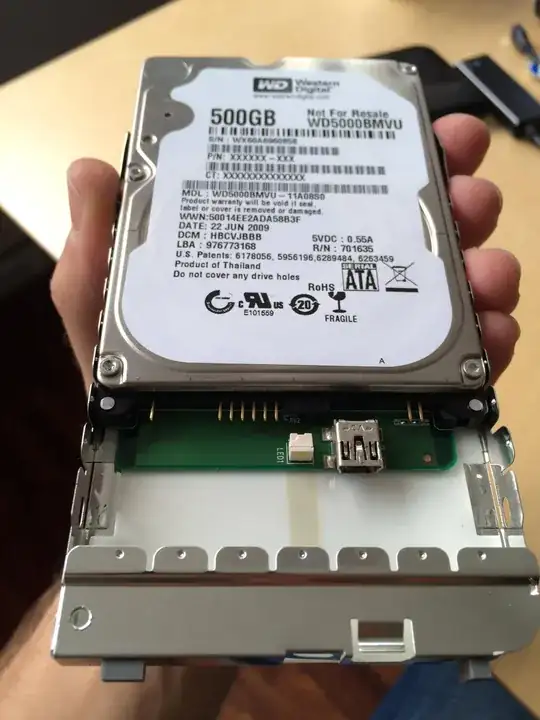
I removed the enclosure because I wanted to connect it to a SATA-USB adapter but I discovered that the HD doesn't have SATA connector but Pins (1x 6 Pins block & 1 2Pins block) sticking out the drive.

Is there an adapter I can use to supply power to the drive via the Pins and not the USB connector? enter image description here
Hennes
  • 64,768
  • 7
  • 111
  • 168
Omnibyte
  • 103
  • 3
  • **If you have clicking then the drive is dead.** The "pins" are an adapter to convert the data and power pins for the enclosure ( that's what the plastic screws are holding ). Its very likely if you try to remove it you will damage the product though. – Ramhound Nov 13 '14 at 11:56
  • @Ramhound Thanks for sharing your knowledge and the concern about the potential damage. Since there is a lot of important data on the disk I think we can't leave anything untried. – Omnibyte Nov 13 '14 at 16:01

1 Answers1

0

Unfortunately, by opening the drive's enclosure, you have voided any warranty that the drive might have had. Judging by the clicking sounds, I would say that the drive has failed after the drop and either the read/write head is stuck or the drive encounters a huge amount of bad sectors and clusters and cannot read on.

I would suggest replacing the drive. You can look for some other solutions as I have seen people succeeding in plugging the drive internally and salvaging parts of their data. This topic might be useful: How to connect Western Digital "My passport" using other means?. You could also look for other possible solution by other people on the internet.

Hope this helps,

Captain_WD.

Captain_WD
  • 309
  • 1
  • 6
  • Hi Captain, Thanks for your help. The disk was already out of warranty which is why I dared to open the enclosure. Maybe we can save the data by connecting it internally. – Omnibyte Nov 13 '14 at 15:59
  • You should definitely try it. The drive is not hardware-encrypted so you should be able to read the data on it or, at least, run a diagnostic tool to check the drive's status. I would recommend using WD Data Lifeguard Diagnostic and run both the quick and the extended tests to check the S.M.A.R.T. status as well as for any bad sectors. Here's a link: http://support.wdc.com/product/download.asp?groupid=810&lang=en. Captain_WD. – Captain_WD Nov 14 '14 at 09:12