10

Office 2007, Windows Server 2008 x64.

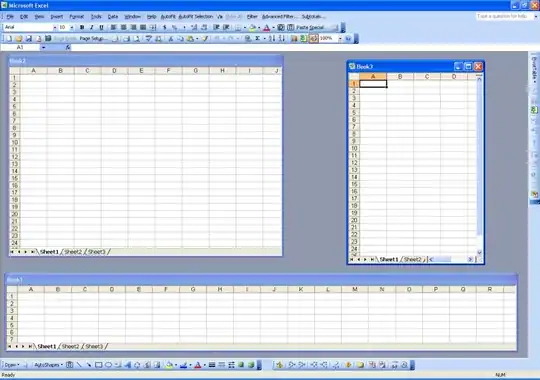
How can I make Excel so that when I double-click a document, it opens in a new Excel instance, so that I can easily view them side-by-side as separate windows and not using the View-Arrange All functionality? Now I have to go to the task bar, click on one document to see it and then click on the other document in the task bar to switch to that one. As the alternative, I close one document, open a new Excel window, then drag the document in there.

Thank you.

Eugene
  • 606
  • 4
  • 10
  • 17
  • 5
    *5 years later:* By default, Excel 2013 opens each workbook in its own window. [More Info](http://blogs.office.com/2013/02/07/open-excel-workbooks-in-separate-windows-and-view-them-side-by-side/) – Ƭᴇcʜιᴇ007 Jul 23 '14 at 15:42
  • 1
    Hey, whaddayaknow! Better late than never! – Eugene Jul 23 '14 at 16:37
  • possible duplicate of [Move open Excel document to separate window](http://superuser.com/questions/275701/move-open-excel-document-to-separate-window) – Tobias Kienzler Oct 15 '14 at 09:10
  • Excel has an option under Advanced->General called "Ignore other applications that use Dynmaic Data Exchange". This does in fact open up a new window every time, but causes a super annoying error that prevents the file from actually opening up. Why does microsoft have to be so stupid? Its in the the GD name of the OS - WINDOWS. Why remove the ability to open windows for your application??? – B T Aug 25 '16 at 00:56
  • 2016 - The problem is back. – user2924019 Mar 13 '17 at 14:57
  • Possible duplicate of [Open Excel files in new window](https://superuser.com/questions/21602/open-excel-files-in-new-window) – Eugene Mar 13 '19 at 14:39

7 Answers7

3

There is a very nice walk-through of modifying the registry here. It will be slightly different under Server 2008 but similar enough to hopefully make sense:

  1. Run the registry editor as an administrator. In case you’re not sure how to do that, open the start menu, then search for regedit.exe. Right click on the regedit.exe file then click on "Run as administrator" option.

  1. In the Registry Editor, go to HKEY_CLASSES_ROOT\.xls key. You can do this by expanding the HKEY_CLASSES_ROOT node, then start typing .xls, or just search for .xls, or just scroll down and hunt for it. You should see something like this:

Look at the (Default) value, in the screenshot above, that is Excel.Sheet.8. Now, go to that key in HKEY_CLASSESS_ROOT. In other words, go to HKEY_CLASSES_ROOT\Excel.Sheet.8.

  1. Expand the Excel.Sheet.8 key and you’ll see that it has several keys under it. One of those keys is named shell. Go ahead and expand the shell key too. you’ll see something like this:
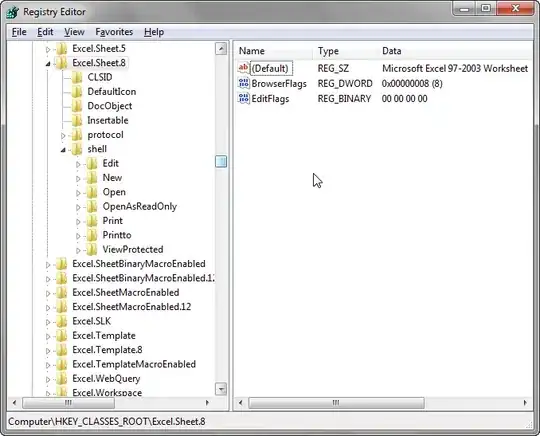
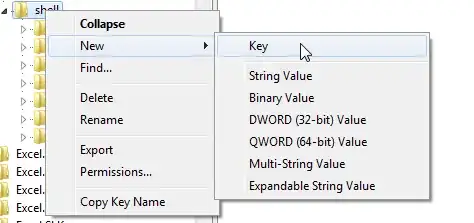
Notice that the keys under shell correspond to the options you see when you right click on an excel file in Explorer. The idea is that we want to add an “open in new instance” option here. So, right click on the shell key, then choose New->Key.
Give the key any name you like. For example, OpenInNewInstance. When the key is created, double click on (Default) to give it a default value. The default value will be the option that you will see on the right click menu. So, for this example, we’ll use Open In New Instance. You should have something like this:
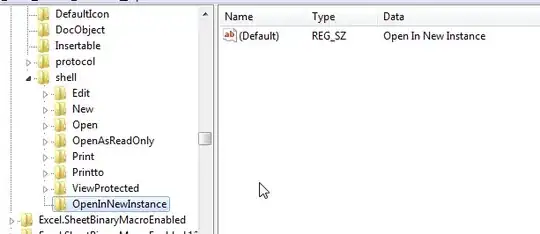
  1. Add a new key under OpenInNewInstance. This time, name it as command. To set the default value of the command key, you will need the path to the EXCEL.EXE file. In Windows 7 64-bit and Office 2010 set the value to this:

C:\Program Files (x86)\Microsoft Office\Office14\EXCEL.EXE" "%1

If you have the same setup as mine, you can just copy the above. Otherwise, make necessary adjustments to match your setup. You should now see something like this.

  1. That’s it! You’re done. Go to Windows Explorer and right click on any .xls file. You should now see your “Open in New Instance” option.
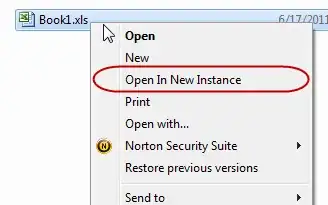
Click on “Open In New Instance” and Excel opens the workbook in a new application window. Right click on another .xls file and open it in a new instance, Excel opens it in yet another application window.

  1. If that’s not enough, and you want this to be the default behavior. In other words, every time you double click an .xls file in Explorer, you want Excel to open it in a new application instance, then, there’s one simple step to do. Go to the shell key and set it’s default value to OpenInNewInstance
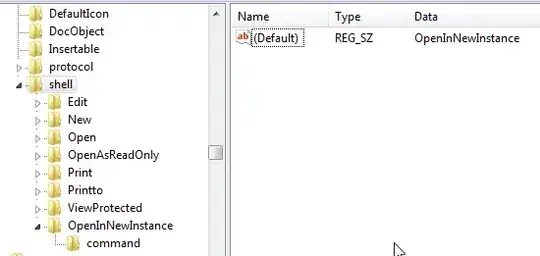
The instructions above allows you to add an option to the right click menu of *.xls files. Excel 2007/2010 files have a different extension (.xlsx or .xlsm). Just follow the same steps, but look for the correct extension (xlsx or xlsm instead of xls) in #2.

http://web.archive.org/web/20141014173336/http://www.excelqa.info/2011/06/17/how-to-open-excel-files-in-a-new-application-instance-windows-7-or-vista/

Josh
  • 5,143
  • 5
  • 34
  • 44
Alex Andronov
  • 403
  • 3
  • 11
0

I see an answer offering a solution using regedit.exe has already been chosen as best. However, I have an easy way that doesn't require editing registry.

After you've opened the first Excel document, find the icon for it in the task bar and right-click it. Choose Microsoft Office Excel 2007. A new Excel document will open. From there, use the main menu to open the second document. Obviously, you can open a third, fourth, etc. the same way.

sarah
  • 101
  • 3
  • 1
    Thank you, @sarah, for your response. However, my question was specifically about double-clicking the file. I was already doing what you suggested and that was getting tedious because I had to do all those extra clicks. – Eugene Mar 11 '19 at 14:20
  • Damn. So sorry, @Eugene. I did just what I hate when people do. I didn't read the question carefully. Especially clueless, as I also would prefer to be able to have an Excel file I double-click open in a new instance of the program. – sarah Mar 12 '19 at 21:00
  • @Eugene, I did find that the question was asked & answered a few years after yours, with what I believe are some additional methods receiving upvotes. Haven't had a chance to try any of them yet. https://superuser.com/questions/431061/how-do-i-force-excel-and-other-microsoft-office-products-to-stop-opening-files – sarah Mar 12 '19 at 21:03
  • @Eugene I also see that that was marked as a duplicate of another version of the same question, which looks like it was posted a couple of months before yours. There's an answer there with 86 upvotes. https://superuser.com/questions/21602/open-excel-files-in-new-window (I haven't read it yet.) Can/should these versions of the question be combined or linked somehow? – sarah Mar 12 '19 at 21:08
  • thanks, @sarah I voted to close it, hopefully admins will get to it some time. This whole question makes no sense anymore with the latest versions of Excel anyway as the problem was taken care of by Microsoft :) – Eugene Mar 13 '19 at 14:40
  • Thanks, Eugene. I haven't spent much time on Stack Exchange lately and so wasn't sure how it should be handled. I disagree though, about the question no longer being relevant. I suspect many of us are still using older versions and are still looking to be able to have double-clicked Excel files open in separate windows. : ) – sarah Mar 16 '19 at 01:49
0

I found a simple way, having had the same issue: Just go to Control Panel -> Folder Options, and switch from "Open Every Folder in the Same Window" to "Open Every Folder in a New Window" (or similar, I'm translating from German Windows 7 settings here)

Linu
  • 11
  • 1
    That's an Explorer setting. The OP wants to be able to open Excel documents in a new instance of Excel. – RobH Jun 16 '15 at 16:35
0
  1. Click the Microsoft Office Button, and then click Excel Options.
  2. Click Advanced, and then click to check the "Ignore other applications" check box in the General area.
  3. Click OK
bugtussle
  • 355
  • 1
  • 3
  • 1
    Nope, worked only for the 2nd document. The third and all other documents opened in the second document's window. Thanks though :) – Eugene Dec 16 '09 at 19:14
0

Go to My Computer > Tools > Folder Options > File Types > and Choose XLSX (XLSX for 2007 or XLS for 2003)

Click Advanced button

Uncheck "browse in same window" in advanced window.

Then highlight Open and click Edit

Make a note of these settings so you can revert back if needed

Make sure in the Action box it says &Open

Check the box next to use DDE

Remove anything that is in DDE Message box and DDE Application Not Running box.

bugtussle
  • 355
  • 1
  • 3
  • How can I do this on Windows Server 2008? It no longer has the File Types dialog and the other one in Control Panel does not have these options. – Eugene Dec 16 '09 at 22:37
  • you have to edit the registry. progress as promised. – bugtussle Dec 17 '09 at 17:51
  • Kije has the correct answer. You can span excel across two monitors, I do it all the time. Depending on the os, you may not be able to use the max\restore button on the top right of the window. – bugtussle Dec 17 '09 at 17:57
  • 2
    Kije's answer is not correct. I specifically state "open in the new Excel instance" while Kije offers to use one Excel instance. Memory usage is not of a concern to me. Spanning across two monitors is a pain. – Eugene Dec 17 '09 at 19:47
0

There was a working solution for Windows XP here, using a registry fix. But it says that it only works in 32-bit OS. I am curious though, if you go in Start...Run and type "C:\Program Files\Microsoft Office\Office12\EXCEL.EXE" "C:\Stuff\sheet.xlsx" does it open in the same window or a new one?

Because that was what this 32-bit hack was, the default open command used DDE open(%1) to provide the filename, which always used any existing window, while this direct %1 argument method without DDE opened a new window.

Just my 2 cents. Might very well not work.

mtone
  • 11,561
  • 5
  • 44
  • 61
-3

Perhaps you already know this, but you can have multiple windows open with one Excel Instance. Use the Window/New Window pull down, and then arrange them anyway you like.

Multiple instances of Excel strikes me as expensive on memory.

enter image description here

Gaff
  • 18,569
  • 15
  • 57
  • 68
Kije
  • 2,152
  • 14
  • 12