4

For one or two days now, whenever I open a YouTube page on Google Chrome, I have dialog boxes similar to this one :
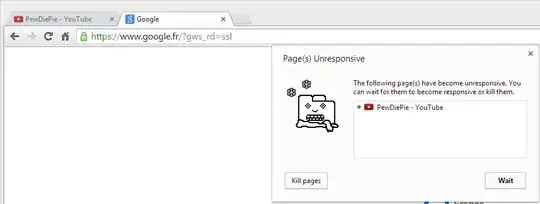
page unresponsive

On this screenshot, the active tab is not the YouTube page, but the same bug occurs when the active tab is the YouTube page itself.

On the screenshot, the YouTube page does not even contain a video player, it's just a list of videos (the same bug occurs on pages with video player, unfortunately).

This dialog box pops up regularly (every minute to every 30 seconds I'd say). However, the page does not crash and the videos can be viewed without any other problem than the anoying popup.

Any clue on how to fix that ?

UPDATES:

  • I realised that simple Google search tabs can be unresponsive too. Untill now, I only had this problem with YouTube and Google searches.

  • However, this isn't due to my Google account or any extension because I started Chrome with a new user profile and still got the same problem.

Speed Tracer result: On a YouTube page without video player.
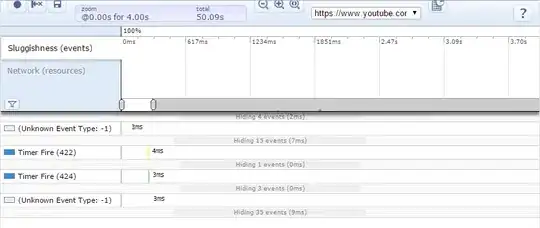
Speed Tracer

Chrome's profiler results: Sorted by CPU usage
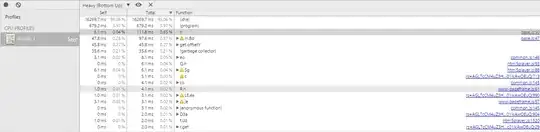
Profiler

When I click on the first line that links to an actual JS file (base.js) and when I reveal it on navigator, it brings me here :
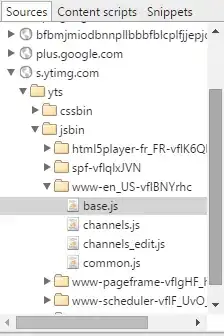
Profiler base.js

Seeven
  • 233
  • 4
  • 12
  • Have you tried 1/ restarting chrome (completely - it can leave a part of itself running), 2/ clearing the chrome cache? – DavidPostill Nov 22 '14 at 10:53
  • @DavidPostill: Hi, 1/ Yes, the bug even occurs after restarting the computer. 2/ Yes, I cleared the Chrome cache also. The bug still occurs. – Seeven Nov 22 '14 at 11:04
  • Try starting chrome with a new user profile and no extensions installed ... – DavidPostill Nov 22 '14 at 11:06
  • @DavidPostill: I started Chrome after deleting my Default profile, then I opened some YouTube tabs, and I still got the popup. (Sorry for the late answer) – Seeven Nov 29 '14 at 09:04
  • What do you see under `chrome://policy`? – Vinayak Nov 29 '14 at 09:12
  • Run [Speed Tracer](https://developers.google.com/web-toolkit/speedtracer/) and post the results here – Vinayak Nov 29 '14 at 09:18
  • @Vinayak: `chrome://policy` shows no rule. – Seeven Nov 29 '14 at 09:30
  • Also try the [Profiler](http://stackoverflow.com/a/6117250/1768141). Check what is hogging the CPU by sorting results by total CPU usage. If you see a script taking up most of the resources, find out the source of it by clicking on it and then selecting 'Reveal in navigator'. [See this for a demo](https://i.imgur.com/JcAk7Yt.gif) – Vinayak Nov 29 '14 at 09:36
  • @Vinayak: I added the Speed Tracer and the Profiler results on my post. Thanks for the demo by the way. – Seeven Nov 29 '14 at 09:47
  • It looks like you do have a few extensions installed. `bfbmjmiodbnnpllbbbfblcpljjjepjdn` is [Turn Off the Lights](https://chrome.google.com/webstore/detail/turn-off-the-lights/bfbmjmiodbnnpllbbbfblcplfjjepjdn). – Vinayak Nov 29 '14 at 09:55
  • @Vinayak: I installed Turn Off the Lights a very long time ago and it never bothered me. I didn't install a new extension very recently. Moreover, I started Chrome with a new user profile, without any extension installed, and I still got this bug. – Seeven Nov 29 '14 at 10:00
  • Try deleting your user profile folder and then starting Chrome by running this command: `rmdir /S /Q "%localappdata%\Google\Chrome\User Data\Default"`. Make sure Chrome is closed when you run it. It will delete all your cookies, history, extensions, bookmarks, saved passwords, etc. If you haven't backed all of that using [Chrome Sync](https://support.google.com/chrome/answer/165139) do so before you run the command. You can check if your data is already synced by checking [Chrome Sync settings](https://www.google.com/settings/chrome/sync) – Vinayak Nov 29 '14 at 10:10
  • @Vinayak: I have already done it, that's what I meant when I said I deleted my Default user profile. The problem persists. – Seeven Nov 29 '14 at 10:26
  • Let us [continue this discussion in chat](http://chat.stackexchange.com/rooms/19038/discussion-between-vinayak-and-seeven-byakko). – Vinayak Nov 29 '14 at 10:39
  • This is happening to me too. Mostly youtube but sometimes reddit too. Maybe Flash is the culprit? – jcollum Dec 02 '14 at 18:50

0 Answers0