6

On XP, the Guest account can run the RDP client to connect to a remote RDP server, but when I try the same under Vista Business (with all updates installed) I get this:
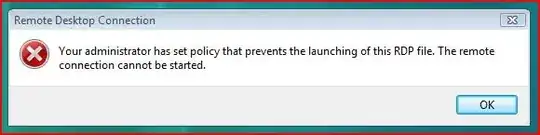
Error

I can run mstsc manually with 'Run' on the Start Menu, but although it runs, nothing happens at all when I click 'connect'.

Everything works fine logged in as any other account, it only fails as 'Guest', and this is on multiple clean installs of Vista.

Is there something in the Local Policy that can be tweaked to allow the RDP client as Guest?


edit: there is also a message in the rdp client itself:
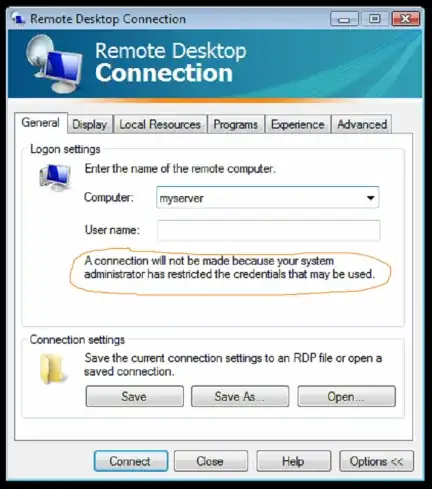
enter image description here

and I get this error when trying rdp+:
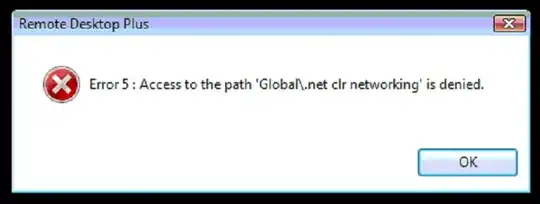
enter image description here

Mokubai
  • 89,133
  • 25
  • 207
  • 233
  • Is this PC (or the one you are connecting to) on a domain? – krowe Dec 14 '14 at 01:45
  • 1
    no, it's standalone and literally just clean-installed with Vista –  Dec 14 '14 at 08:09
  • You _just_ installed Vista? I'm sorry. 7 really is a lot better. It's at least a proper implementation of what they started to throw together in Vista. I can't say I'm a fan of 8, but Vista is the new Me. – Caleb Dec 18 '14 at 14:37
  • 1
    @Caleb ha ha, yes, these are cast-off PCs from someones upgrade cycle - we wipe them and lock them down as RDP terminals. It's been XP up till now, but we are starting to get Vista too... –  Dec 18 '14 at 14:42
  • @JackDouglas If all you're doing is RDP, why not setup a Linux image that boots straight to an RDP client? (Caveat: I use RDP all the time, but only for very specialty purposes and don't know if the Linux clients hold up in production.) – Caleb Dec 18 '14 at 14:58
  • 2
    @Caleb I went down that route a couple of years ago and gave up - things like local printer support/redirection and support for random video cards and random resolutions were the stumbling blocks at the time iirc. –  Dec 18 '14 at 15:19
  • I would suggest Start>Run gpedit.msc - Since you're not on a domain, Local Group Policies - In there you should find your RDP policies and allow the Guest Account to use it. Your error tells you it's a policy issue. – Andrew Dec 18 '14 at 19:43
  • @Reeves is there any way of searching for policies that match '%RDP%'? –  Dec 19 '14 at 06:30
  • @JackDouglas This should help you find what you're looking for: http://www.howtogeek.com/175087/how-to-enable-and-secure-remote-desktop-on-windows/ – Andrew Dec 19 '14 at 06:41
  • What edition of Vista is this and what service pack level? Also, what is the [version](http://technet.microsoft.com/en-us/library/cc736828%28v=ws.10%29.aspx) of the RDP Client you're using? – I say Reinstate Monica Dec 21 '14 at 22:41
  • What sort of media did you use to perform the clean install of Windows Vista? (i.e. Volume License, System Builder, Refurbisher, OEM, etc.) – I say Reinstate Monica Dec 21 '14 at 22:53
  • 1
    @Twisty it's Vista Business SP1, and I used the full install iso (retail and OEM are the same afaik with Vista, just different keys). I have not installed any updates (and probably should, at least to see if it makes any difference). –  Dec 22 '14 at 07:57
  • Goodness, yes do install updates. This very well could be a bug resolved by one of the many updates not yet installed. By OEM I also would include media from the likes of Dell, Gateway, etc. which due to their potential customizations would not be bit-for-bit identical to retail media. – I say Reinstate Monica Dec 22 '14 at 13:59
  • @Twisty ah, good point about customized media. I'll install updates on another clean install and update the question with what I find. –  Dec 22 '14 at 14:01
  • 1
    @Twisty installed all updates and no change - I've given up and gone another route! –  Dec 23 '14 at 12:49

3 Answers3

1

I've given up trying to find a solution and I'm using a workaround instead. Seeing as these machines are locked down and only required to run Remote Desktop Client, I'm comfortable with this being a bit of a hack:

  1. Create normal (limited) user called MYUSER (or whatever)
  2. Set everything up in the profile the it needs to be (eg link to .rdp file)
  3. As admin, copy C:\Users\MYUSER\NTUSER.DAT to C:\Users\Default (overwrite destination)
  4. Rename C:\Users\MYUSER\NTUSER.DAT to C:\Users\DASH\MYUSER.DAT.MAN

Basically this forces a temporary profile to be used on every login, and this profile comes from C:\Users\Default. The effect is that any changes a user makes while logged in are discarded when logging out.

0

I can't replicate this situation but please, try this:

Local Security Policy -> Applicatio Control Policies -> AppLocker -> Executable Rules -> Create new rule...

Create rule exception for Guest to lunch %SYSTEM32%\mstsc.exe file.

Diodak
  • 144
  • 10
  • 1
    I'll try this but there is nothing showing in the Event Log to indicate it's being blocked by SoftWare Restrictions (it's Vista, so no AppLocker) –  Dec 18 '14 at 14:14
  • @jack-douglas yeah, that's why I can't test it. I've got 7. – Diodak Dec 18 '14 at 14:15
0

To allow Guest to use remote logon, one needs to add the Guest account to the Remote Desktop Users group, as described in the article Configure the Remote Desktop Users Group.

  1. Start the Control Panel -> System
  2. Click the Remote tab
  3. Under "Remote Desktop" click the "Select Users..." button
  4. Click Advanced
  5. Click Find now
  6. Scroll down and double-click on Guest
  7. Click OK all the way out

Giving these permissions to the Guest account may be a security risk.


Another idea: Try to sign the .rdp file with a trusted certificate.

harrymc
  • 455,459
  • 31
  • 526
  • 924
  • 4
    Doesn't this allow the Guest user to log in to the PC via RDP rather than allowing the guest user to RDP to an external server? –  Dec 18 '14 at 17:18
  • One may need to do it on both server and client, and there may be other permissions that Guest may need. AFAIK no one has ever tried to do this before with Guest, so I cannot guarantee that this will work. But it's a start. – harrymc Dec 18 '14 at 17:24
  • We won't be enabling Guest access on the server (for what I hope are obvious reasons) - but note that the error message on the client comes *before any connection attempt* - even launching the .RDP file is prevented. –  Dec 18 '14 at 17:26
  • Have you tried adding Guest to this group on the client? (No way that I'll be trying this at the office.) – harrymc Dec 18 '14 at 17:30
  • I have now - and it makes no difference I'm afraid. –  Dec 18 '14 at 17:41
  • You could try and see if there is in the Event Viewer any trace of this policy violation, which might be a clue. You might also try doing it [the other way](http://superuser.com/a/144820/8672) by adding Guest to the group. What happens if you use Remote Desktop not via an .rdp file? Try also using [Royal TS Version 1.5.1](http://download.code4ward.net/c4w/files/rts-1.5.1/royaltsinstaller.msi) (last freeware version). – harrymc Dec 18 '14 at 20:17
  • "I can run mstsc manually with 'Run' on the Start Menu, but although it runs, nothing happens at all when I click 'connect'." - I'll try Royal TS. Can't see anything at all in Event Viewer. –  Dec 19 '14 at 06:30