1

I have a thumb drive and it has a black colored USB port. I plug into a computer that only have USB 2 port. At first, it can be identify. I did a format and suddenly, the device cannot be recognized.

May I know how I can tell if the thumb drive is a USB 2 or USB 3, given that it does not have a blue colored USB port and there are no markings or identifier to tell if the thumb drive is a USB 2 or 3.

I also notice that under the Eject thumb drive option, I notice it label as 'USB 3 check!'. This made me wonder if the thumb drive is a USB 3 device.

Please enlighten me.

Thank you.

user275517
  • 597
  • 6
  • 15
  • 27
  • Are you able to post a picture of this thumb drive? What brand/model is it? – TheJamaicanGuy Dec 31 '14 at 06:25
  • 1
    You could try to test the READ/WRITE speeds and compare them to USB 2.0 and 3.0 specs :D – Darius Dec 31 '14 at 07:26
  • possible duplicate of [Verifying USB connection speed (USB 3 or USB 2?)](http://superuser.com/questions/478184/verifying-usb-connection-speed-usb-3-or-usb-2) – Indrek Dec 31 '14 at 07:34

1 Answers1

2

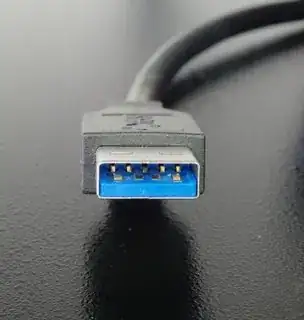
While they have the same footprint, the USB 3.0 connector has an extra set of 5 pins

enter image description here.
It is also supposed to be blue by specification I believe.

Your drive is probably USB 2.0

Journeyman Geek
  • 127,463
  • 52
  • 260
  • 430