I need to make the same changes to multiple spreadsheets over time. The clipboard forgets or deletes its contents when I close Excel. Is their any way to save the contents of the clipboard for the next time I need to change them?
Asked
Active
Viewed 681 times
0

-
Sounds like a usage case for a [clipboard manager](http://lifehacker.com/5298615/five-best-clipboard-managers) or different usage behavior. If you need to copy and paste between multiple spreadsheets open multiple instances of excel. – Ramhound Jan 02 '15 at 18:54
-
As said [here](http://superuser.com/questions/611854/prevent-excel-from-clearing-copied-data-for-pasting-after-certain-operations-w), Excel doesn't support doing this, so you will have to use a clipboard manager unfortunately. – ᔕᖺᘎᕊ Jan 02 '15 at 18:57
2 Answers
0
One clipboard manager I use is Clipjump, http://www.portablefreeware.com/?id=2523, but there are a slew of them available. They allow you to save a number of items from the clipboard, so it might simplify your Excel use.

DrMoishe Pippik
- 25,661
- 4
- 36
- 54
0
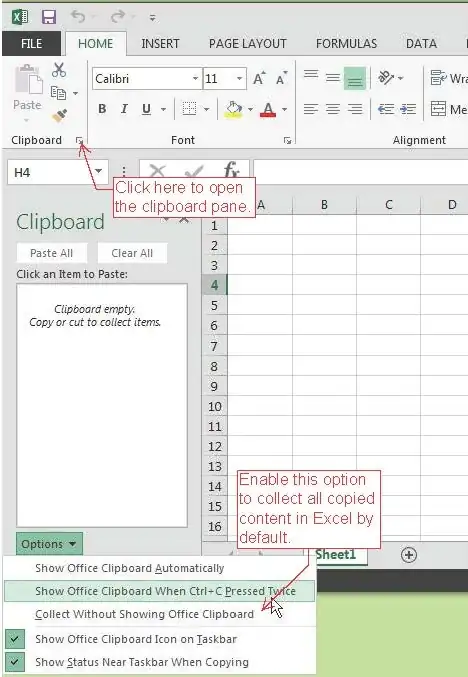
You may find the clipboard pane useful. It will collect anything you copy to a list that carries over across all MS Office programs. With this enabled, the last several copies should remain there even after exiting Excel.

PFitz
- 2,478
- 1
- 17
- 24