2

There are some process in the Windows-Task-Manager that you can't kill them in Non-Administrator users :
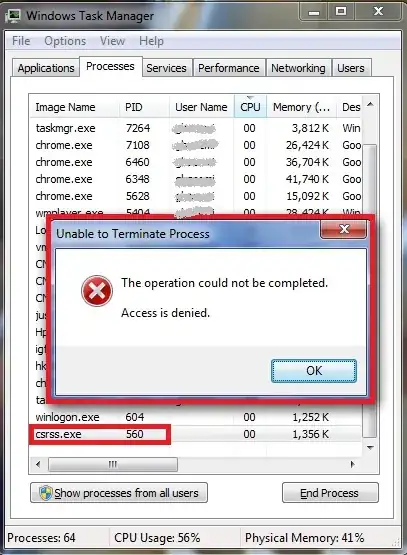
enter image description here

And even in Administrator users, when you try to kill them, you receive this below warning :

enter image description here

I want to know, is there any way to make another program's process like this? i.e if I want to write a program with VB6 for example, is there any way to prevent the user to kill its process? (having this behavior, or a similar behavior that prevent stopping it)

Ebrahim Ghasemi
  • 642
  • 4
  • 12
  • 25
  • [related](http://blogs.msdn.com/b/oldnewthing/archive/2004/02/16/73780.aspx) and [related](http://blogs.msdn.com/b/oldnewthing/archive/2013/06/20/10427187.aspx) – u1686_grawity Jan 05 '15 at 06:44

1 Answers1

1

You can flag programs as critial. Doing this would bugcheck your system with Bug Check 0xF4: CRITICAL_OBJECT_TERMINATION when you try to kill the process. This is how csrss.exe is flagged and this is why you see this meesage.

magicandre1981
  • 97,301
  • 30
  • 179
  • 245
  • Is there any code-base solution? I mean "Can I wrote my program in a way that behave like this?" Assume that I don't want to use any third-party software. – Ebrahim Ghasemi Jan 05 '15 at 06:26
  • @Abraham if you click on the first link provided, you can see a programmatical way to do it. Granted, it's using AutoIt language, but the program itself invoked system-standard DLLs, and such invocation is doable from any programming language; you just have to find how :) – pepoluan Jan 05 '15 at 08:54
  • @pepoluan Thank you :) I just was took a brief look. I read it again deeper. – Ebrahim Ghasemi Jan 05 '15 at 09:48