2

I have Virtual Box installed on base OS RHEL 5.5. I am using Windows 7 as a VM image on Virtual Box. While transferring a folder of 600MB on Windows I got a Virtual Box error saying Memory limit outside limit and then it hanged. I restarted my Base OS(RHEL 5.5), when i tried to launch the Windows 7 image I'm getting the following error message

   Start tag expected, '<' not found.
   Location: '/opt/VirtualBox/VMs/Machines/Windows 7/Windows 7.xml', 
   line 1 (0), column 1.
   /home/vbox/vbox-3.2.12/src/VBox/Main/MachineImpl.cpp[679] (nsresultMachine::registeredInit()).
   Result Code: 
   NS_ERROR_FAILURE (0x80004005)
   Component: 
   VirtualBox
   Interface: 
   IVirtualBox {3f36e024-7fed-4f20-a02c-9158a82b44e6}

Please help me debug this error as deleting the VM image and installing a new one is not an option as I'll lose all my data.

EDIT 1:

I tried creating a new VM using existing disk files. The error i'm getting is..

 new VM

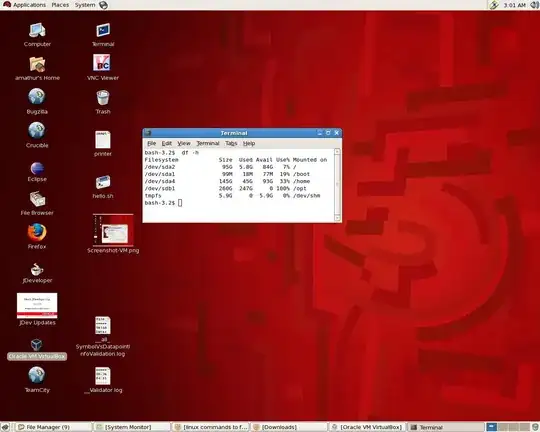
The disk space is ..

enter image description here

Lucy
  • 121
  • 2
  • Can you open the file given by the "Location" in a text editor? Perhaps post it, or at least the first few lines. – heavyd Jan 30 '15 at 07:56
  • The Windows 7.xml file is empty..Is it possible that all the file content got deleted?? – Lucy Jan 30 '15 at 07:58
  • Looks like the file got corrupted in the crash. You should be able to recreate the VM and use the existing disk files (look for *.vdi or *.vhd) – heavyd Jan 30 '15 at 08:04
  • Could you guide me how to do that – Lucy Jan 30 '15 at 09:31
  • In VB create a new VM. Give it a name and select Win 7 as the OS. When it asks about a hard drive, select "Use an existing virtual hard drive file". Select the file `/opt/VirtualBox/VMs/Machines/Windows 7/Windows 7.vdi`. Then let the Wizard finish, using defaults – heavyd Jan 30 '15 at 17:46
  • so by using the above steps i'll be able to access my old files in windows?? – Lucy Jan 31 '15 at 13:21
  • Correct, all of the VMs files are stored in the vdi file. – heavyd Jan 31 '15 at 14:46
  • I'm gettign an error when i tried creating a new VM using the steps you mentioned. i have attached the screen shot in the question under the edit section. – Lucy Feb 02 '15 at 06:22
  • Do you have plenty of free disk space on the host machine? – heavyd Feb 02 '15 at 06:30
  • I have attached the screen-shot of free spaces on various drives..Looks like the disk 'opt' in which the VM are already mounted is full..Do you know how to create a VM on a different disk? – Lucy Feb 02 '15 at 07:18
  • Although this question is about snapshots, it applies for the VM disks as well. http://superuser.com/a/126831/820 – heavyd Feb 02 '15 at 07:24

0 Answers0