1

My laptop's keyboard is broken so I'm using an external USB keyboard. The problem is that Windows 7 seems to think that my WiFi switch (which I'm thinking is some key combo on the broken laptop keyboard I have torn off) is engaged in the OFF position. I know that it's possible to override this switch because the internal wireless adapter IS working fine in Ubuntu. However, I can't seem to find a way to forcefully override the no longer existing switch in Windows 7. Is that even possible?

I have tried to press the WiFi switch key combo (F2 with modifiers) from the USB keyboard to no avail, and there's no override option in the BIOS.

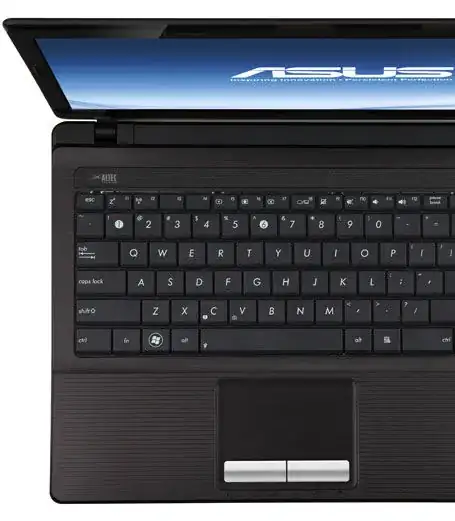
Notebook make and model: ASUS K53Z

  • Usually those function keys just disable the network adapter. Can you reenable it in the networking connection control panel (start > run > ncpa.cpl)? If not sometime you can enable the wireless radios via the bios and disable the keyboard shortcut. – вʀaᴎᴅᴏƞ вєнᴎєƞ Feb 03 '15 at 00:50
  • What's your notebook's make and model? – Daniel B Feb 03 '15 at 01:02
  • My BIOS has no such option, I just checked. The adapter is greyed out in Windows Mobility Center and troubleshooting the network connection gives me the unhelpful advice to "turn on wireless capability". – Emanuel Landeholm Feb 03 '15 at 01:03
  • Ah, can’t help you with ASUS, sorry. On Lenovo devices, Fn-F5 just launches a program that you can also launch manually. You could look into that. – Daniel B Feb 03 '15 at 23:10
  • Disconnect the broken keyboard, it would require you to remove the keyboard to access the cable. – Moab Feb 08 '15 at 03:00
  • The broken keyboard is disconnected and removed. – Emanuel Landeholm Feb 17 '15 at 17:12
  • This question is related: `Windows 10: “Disable-NetAdapter” disconnect the hardware Bluetooth from the computer instead of turning it OFF`( looking for windows equivalent of RFKILL) https://superuser.com/questions/1444278/windows-10-disable-netadapter-disconnect-the-hardware-blutooth-from-the-compu?noredirect=1#comment2179947_1444278 – JinSnow Jun 04 '19 at 15:47

1 Answers1

0

From the images on that page it looks like your WiFi enable key is the F2 key. Its the key with a little antenna icon.

enter image description here

You will either need to press that key alone or press and hold the Fn key (the one to the left of the start button) then press F2.

Either that or look for a key with a similar icon on it on your function key set and try it with and without your Fn key.

Mokubai
  • 89,133
  • 25
  • 207
  • 233
  • Clever you! I'm in Ubuntu-land right know, but I'll be sure to try some F2-combos when I reboot into Windows 7. – Emanuel Landeholm Feb 03 '15 at 22:59
  • Well, so much for that. My USB keyboard is unable to send the correct character code, whatever it is. How silly and inconvenient. – Emanuel Landeholm Feb 17 '15 at 17:07
  • @EmanuelLandeholm as another option can you open the start menu and in the search box type `mblctr.exe` and then return. Hopefully this will run the Mobility Centre which may allow you to enable Wifi: http://i.imgur.com/2idvP.png – Mokubai Feb 19 '15 at 18:37
  • Like I said in the comment above, the adapter is greyed out in Windows Mobility Center. – Emanuel Landeholm Feb 19 '15 at 19:21
  • slightly related: Windows 10: “Disable-NetAdapter” disconnect the hardware blutooth from the computer instead of turning it OFF https://superuser.com/questions/1444278/windows-10-disable-netadapter-disconnect-the-hardware-blutooth-from-the-compu?noredirect=1#comment2179947_1444278 – JinSnow Jun 04 '19 at 15:46